

Browser EQ
16 rating
)
Ringkasan
Control the frequency content of your browser audio
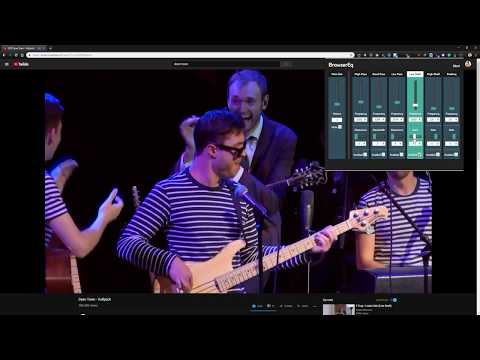
Browser EQ is a parametric audio equalizer that allows users to control the frequency content of their in-browser audio. Is the volume level of a video you are watching too low? Is the video game footage you are watching too bass heavy or has a high pitched hiss going on in the background? Now you can use Browser EQ to filter, boost or cut the audio frequency content of anything you are watching in the browser, whenever you want. Release Notes: As of version 1.0.0, there is only one instance of the eq enabled per browser, which means when you toggle the EQ popup on another tab, that tab will take over and the previously EQ'ed tab will go back to its default audio stream. Right now EQ persists between URL changes and page refreshes, so to close it down completely you need to close the tab (or alternatively toggle the EQ on another page). Coming soon, Presets, specified by use cases to give you an easier starting values. Panning controls, to fix possible stereo problems on the video you are watching. Ability to turn EQ on/off from the UI without having to close the tab.
4,1 dari 516 rating
Detail
- Versi1.0.1
- Diupdate15 Juli 2022
- Ditawarkan olehBerrak Nil Boya
- Ukuran22.43KiB
- BahasaEnglish
- Developer
Email
berraknil@gmail.com - Non-pedagangDeveloper ini tidak mengidentifikasi diri sebagai pedagang. Bagi konsumen di Uni Eropa, perlu diperhatikan bahwa hak konsumen tidak berlaku untuk kontrak antara Anda dan developer ini.
Privasi

Browser EQ telah mengungkapkan informasi berikut ini terkait pengumpulan dan penggunaan data Anda.
Browser EQ menangani hal berikut:
Developer ini menyatakan bahwa data Anda
- Tidak dijual ke pihak ketiga, di luar kasus penggunaan yang disetujui
- Tidak digunakan atau ditransfer untuk tujuan yang tidak terkait dengan fungsi inti item
- Tidak digunakan atau ditransfer untuk menentukan kelayakan kredit atau untuk tujuan pinjaman