

Browser Command Center

Overview
A fast command palette for tabs, workspaces, cleanup, focus, and everyday browser actions.
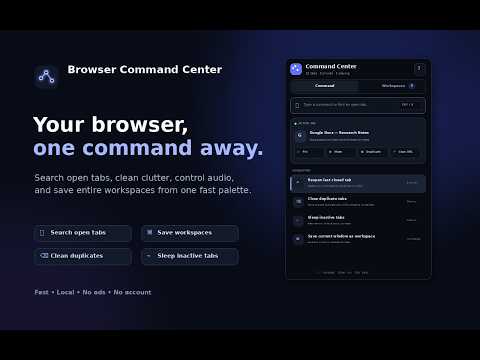
Browser Command Center is a fast, all-in-one command palette for managing your Chrome tabs and browser workflow. Search commands or open tabs from one place, then quickly perform actions without digging through Chrome menus. Features include: • Search and instantly switch between open tabs • Save groups of tabs as reusable workspaces • Restore recently closed tabs and windows • Close duplicate tabs • Sort tabs by website • Sleep inactive tabs to reduce memory usage • Pin, unpin, mute, or duplicate tabs • Copy one or all open tab URLs • Close tabs to the right • Focus on one tab while protecting pinned tabs • Keyboard-friendly command navigation Browser Command Center is designed to be simple for new users while still giving power users faster control over their browser. Privacy is built in. The extension does not use ads, analytics, tracking, or an external account. Saved workspaces and settings remain in Chrome’s local extension storage.
0 out of 5No ratings
Details
- Version1.0.0
- UpdatedSeptember 6, 2026
- Size40.65KiB
- LanguagesEnglish (United States)
- Developer
Email
ananiyatilahun2011@gmail.com - Non-traderThis developer has not identified itself as a trader. For consumers in the European Union, please note that consumer rights do not apply to contracts between you and this developer.
Privacy

This developer declares that your data is
- Not being sold to third parties, outside of the approved use cases
- Not being used or transferred for purposes that are unrelated to the item's core functionality
- Not being used or transferred to determine creditworthiness or for lending purposes