


Overview
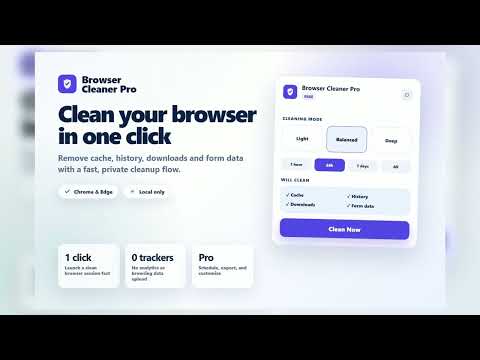
Clear cache, cookies, history & browsing data in one click. Free up space and protect privacy with scheduled auto-clean. Local.
Browser Cleaner Pro gives you deliberate, privacy-first control over browser data. Clean on demand in one click, choose every category yourself, or use Pro automation when you want a routine that stays out of your way. Clean your way — Free Light clears cache and download history for a quick refresh. Balanced adds browsing history and form data for everyday cleanup. Deep clears every supported category, including cookies and site storage. A clear warning appears before a choice that can sign you out. Custom lets you check or uncheck each data category. Your choices are saved locally. Choose the last hour, 24 hours, 7 days, 30 days, or all time. Keep the latest three cleanup records, view local insights, and back up or restore your local settings and history. Backups never include license credentials. Automate with Pro Run your preferred cleanup every few hours, daily, weekly, or when the browser starts. Use quiet hours to suppress scheduled-clean notifications while cleaning continues. Protect important domains with Safe Deep Clean. It preserves origin-scoped data such as cookies, cache, local storage, IndexedDB, file systems, service workers, and cache storage. Chrome history, download history, and form data remain global and are still removed. Save and switch up to 50 named cleanup profiles. Keep history for a chosen period from 7 days to 10 years, then export it as CSV or JSON. Receive scheduled-clean notifications, including an estimated reclaimed-space amount where the browser makes it available. Try Pro first Start every Pro feature with a one-time 7-day trial. No payment card is required for the trial. Privacy and permissions Cleanup is performed by Chrome or Edge through the browser's browsingData API. Browser Cleaner Pro does not read browsing content, URLs, cookie values, or form contents, and it never transmits them. Settings, cleanup history, and optional local analytics stay in chrome.storage.local on your device; any backup is created locally only when you choose to download one. The extension does not request broad page-access permissions such as <all_urls>. Its only host permission is the configured licensing backend, used for paid-license activation and validation. Payments and license emails are handled by the companion website; the extension never sends browsing data to it. Permissions used browsingData — remove the browser-data categories and time range you choose. storage — keep settings, profiles, local history, backups, and license state on device. alarms — run your Pro schedule. notifications — optionally report scheduled-clean results. system.storage — estimate reclaimed disk space when the browser supports it.
0 out of 5No ratings
Details
- Version1.0.2
- UpdatedJuly 18, 2026
- FeaturesOffers in-app purchases
- Size96.05KiB
- LanguagesEnglish
- DeveloperWebsite
Email
btanh82@gmail.com - Non-traderThis developer has not identified itself as a trader. For consumers in the European Union, please note that consumer rights do not apply to contracts between you and this developer.
Privacy

Browser Cleaner Pro - Clear Cache & Cookies has disclosed the following information regarding the collection and usage of your data. More detailed information can be found in the developer's privacy policy.
Browser Cleaner Pro - Clear Cache & Cookies handles the following:
This developer declares that your data is
- Not being sold to third parties, outside of the approved use cases
- Not being used or transferred for purposes that are unrelated to the item's core functionality
- Not being used or transferred to determine creditworthiness or for lending purposes
Support
For help with questions, suggestions, or problems, visit the developer's support site