

BrowseGuard – Lock & Protect Browser Tabs

Overview
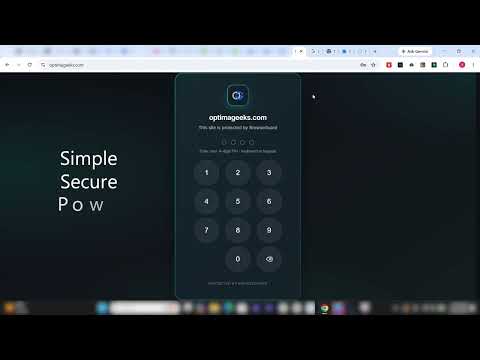
Secure sensitive websites and browser tabs with password protection. Lock tabs instantly and protect your privacy.
Do your coworkers peek at your screen when you step away? BrowseGuard lets you lock individual browser tabs with a PIN or biometric authentication — without locking your entire computer. Protect banking, email, client portals, or any other sensitive website. Your data stays on your device. No account required. ━━━━━━━━━━━━━━━━━━━━━━━━━━━━━━━━━━━━━ ⭐ KEY FEATURES ━━━━━━━━━━━━━━━━━━━━━━━━━━━━━━━━━━━━━ 🔒 Tab-level password protection Protect any website you choose. Use one master PIN for everything, or set different PINs per site. 👆 Biometric unlock Unlock in seconds with Touch ID, Windows Hello, or any WebAuthn-compatible authenticator. Your PIN is always available as a fallback. ⏱ Auto-lock rules Configure tabs to re-lock automatically based on: • Session length (1–120 minutes) • Inactivity timeout (1–60 minutes) • Switching to another tab • Browser window losing focus • Browser restart • In-page navigation 🚫 Brute-force protection Too many wrong PIN attempts trigger a temporary cooldown to prevent unauthorized access. 🛡 Anti-tamper safeguards BrowseGuard monitors for security events and helps maintain the integrity of your protection settings. 🎯 Focus mode Lock distracting sites during work or study sessions. When the session ends, those tabs stay protected. ⌨ Keyboard shortcuts Ctrl+Shift+L — Lock all protected tabs Ctrl+Shift+K — Lock the current tab 📋 Activity log Review lock, unlock, and security events organized by site and time. 💾 Backup and restore Export your site settings as a JSON file and reimport them anytime. ━━━━━━━━━━━━━━━━━━━━━━━━━━━━━━━━━━━━━ 🔐 PRIVACY ━━━━━━━━━━━━━━━━━━━━━━━━━━━━━━━━━━━━━ ✔ Your PIN is hashed with PBKDF2-SHA256 before storage — never stored in plain text ✔ All settings and activity data are stored locally on your device ✔ Nothing is uploaded to external servers ✔ No account required ✔ No subscription ✔ No ads ✔ Built on Chrome Manifest V3 ✔ Works in Incognito when the extension is enabled for it ━━━━━━━━━━━━━━━━━━━━━━━━━━━━━━━━━━━━━ ⚙ PERMISSIONS EXPLAINED ━━━━━━━━━━━━━━━━━━━━━━━━━━━━━━━━━━━━━ Storage — saves your settings and protected site list locally Tabs / Scripting — detects when you visit a protected site and displays the lock screen All URLs — required to protect whichever sites you configure (no data is collected) Alarms / Idle — powers inactivity timers and auto-lock rules Notifications — alerts you when a tab is locked, unlocked, or a security event occurs ━━━━━━━━━━━━━━━━━━━━━━━━━━━━━━━━━━━━━ 🚀 GETTING STARTED ━━━━━━━━━━━━━━━━━━━━━━━━━━━━━━━━━━━━━ 1. Click "Add to Chrome." 2. Create a 4-digit master PIN. 3. Add the websites you want to protect. 4. Browse with an extra layer of privacy. ━━━━━━━━━━━━━━━━━━━━━━━━━━━━━━━━━━━━━ BrowseGuard is built for office professionals, remote workers, freelancers, developers managing multiple accounts, and anyone who wants a quick, lightweight privacy layer for their browser tabs.
5 out of 56 ratings
Details
- Version1.0.0
- UpdatedJuly 30, 2026
- Size191KiB
- LanguagesEnglish
- DeveloperOptimaGeeks LLCWebsite
548 Market St San Francisco, CA 94104-5401 USEmail
arslbbt@gmail.comPhone
+1 406-964-6201 - TraderThis developer has identified itself as a trader per the definition from the European Union and committed to only offer products or services that comply with EU laws.
- D-U-N-S129997640
Privacy

This developer declares that your data is
- Not being sold to third parties, outside of the approved use cases
- Not being used or transferred for purposes that are unrelated to the item's core functionality
- Not being used or transferred to determine creditworthiness or for lending purposes
Support
For help with questions, suggestions, or problems, visit the developer's support site