

Brightspace PDF Merger (D2L) – HEIC/JPG/PNG to PDF
1 rating
)
Overview
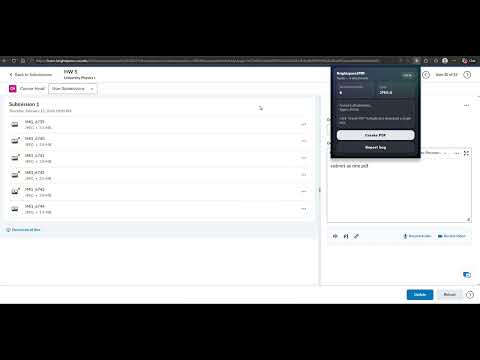
Convert Brightspace submission attachments into a single PDF for grading. Preserves order. Local processing.
brightspace2pdf helps instructors and TAs grade faster by converting Brightspace submission image attachments into one clean PDF. Brightspace submissions often include multiple files—especially iPhone HEIC photos—which are annoying to open one by one. brightspace2pdf finds the attachment download links on the submission page, downloads the images, converts them when needed, and assembles everything into a single, easy-to-grade PDF. ✅ Fully free ✨ What it does 📄 Merges multiple submission attachments into one PDF 📸 Supports HEIC/HEIF, JPG/JPEG, PNG 🧾 Keeps the same order shown on the Brightspace page 🔒 Runs locally in your browser (no manual uploads) 🎯 Best for 👩🏫 Professors, instructors, and teaching assistants ✍️ Grading handwritten homework, image-based quizzes, scanned solutions 🛠️ Troubleshooting If no files are detected: 🔁 Hard refresh Brightspace: Ctrl + Shift + R 📜 Scroll the page so attachments fully load 🧩 Open the extension again 🔓 If prompted, Allow access for your Brightspace site (first time only) ➡️ If it shows files from a different submission, go to the next submission using the top-right arrow, then come back to the current one and reopen the extension (this forces Brightspace to refresh the attachment list). 🛡️ Privacy brightspace2pdf only processes files you already have access to on Brightspace and builds the PDF locally. It does not upload files to external servers. 🚫 Disclaimer brightspace2pdf is not affiliated with or endorsed by D2L / Brightspace.
5 out of 51 rating
Details
- Version0.2.4
- UpdatedMarch 3, 2026
- Offered byTrident Labs
- Size1.04MiB
- LanguagesEnglish
- Developer
Email
shubhamhazaria@gmail.com - Non-traderThis developer has not identified itself as a trader. For consumers in the European Union, please note that consumer rights do not apply to contracts between you and this developer.
Privacy

Brightspace PDF Merger (D2L) – HEIC/JPG/PNG to PDF has disclosed the following information regarding the collection and usage of your data. More detailed information can be found in the developer's privacy policy.
Brightspace PDF Merger (D2L) – HEIC/JPG/PNG to PDF handles the following:
This developer declares that your data is
- Not being sold to third parties, outside of the approved use cases
- Not being used or transferred for purposes that are unrelated to the item's core functionality
- Not being used or transferred to determine creditworthiness or for lending purposes
Support
For help with questions, suggestions, or problems, please open this page on your desktop browser