


Преглед
Capture meeting notes, transcribe, summarize and gather insights without distraction.
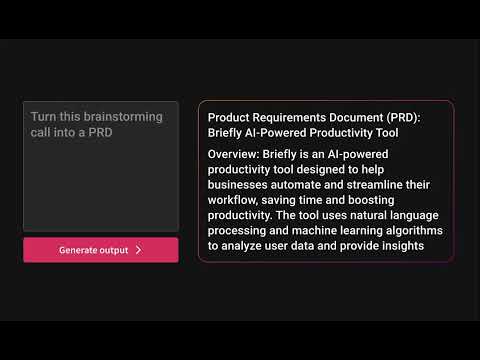
Capture meeting notes, transcribe, summarize and gather insights without distraction. Let Briefly take your meeting notes, organize your thoughts, and be more focused during meetings, all within your browser. Briefly makes it easy to be more productive after meetings by generating summaries, action items, and composing thoughtful follow-up emails. It simplifies your post-meeting workflow by transforming your conversations into a variety of polished project documents like product requirements, marketing briefs, sentiment reports, investment memos, and more. Briefly works where you do. Update your CRM directly from Slack after receiving and reviewing meeting summaries and insights from your latest call. ✅ Never miss a thing Briefly transcribes all your meetings and categorizes them based on the topics and content covered. Capture important points with our voice-activated notes feature. Get your summaries delivered to your inbox after every call to make it easier to organize your meeting notes for a later time. 💡Objective summaries and takeaways Briefly uses AI to generate comprehensive summaries from transcriptions, identify key insights grouped by topic and personalized action items, so you don't have to comb through transcripts to synthesize notes. ✍️ Personalized follow-ups Timely correspondence and accurate action items can lead to higher close rates and follow-up meetings booked. Briefly automatically crafts compelling customized follow-up messages from the contents of your meeting. Send them out right after your meeting is over so you can save time when you’re in back-to-back meetings. 💼 Sync your CRM Keep all customer interactions in sync. Automatically sync meeting notes with customer contacts in either Salesforce or Hubspot using Slack. 📝 Craft your project docs Input your custom prompt and let Briefly convert your transcript into the requested document. Browse our popular templates, and tailor them until your results are perfect. Make the most out of the knowledge shared in conversation by using different prompts to draft multiple docs per call. 🥷 Unintrusive Briefly does not add a “ghost” note-taker into your meeting, and does not require you to record the meeting, allowing you to stay focused and not be distracted. 📑 No matter what platform you take your calls on, import your meeting transcripts from Zoom, Microsoft Teams, or any other platform directly to Briefly. Upload reports, articles, and any other text files and turn them into summaries and project documents via your dashboard. 🪄Briefly is great for: Product and Engineering Sales Marketing Customer Success Venture Capital 📌 How to Get Started: 1. Install Chrome Extension and pin the icon to your toolbar. 2. Sign in with Google. 3. Start your Google Meet and under Current Call, click “Start transcribing this meeting”. 4. After the call, open the Briefly extension and click the “Past Call” tab to view the transcripts and AI summaries for all your calls. 5. Click the AI follow-up tab to view the follow-up email and edit it from your Gmail inbox. 6. Check your spam if you’re not receiving your recaps shortly after the call. Your recaps are only sent to you. 7. To access your dashboard, go to the Past Calls tab by clicking "Create on web" or visit: https://app.brieflyai.com ** Important Note: Your transcripts, conversations, and summaries are NOT stored or collected by Briefly. Briefly is powered by OpenAI’s GPTchat.
4,5 од 517 оцена
Детаљи
- Верзија1.2.0
- Ажурирано21. октобар 2025.
- ФункцијеНуди куповине у апликацији
- НудиBriefly App
- Величина1.75MiB
- ЈезициEnglish (United States)
- ПрограмерBryan Oki
222 W Baltimore Ave Larkspur, CA 94939-2126 USИмејл
bryan@brieflyai.comТелефон
+1 650-868-0596 - ТрговацОвај програмер се идентификовао као трговац према дефиницији Европске уније и обавезао да ће нудити само производе или услуге које су у складу са законима ЕУ.
Приватност

Briefly: AI meeting summary & email follow up је открио следеће информације у вези са прикупљањем и коришћењем ваших података. Детаљније информације можете да пронађете у програмеровом документу privacy policy.
Briefly: AI meeting summary & email follow up поступа са следећим:
Овај програмер изјављује да се ваши подаци
- не продају трећим странама, осим у оквиру одобрених случајева коришћења
- не користе и не преносе у сврхе које нису повезане са основном функцијом ставке
- не користе и не преносе ради утврђивања кредитне способности или давања зајма
Подршка
Ако вам треба помоћ у вези са питањима, предлозима или проблемима, отворите ову страницу у прегледачу за рачунаре