

BridgeX MT5 to TV Mirror

Overview
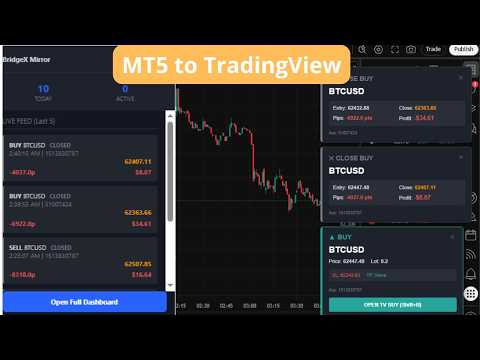
BridgeX Mirror instantly streams your MT5 trades directly to TradingView. Get live pop-up alerts for opens, closes, and pending…
BridgeX Mirror instantly streams your MT5 trades directly to TradingView. Get live pop-up alerts for opens, closes, and pending orders. Includes a premium analytics dashboard with Win Rate, Profit Factor, and PnL tracking. You execute trades on MetaTrader 5 manually or by EAs, but you analyze charts on TradingView. Constantly switching screens to see if your MT5 EA or manual trades have opened is inefficient and slows down your workflow. BridgeX Mirror seamlessly bridges this gap. It instantly pushes your MT5 trade data (Opens, Closes, Pending Orders, SL/TP updates) directly onto your TradingView screen as sleek, professional pop-up alerts. No complex webhooks. No third-party signal services. Just a direct, secure bridge between your terminal and your charts. ⚡ Key Features ✅ Live TradingView Alerts: Beautiful, non-intrusive pop-ups on TradingView the millisecond a trade opens or closes. Includes distinct sounds for Buys, Sells, and Closes. ✅ 1-Click TradingView Execution: Want to manually mirror your MT5 trades on TradingView? Click the built-in button on the popup, and it automatically triggers TradingView's Shift+B / Shift+S hotkeys. ✅ Close Trade Analytics: Unlike basic copiers, BridgeX tracks the full lifecycle. Get instant close alerts showing exact Pips gained/lost and Dollar Profit ($). ✅ Advanced Analytics Dashboard: A built-in premium dashboard tracks your performance live: - Overall Win Rate, Profit Factor, and Net P&L. - Average Win/Loss size, Best/Worst trade. - Average Holding Time. - Per-Account Breakdown (Compare performance across multiple accounts). ✅ Smart Trade Merging: Intelligently combines MT5 open records and close records into one clean, unified trade history (fixing MT5's split-deal architecture). ✅ Multi-Account & API Key Isolation: Running 5 different EAs on 5 different accounts? BridgeX lets you generate unique API keys to filter exactly which accounts feed into your Dashboard and TradingView. Perfect for signal providers! ✅ Symbol Mapping: Automatically translates MT5 symbols (e.g., US500) to TradingView symbols (e.g., SPX500). 🛠 How It Works BridgeX Mirror requires a companion Chrome Extension (100% Free, provided ) to receive the data on TradingView. 1- Install Extension: Download the free BridgeX Mirror Chrome Extension . 2- Generate Key: Open the Extension Dashboard, click "Generate API Key", and copy it. 3- Attach EA: Drag the BridgeX Mirror utility (available in the mql5 market) onto your MT5 chart, paste the API Key into the settings, and click OK. 🎯 Who Is This For? - Signal Providers: Share your trades visually on TradingView without exposing your broker or account details. - Prop Firm Traders: Track your MT5 prop firm accounts while managing your risk and stats on a beautiful dashboard. - Algorithmic Traders: Monitor your EAs without keeping MT5 in the foreground. - Manual Copiers: Use the instant alert pop-ups to quickly execute matching trades on your TradingView broker. 💡 Why Choose BridgeX? No Subscriptions: Pay once on MQL5, the Chrome Extension and Dashboard are free forever. Privacy First: Data goes directly from your MT5 terminal to your browser via your own secure PocketBase API. No middlemen. Lightweight: The MT5 utility uses a terminal Mutex, meaning you only need ONE instance running per MT5 terminal, no matter how many charts you have open. Zero CPU drain. Full documentation, setup guide, and video tutorial available on our YouTube channel.
0 out of 5No ratings
Details
- Version1.0
- UpdatedJuly 5, 2026
- Size51.13KiB
- LanguagesEnglish (United States)
- Developer
Email
traderrentable1@gmail.com - Non-traderThis developer has not identified itself as a trader. For consumers in the European Union, please note that consumer rights do not apply to contracts between you and this developer.
Privacy

BridgeX MT5 to TV Mirror has disclosed the following information regarding the collection and usage of your data. More detailed information can be found in the developer's privacy policy.
BridgeX MT5 to TV Mirror handles the following:
This developer declares that your data is
- Not being sold to third parties, outside of the approved use cases
- Not being used or transferred for purposes that are unrelated to the item's core functionality
- Not being used or transferred to determine creditworthiness or for lending purposes
Support
For help with questions, suggestions, or problems, visit the developer's support site