

Brevframe: Visualize Articles & PDFs

Overview
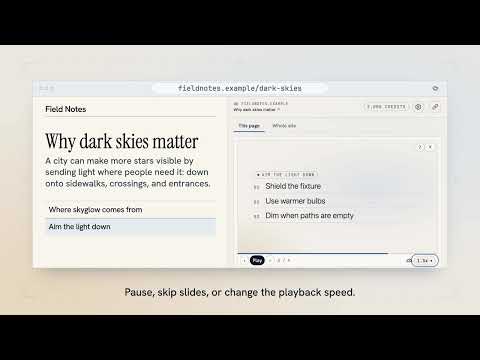
Turn articles and PDFs into narrated visual walkthroughs. Add diagrams to explain key ideas.
See what the page is explaining. Brevframe turns articles and PDFs into narrated visual walkthroughs in Chrome, with links back to the source. Generate a diagram to trace a process, compare approaches, or show how the pieces fit together. Step through the visuals at your own pace and share the walkthrough with a link. You can also summarize long documents in the PDF reader or listen to articles. Click the Brevframe icon or right-click the page and choose “Read with Brevframe.”
0 out of 5No ratings
Details
- Version0.0.5
- UpdatedNovember 20, 2026
- FeaturesOffers in-app purchases
- Offered byhello@ithacaworks.xyz
- Size1.06MiB
- LanguagesEnglish (United States)
- Developer
Email
hello@ithacaworks.xyz - Non-traderThis developer has not identified itself as a trader. For consumers in the European Union, please note that consumer rights do not apply to contracts between you and this developer.
Privacy

Brevframe: Visualize Articles & PDFs has disclosed the following information regarding the collection and usage of your data. More detailed information can be found in the developer's privacy policy.
Brevframe: Visualize Articles & PDFs handles the following:
This developer declares that your data is
- Not being sold to third parties, outside of the approved use cases
- Not being used or transferred for purposes that are unrelated to the item's core functionality
- Not being used or transferred to determine creditworthiness or for lending purposes