

Breakpointer — Responsive Viewport Tester

Overview
Responsive design tester: preview any site at many screen sizes side by side and find the exact width where your layout breaks.
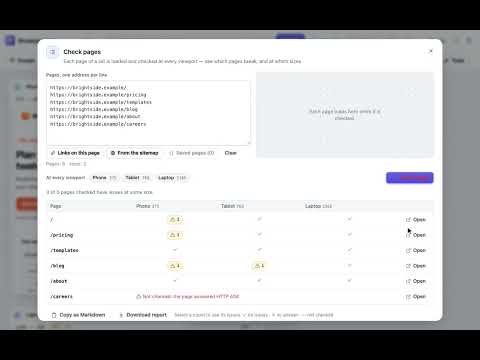
Find where your layout breaks — at every screen size, at once. Breakpointer shows any website at several viewport sizes side by side, right in Chrome. Each preview gets a real layout width and height, so media queries and responsive layouts behave exactly as they would in a window that size. Preview fast • Click the toolbar button and choose “Preview this page”, right-click any page or link, press Alt+Shift+P, or type “bpt” and a URL in the address bar. • 28 common sizes for phones, foldables, tablets, laptops and desktops (search by name or size), plus any custom size. • Drag a preview's edge to resize it and watch the page reflow live — it snaps to your breakpoints. • Press Ctrl/⌘ + K to search every command, size, group and page. Find where it breaks • Scan every width: the page is checked at every width of a range, and each issue's first and last width is found to the pixel — on a chart with the page's height, its breakpoints and your viewports. Add a viewport at the worst width in one click. • Audit: every issue of every size in one place, the page's weight, requests, image pixels, largest contentful paint and layout shift per size, and the type scale of headings, text and buttons — copy any of it as a Markdown table. • Visual check: save a baseline of every viewport, compare after a change and see what moved, pixel by pixel — side by side, with a slider, or the differences boxed. • Inspector: click an element in one preview and compare its size, display, font, spacing and layout at every size — what changes is highlighted. • Breakpoints read from the page's own CSS, plus Tailwind, Bootstrap or your own — label every viewport and test both sides of each breakpoint. • Light and dark side by side: show any preview with the page's light or dark styles. • Responsive checks find sideways scrolling (and the element causing it), a missing viewport tag, tiny text, small touch targets, text cut off by its box, low-contrast text, blurry images, elements covering the screen and layout shifts — highlight them right in the page. • Scroll one preview and the others show the same content; click a link and every preview opens it. • Layout outlines, a column grid, pixel rulers, hidden scrollbars and live CSS applied to every size at once — save the CSS you use often as snippets. • Compare two addresses: a second preview next to every viewport, e.g. staging next to production, following the same pages. • Simulate colour blindness and blurred vision, reduced motion and paused animations, and stress the layout with longer translated text and right-to-left. • Measure in CSS pixels, check colour contrast against WCAG with an eyedropper, and lay a design mockup over a preview to compare pixel by pixel. • Open every viewport as a real window of its exact size (for sites that need your sign-in), keep an always-on-top floating preview next to your editor, or preview the page you're browsing in the side panel. • Full-page screenshots, text spacing (WCAG), prefers-contrast and print styles, image-size and tab-order labels, and a baseline grid. Share what you see • Screenshots of one preview or the workspace, every viewport in one labelled image, copy to the clipboard, and an HTML report of every size with its issues. • Open any preview in a real window of the exact size. Work your way • Save viewport groups like “Checkout QA” and switch in one click; six built-in groups included. • Focus on one viewport, go back and forward between pages, star the pages you test often, zoom with Ctrl/⌘ + wheel and pan with Space + drag. • Reloads keep every preview where it was scrolled, and can run automatically; share a workspace link that opens the page with your viewports. • Export and import your setup to share it with your team. • A clean light and dark design, keyboard shortcuts for everything, English and Vietnamese. Private by design • No account, no analytics, no server. Settings stay in your browser. • No access to your sites at install. Some sites block being shown inside other pages, and the in-page tools need your permission too; you can allow Breakpointer on a site (or all sites) when you need to — or only until Chrome closes — and remove access anytime. • Visual-check baselines stay in your browser and are never uploaded. Good to know Breakpointer changes the viewport size; it doesn’t emulate a device’s user agent, pixel density, touch input or browser engine. Sign-in state and third-party cookies can behave differently inside previews.
0 out of 5No ratings
Details
- Version0.5.0
- UpdatedOctober 19, 2026
- Offered byTanix
- Size271KiB
- Languages2 languages
- Developer
Email
truongngoctan2388@gmail.com - Non-traderThis developer has not identified itself as a trader. For consumers in the European Union, please note that consumer rights do not apply to contracts between you and this developer.
Privacy

This developer declares that your data is
- Not being sold to third parties, outside of the approved use cases
- Not being used or transferred for purposes that are unrelated to the item's core functionality
- Not being used or transferred to determine creditworthiness or for lending purposes
Support
For help with questions, suggestions, or problems, please open this page on your desktop browser