


Overview
Create and post styled breaking news banners directly from Bluesky's composer
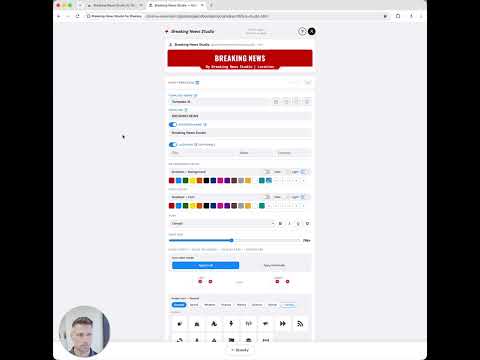
Breaking News Studio (BNS) adds a powerful banner tool directly into Bluesky's composer, letting journalists, school administrators, and public communicators create professional-quality breaking news taglines in seconds — without leaving the platform. First to report. Not first to reply. How it works: Step 1. In your Bluesky home page, click the Breaking News Studio (BNS) red lightning bolt icon in sidebar menu to open your Breaking News Studio, where you design and save your banner templates. Step 2. Back in Bluesky, start to compose your post, and click the red newspaper icon to open Image Builder. Select one of your saved banners, add a photo (optional), and hit "Add to post." Your banner is composited directly onto your image and attached automatically inside your Bluesky compose window. It's that easy. Key features: •Your banner generates faster recognition of your breaking stories and alerts — helping your posts stand out in a crowded feed. • Full customization: colors, fonts, icons, and images let you build a banner that's uniquely yours. A consistent look across your posts strengthens your personal or organizational brand. • Get credit — and keep it. Your byline is baked directly into the image, making it harder for others to repost your work and claim it as their own. • Speed matters. The Image Builder lives inside your Bluesky composer, so you can attach a professional banner to your post in seconds. • Saved banners can be used over and over again. • Works with a photo or as a banner-only post. • Free to use forever with the Reporter plan. Upgrade to the Publisher plan for unlimited templates and advanced styling — starting at $2.49/month. Built for: • Journalists and reporters - politics, sports, finance, science, weather, etc - If you break stories your audience should know it the moment they see your post. • School and district administrators — closings, emergencies, and important announcements deserve more than plain text. • Local government and public safety communicators — when seconds count, your message needs to be impossible to miss. • Sports teams and community organizations — score updates, event alerts, and big announcements that look as big as the moment. No account required. No data collected. Everything runs locally in your browser.
0 out of 5No ratings
Details
- Version0.1.0
- UpdatedAugust 20, 2026
- FeaturesOffers in-app purchases
- Size231KiB
- LanguagesEnglish
- DeveloperJeremy Jed MaslowskiWebsite
5043 E Friess Dr Scottsdale, AZ 85254-2831 USEmail
info@breakingnewsstudio.comPhone
+1 602-857-4511 - TraderThis developer has identified itself as a trader per the definition from the European Union and committed to only offer products or services that comply with EU laws.
Privacy

This developer declares that your data is
- Not being sold to third parties, outside of the approved use cases
- Not being used or transferred for purposes that are unrelated to the item's core functionality
- Not being used or transferred to determine creditworthiness or for lending purposes
Support
For help with questions, suggestions, or problems, visit the developer's support site