


Overview
Generate brand-consistent ads instantly from any webpage. Right-click any image or text to create on-brand marketing visuals.
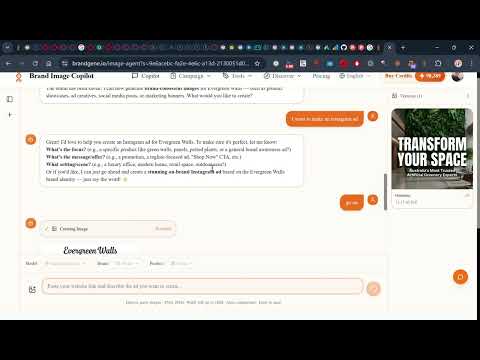
BrandGene brings conversational AI image creation and automated brand intelligence directly into your browser workflow. Design on-brand marketing creatives, analyze any brand's visual identity, and curate your product library without ever leaving your current tab. WHAT'S NEW IN V1.1.1 • Native Chrome Side Panel: Interact with our powerful conversational Image Agent directly in a persistent browser side panel. No need to switch tabs or open separate windows. • Browser Context Menu Shortcuts: Right-click any web image to use it as a reference draft, or right-click highlighted text to start generating instant visual concepts. • Rich Agent Experience: Real-time generation streaming, version canvas history, follow-up creative iteration, and original-resolution downloads. • Expanded Model Preferences: Built-in support for GPT Image 2.5 / 2.6 and Nano Banana 2.1 (1K / 2K / 4K). • Multi-language UI: Seamless experience in English and Simplified Chinese. CORE CAPABILITIES 1. Image Agent in Side Panel - Chat with an AI creative partner to produce high-impact, brand-consistent marketing visuals. - Attach reference images from the current webpage or your computer. - Refine existing outputs through conversational follow-ups. 2. One-Click Brand DNA Analysis - Extract primary and secondary brand colors, typography, tone, and visual styles from any website. - Save extracted brand identities directly to your BrandGene account. 3. Instant Product Extraction - Capture product titles, descriptions, pricing, and high-res imagery directly from e-commerce pages. - Add products to your creative workspace in one click. 4. Seamless Account Sync - Automatically syncs with your BrandGene.io account, shared credit balance, and persistent creative history. HOW TO USE 1. Click the BrandGene icon in your Chrome toolbar to open the Image Agent in the Side Panel. 2. Sign in with your BrandGene account. 3. Start chatting to generate images, or right-click any web image/text to start a draft immediately. PRIVACY & SAFETY We value your privacy. The extension only communicates with secure BrandGene servers, reads authentication cookies exclusively from brandgene.io, and never passively monitors or records your web browsing history. Need assistance? Visit https://brandgene.io or reach out to our support team.
0 out of 5No ratings
Details
- Version1.1.1
- UpdatedNovember 16, 2026
- FeaturesOffers in-app purchases
- Size206KiB
- Languages2 languages
- DeveloperWebsite
Email
ameryzhu@gmail.com - Non-traderThis developer has not identified itself as a trader. For consumers in the European Union, please note that consumer rights do not apply to contracts between you and this developer.
Privacy

BrandGene - AI Brand Ad Generator has disclosed the following information regarding the collection and usage of your data. More detailed information can be found in the developer's privacy policy.
BrandGene - AI Brand Ad Generator handles the following:
This developer declares that your data is
- Not being sold to third parties, outside of the approved use cases
- Not being used or transferred for purposes that are unrelated to the item's core functionality
- Not being used or transferred to determine creditworthiness or for lending purposes
Support
For help with questions, suggestions, or problems, visit the developer's support site