


Overview
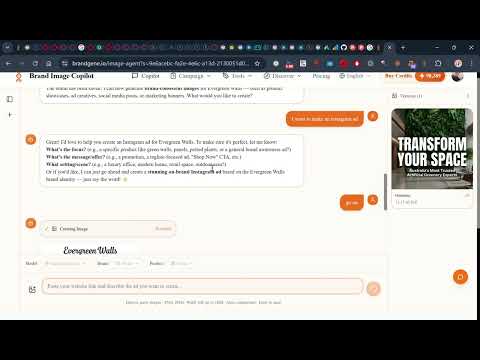
Generate brand-consistent ads instantly from any webpage. Right-click any image or text to create on-brand marketing visuals.
BrandGene brings AI-powered brand tools directly to your browser. Create images through conversation, analyze brand identities, and build your product library — all from any webpage. KEY FEATURES • Image Agent (AI Chat-to-Image) - Open BrandGene's Image Agent directly from the extension - Create and iterate on images through natural conversation - Right-click any image or selected text to start generating - Brand-aware: uses your Brand DNA to stay on-brand • Brand DNA Analysis - Analyze any brand's website to extract its visual identity - Automatically detects brand colors, fonts, tone, and style - Saves Brand DNA to your BrandGene account - Right-click any page and select "Analyze this page as brand asset" • Quick Product Import - Navigate to any product page and import it with one click - AI extracts product name, description, price, and selling points - Select product images and save to your product library - Right-click any product page to start importing • Right-Click Context Menu - "Generate image from this text" — opens Image Agent with selected text - "Generate branded ad" — opens Image Agent with reference image - "Analyze this page as brand asset" — starts brand analysis - "Add product from this page" — starts product import • Seamless Integration - Syncs with your BrandGene account - Credits shared across web and extension - Quick access to purchase more credits HOW TO USE 1. Click the BrandGene icon in your toolbar 2. Sign in with your BrandGene account 3. Use the three tabs: - Image Agent: Opens the AI image generation chat - Product: Import products from any webpage - Brand: Analyze brand identity from any webpage 4. Or right-click on any page for quick actions CREDITS Features like Brand DNA analysis use credits from your BrandGene account. Click "Buy Credits" in the extension header or visit https://brandgene.io/pricing to purchase more. PRIVACY We respect your privacy. The extension only: - Reads cookies from brandgene.io for authentication - Extracts page content when you explicitly trigger brand analysis or product import - Communicates with BrandGene servers for AI analysis We do not collect browsing history, personal data, or any information from pages you visit unless you explicitly trigger an action. See our full privacy policy at https://brandgene.io/privacy SUPPORT Need help? Visit https://brandgene.io or contact our support team. --- Made with love by the BrandGene team
0 out of 5No ratings
Details
- Version1.0.0
- UpdatedApril 17, 2026
- FeaturesOffers in-app purchases
- Size114KiB
- LanguagesEnglish
- DeveloperWebsite
Email
ameryzhu@gmail.com - Non-traderThis developer has not identified itself as a trader. For consumers in the European Union, please note that consumer rights do not apply to contracts between you and this developer.
Privacy

BrandGene - AI Brand Ad Generator has disclosed the following information regarding the collection and usage of your data. More detailed information can be found in the developer's privacy policy.
BrandGene - AI Brand Ad Generator handles the following:
This developer declares that your data is
- Not being sold to third parties, outside of the approved use cases
- Not being used or transferred for purposes that are unrelated to the item's core functionality
- Not being used or transferred to determine creditworthiness or for lending purposes
Support
For help with questions, suggestions, or problems, visit the developer's support site