

BrandBird ✦ Beautiful Screenshots By Default✦

Ringkasan
Create beautiful social media posts & sharable images by screenshotting your current tab!
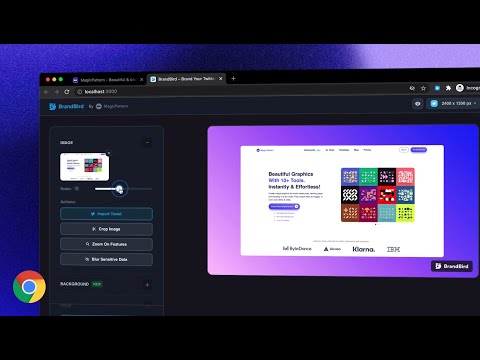
It's simple, really! ✨ Just open the extension and choose one of the 4 commands and see the magic happen: 𝟙. 𝕍𝕚𝕤𝕚𝕓𝕝𝕖 𝕊𝕔𝕣𝕖𝕖𝕟 Grabs a screenshot of your current active tab and import it to BrandBird for further polishing. 𝟚. 𝔼𝕩𝕥𝕣𝕒𝕔𝕥 𝔼𝕝𝕖𝕞𝕖𝕟𝕥 Select any element from any website to avoid cropping the image, and import it to BrandBird to make it beautiful. 𝟛. ℍ𝕚𝕘𝕙𝕝𝕚𝕘𝕙𝕥 𝔼𝕝𝕖𝕞𝕖𝕟𝕥 Pick an element and the BrandBird Chrome extension will automatically highlight it. Perfect for product tutorials . 𝟜. 𝕆𝕡𝕖𝕟 𝔾𝕣𝕒𝕡𝕙 (𝕆𝔾) 𝕄𝕒𝕜𝕖𝕣 Extracts the title, description & logo from the active tab, grabs a screenshot, and imports everything to the BrandBird studio. Then, the image will be imported into BrandBird, and you can customize further edit it by adding: - Gradient, pattern, or image backgrounds - Shadows - 3D Effects - Device Mockups - Annotation elements like circles, arrows, rectangles, and text - Crop, resize, and blur parts of your image - And many more Last but not least... ℝ𝕚𝕘𝕙𝕥-ℂ𝕝𝕚𝕔𝕜 𝔸𝕔𝕥𝕚𝕠𝕟𝕤 You can instantly import text, images, and tweets to the BrandBird editor by using the right-click Chrome extension functionality. 🛟 Learn more in our how-to-use guide: https://help.brandbird.app/posts/how-to-use-chrome-extension
4,6 dari 59 rating
Detail
- Versi0.0.7
- Diupdate3 April 2024
- Ukuran278KiB
- BahasaEnglish
- Developer
- Non-pedagangDeveloper ini tidak mengidentifikasi diri sebagai pedagang. Bagi konsumen di Uni Eropa, perlu diperhatikan bahwa hak konsumen tidak berlaku untuk kontrak antara Anda dan developer ini.
Privasi

BrandBird ✦ Beautiful Screenshots By Default✦ telah mengungkapkan informasi berikut ini terkait pengumpulan dan penggunaan data Anda. Informasi lebih mendetail dapat dilihat di privacy policy developer.
BrandBird ✦ Beautiful Screenshots By Default✦ menangani hal berikut:
Developer ini menyatakan bahwa data Anda
- Tidak dijual ke pihak ketiga, di luar kasus penggunaan yang disetujui
- Tidak digunakan atau ditransfer untuk tujuan yang tidak terkait dengan fungsi inti item
- Tidak digunakan atau ditransfer untuk menentukan kelayakan kredit atau untuk tujuan pinjaman
Dukungan
Untuk mendapatkan bantuan terkait pertanyaan, saran, atau masalah, buka halaman ini di browser desktop Anda