

BrandBird ✦ Beautiful Screenshots By Default✦

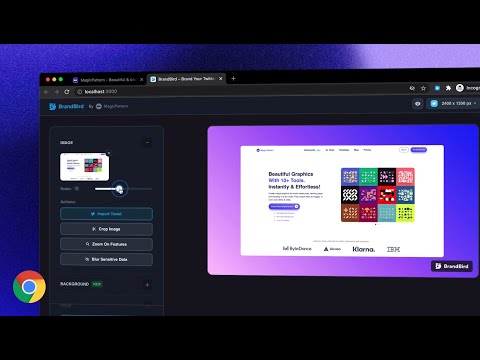
Présentation
Create beautiful social media posts & sharable images by screenshotting your current tab!
It's simple, really! ✨ Just open the extension and choose one of the 4 commands and see the magic happen: 𝟙. 𝕍𝕚𝕤𝕚𝕓𝕝𝕖 𝕊𝕔𝕣𝕖𝕖𝕟 Grabs a screenshot of your current active tab and import it to BrandBird for further polishing. 𝟚. 𝔼𝕩𝕥𝕣𝕒𝕔𝕥 𝔼𝕝𝕖𝕞𝕖𝕟𝕥 Select any element from any website to avoid cropping the image, and import it to BrandBird to make it beautiful. 𝟛. ℍ𝕚𝕘𝕙𝕝𝕚𝕘𝕙𝕥 𝔼𝕝𝕖𝕞𝕖𝕟𝕥 Pick an element and the BrandBird Chrome extension will automatically highlight it. Perfect for product tutorials . 𝟜. 𝕆𝕡𝕖𝕟 𝔾𝕣𝕒𝕡𝕙 (𝕆𝔾) 𝕄𝕒𝕜𝕖𝕣 Extracts the title, description & logo from the active tab, grabs a screenshot, and imports everything to the BrandBird studio. Then, the image will be imported into BrandBird, and you can customize further edit it by adding: - Gradient, pattern, or image backgrounds - Shadows - 3D Effects - Device Mockups - Annotation elements like circles, arrows, rectangles, and text - Crop, resize, and blur parts of your image - And many more Last but not least... ℝ𝕚𝕘𝕙𝕥-ℂ𝕝𝕚𝕔𝕜 𝔸𝕔𝕥𝕚𝕠𝕟𝕤 You can instantly import text, images, and tweets to the BrandBird editor by using the right-click Chrome extension functionality. 🛟 Learn more in our how-to-use guide: https://help.brandbird.app/posts/how-to-use-chrome-extension
4,6 sur 59 avis
Détails
- Version0.0.7
- Dernière mise à jour3 avril 2024
- Taille278KiB
- LanguesEnglish
- Développeur
- Non-professionnelCe développeur ne s'est pas identifié comme professionnel. Pour les consommateurs de l'Union européenne, veuillez noter qu'il est possible que les droits des consommateurs ne s'appliquent pas aux contrats entre vous et ce développeur.
Confidentialité

BrandBird ✦ Beautiful Screenshots By Default✦ a fourni les informations suivantes sur la collecte et l'utilisation de vos données. Pour plus d'informations, consultez les privacy policy du développeur.
BrandBird ✦ Beautiful Screenshots By Default✦ gère les éléments suivants :
Ce développeur déclare que vos données :
- Ne seront pas vendues à des tiers en dehors des cas d'utilisation approuvés.
- Ne seront ni utilisées ni transférées à des fins sans rapport avec la fonctionnalité de base de l'article.
- Ne seront ni utilisées ni transférées pour déterminer votre solvabilité ou en vue de vous proposer un prêt.
Assistance
Pour obtenir de l'aide concernant des questions, des suggestions ou des problèmes, veuillez ouvrir cette page dans votre navigateur pour ordinateur