

BrandBird ✦ Beautiful Screenshots By Default✦

Descripción general
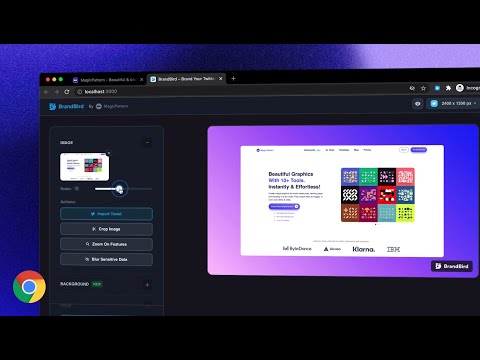
Create beautiful social media posts & sharable images by screenshotting your current tab!
It's simple, really! ✨ Just open the extension and choose one of the 4 commands and see the magic happen: 𝟙. 𝕍𝕚𝕤𝕚𝕓𝕝𝕖 𝕊𝕔𝕣𝕖𝕖𝕟 Grabs a screenshot of your current active tab and import it to BrandBird for further polishing. 𝟚. 𝔼𝕩𝕥𝕣𝕒𝕔𝕥 𝔼𝕝𝕖𝕞𝕖𝕟𝕥 Select any element from any website to avoid cropping the image, and import it to BrandBird to make it beautiful. 𝟛. ℍ𝕚𝕘𝕙𝕝𝕚𝕘𝕙𝕥 𝔼𝕝𝕖𝕞𝕖𝕟𝕥 Pick an element and the BrandBird Chrome extension will automatically highlight it. Perfect for product tutorials . 𝟜. 𝕆𝕡𝕖𝕟 𝔾𝕣𝕒𝕡𝕙 (𝕆𝔾) 𝕄𝕒𝕜𝕖𝕣 Extracts the title, description & logo from the active tab, grabs a screenshot, and imports everything to the BrandBird studio. Then, the image will be imported into BrandBird, and you can customize further edit it by adding: - Gradient, pattern, or image backgrounds - Shadows - 3D Effects - Device Mockups - Annotation elements like circles, arrows, rectangles, and text - Crop, resize, and blur parts of your image - And many more Last but not least... ℝ𝕚𝕘𝕙𝕥-ℂ𝕝𝕚𝕔𝕜 𝔸𝕔𝕥𝕚𝕠𝕟𝕤 You can instantly import text, images, and tweets to the BrandBird editor by using the right-click Chrome extension functionality. 🛟 Learn more in our how-to-use guide: https://help.brandbird.app/posts/how-to-use-chrome-extension
4.6 de 59 calificaciones
Detalles
- Versión0.0.7
- Fecha de actualización3 de abril de 2024
- Tamaño278KiB
- IdiomasEnglish
- Desarrollador
- No comercianteEl desarrollador no se identificó como comerciante. Si eres un consumidor de la Unión Europea, ten en cuenta que los derechos de los consumidores no aplican a los contratos entre el desarrollador y tú.
Privacidad

BrandBird ✦ Beautiful Screenshots By Default✦ divulgó la siguiente información sobre la recopilación y el uso de tus datos. En la privacy policy del desarrollador, encontrarás más información.
BrandBird ✦ Beautiful Screenshots By Default✦ controla lo siguiente:
Este desarrollador declara el siguiente tratamiento de tus datos:
- No se venden a terceros, excepto en los casos de uso aprobados
- No se utilizan ni transfieren para fines no relacionados con la funcionalidad principal del elemento
- No se utilizan ni transfieren para determinar tu solvencia ni ofrecer préstamos
Asistencia
Si tienes preguntas, sugerencias o problemas, abre esta página en tu navegador para computadoras