


Overview
Bring your own API keys. Private AI sidebar with page reading, selection tools, conversation branching, and MCP.
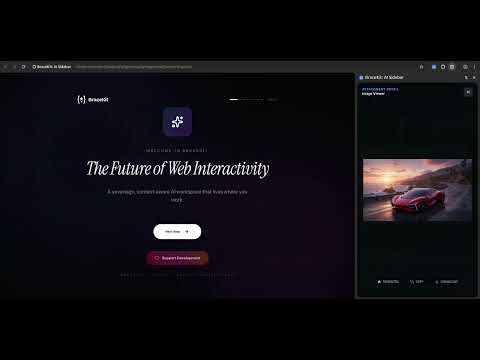
BraceKit is a private AI sidebar for Google Chrome. Chat with models you already pay for—cloud APIs or local runtimes—without leaving the page. The extension is free. There is no BraceKit subscription and no bundled AI quota. You add your own API keys (bring your own key). Keys stay on your device, encrypted. Optional PIN lock. No BraceKit account and no telemetry. WHAT YOU CAN DO - Read the current page into clean markdown (ads and chrome stripped) so the model sees the article, docs, or ticket you are looking at. - Select text anywhere and use the floating toolbar: Summarize, Explain, Translate, Rephrase, Simplify, Expand, Fix grammar, plus your own prompts. Apply the result into editable fields. - Attach images and text files. Vision-capable models can debug a UI from a screenshot. - Type bk in the address bar, then a query, to start a chat or jump to an old one. - Branch a conversation to try another approach without losing the original thread. - Build slide decks in the sidebar: plan, edit, and export from a dedicated slide workspace. - Generate images (including aspect ratio) and browse them in the gallery. - Connect local MCP servers so the model can use your tools from the sidebar. - Keep preferences and project notes in a local memory system; auto-compact long threads so you stay under context limits. - Keep chatting after you close the sidebar—the agent loop runs in a service worker. HOW KEYS WORK You choose the endpoint. BraceKit talks to it from your browser. You pay that provider at their rates. BraceKit does not proxy your prompts through BraceKit servers. PRIVACY Conversations and keys live locally. Docs: https://bracekit.nexifle.com/guide/ Privacy: https://bracekit.nexifle.com/privacy-policy/
0 out of 5No ratings
Details
- Version0.9.2
- UpdatedAugust 26, 2026
- Size4.4MiB
- LanguagesEnglish
- DeveloperWebsite
Email
support@nexifle.com - Non-traderThis developer has not identified itself as a trader. For consumers in the European Union, please note that consumer rights do not apply to contracts between you and this developer.
Privacy

BraceKit: AI Sidebar has disclosed the following information regarding the collection and usage of your data. More detailed information can be found in the developer's privacy policy.
BraceKit: AI Sidebar handles the following:
This developer declares that your data is
- Not being sold to third parties, outside of the approved use cases
- Not being used or transferred for purposes that are unrelated to the item's core functionality
- Not being used or transferred to determine creditworthiness or for lending purposes
Support
For help with questions, suggestions, or problems, visit the developer's support site