


Overview
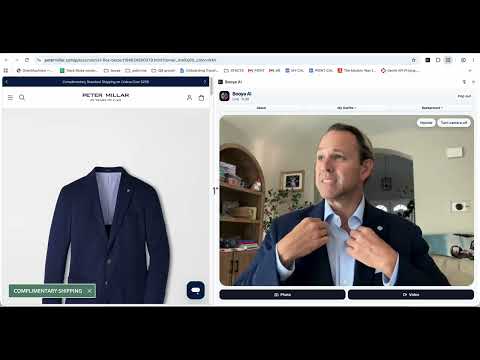
Live AI virtual try-on for clothes. Drag an outfit from any online store onto your webcam and see it on you in real time.
Booya AI is a live virtual try-on for clothes. Drag an outfit from any online store onto your webcam and see it on you in real time. It moves when you move. No photo uploads, no waiting for a generated picture. HOW TO TRY ON CLOTHES ONLINE WITH BOOYA AI 1) Add Booya AI to Chrome, then click the Booya AI icon in your toolbar. 2) Turn on your camera in the side panel. 3) Go to any clothing website and drag a product photo onto your video. 4) See the outfit on you, live. Turn around, step back, and check the look before you buy. WHY SHOPPERS USE BOOYA AI • Live AI fitting room: the outfit follows you on your webcam, not a still image. • Works on any store: try on jackets, coats, dresses, shirts, hoodies and more from the sites you already shop. • Keeps the real colors: the outfit matches the color and style of the product photo. • Change your scene: put yourself in Paris, Tokyo, on a beach or on the red carpet to see how the look fits the moment. • Save and share: take a photo or record a short video of your look to send to friends before you buy. • One click back to normal: the red Stop effect button takes the outfit off and returns you to your regular camera. • My Outfits: every look you drop is saved in the side panel so you can switch between them fast. PLANS Free: 10 live try-ons every month (one minute each). Paid: 25 live try-ons every month for $9.99 a month. FAQ What is Booya AI? Booya AI is a Chrome extension for live virtual try-on. It shows clothes from any shopping website on you through your webcam, in real time. Do I need to upload a photo of myself? No. Booya AI uses your live camera, so you see the clothes on your body as you move. Which websites does it work on? Most online clothing stores. If a photo won't drop, open the product page and drag the main product photo. Is Booya AI free? Yes. You get 10 free live try-ons each month. For $9.99 a month you get 25. How do I stop the try-on? Click the red Stop effect button. Your normal camera comes back and the try-on time stops. Is my camera video private? Your camera is only used to show your try-on. Booya AI does not sell your data. Privacy policy: https://booya.ai/PrivacyPolicy Booya AI — virtual try-on, AI fitting room and virtual dressing room for online shopping. Learn more at https://booya.ai
0 out of 5No ratings
Details
- Version0.1.16
- UpdatedNovember 3, 2026
- Size3.72MiB
- LanguagesEnglish
- DeveloperWebsite
Email
jasonmartell2012@gmail.com - Non-traderThis developer has not identified itself as a trader. For consumers in the European Union, please note that consumer rights do not apply to contracts between you and this developer.
Privacy

Booya AI: Live Virtual Try-On for Clothes has disclosed the following information regarding the collection and usage of your data. More detailed information can be found in the developer's privacy policy.
Booya AI: Live Virtual Try-On for Clothes handles the following:
This developer declares that your data is
- Not being sold to third parties, outside of the approved use cases
- Not being used or transferred for purposes that are unrelated to the item's core functionality
- Not being used or transferred to determine creditworthiness or for lending purposes
Support
For help with questions, suggestions, or problems, visit the developer's support site