

Bookshelf: Folder Manager for Gemini Notebook
48 ratings
)
Overview
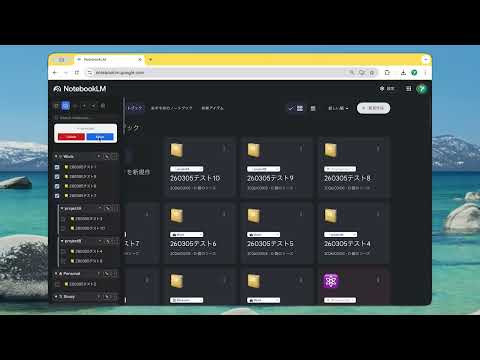
Add folders, subfolders & cloud sync to Gemini Notebook. Drag-and-drop, search, sort, dark mode, export/import. Tile & list view.
Take control of your Google NotebookLM workspace. As your notebook collection grows, finding what you need gets harder. "Bookshelf for NotebookLM" adds powerful folder management directly into NotebookLM, so you can organize, search, and sync your projects with ease. 🚀 KEY FEATURES: 📂 Folders & Subfolders Create categories like "Work," "Study," or "Personal" and nest subfolders for deeper organization. 🖱️ Intuitive Drag & Drop Drag notebooks into folders, reorder folders and links freely to match your workflow. 🔍 Search & Sort Quickly find notebooks by name. Sort alphabetically (A-Z / Z-A) with one click. ☁️ Cloud Sync Sync your bookshelf across devices using Chrome profile sync (chrome.storage.sync). Push and pull your data between local and cloud. ✨ Auto-Detect New Notebooks Newly created notebooks are automatically placed in "Uncategorized" — nothing gets lost. 📋 Tile & List View Support Folder selectors appear in both tile and list views, with a dedicated folder column in list view. 🌙 Dark Mode Fully supports NotebookLM's dark mode for comfortable use day and night. 📦 Export / Import Back up your bookshelf settings as JSON, or transfer them to another browser. 🗂️ Collapsible Sidebar Toggle the sidebar open or closed to maximize your workspace. 🌐 6 Languages Supports English, Japanese, Chinese (Simplified/Traditional), Korean, and Spanish. 🔒 PRIVACY & SECURITY: Local Storage Only: All folder settings are stored in your Chrome browser (chrome.storage). Cloud sync uses Chrome's built-in profile sync — no third-party servers. Anonymous stats only: We collect anonymous counters (shelf count, usage frequency, etc.) to improve the extension. No URLs, note titles, or personal data are collected. You can opt out in Settings. Safe & Secure: This extension only interacts with the NotebookLM interface to enhance your experience. ⚠️ DISCLAIMER: This extension is an independent project by an individual developer and is NOT affiliated with, endorsed by, or connected to Google LLC or NotebookLM. ☕ SUPPORT THE DEVELOPMENT: If you find this extension helpful, please consider leaving a review on the Chrome Web Store or buying me a coffee! Your support keeps the project alive. buymeacoffee.com/south0120 To improve the extension, anonymous usage stats (shelf count, activity frequency, etc.) are collected. You can opt out in the settings.
4.3 out of 548 ratings
Details
- Version2.2.1
- UpdatedJuly 28, 2026
- Offered bysouth0120
- Size87.35KiB
- Languages6 languages
- Developer
Email
south0120@gmail.com - Non-traderThis developer has not identified itself as a trader. For consumers in the European Union, please note that consumer rights do not apply to contracts between you and this developer.
Privacy

Bookshelf: Folder Manager for Gemini Notebook has disclosed the following information regarding the collection and usage of your data. More detailed information can be found in the developer's privacy policy.
Bookshelf: Folder Manager for Gemini Notebook handles the following:
This developer declares that your data is
- Not being sold to third parties, outside of the approved use cases
- Not being used or transferred for purposes that are unrelated to the item's core functionality
- Not being used or transferred to determine creditworthiness or for lending purposes
Support
For help with questions, suggestions, or problems, visit the developer's support site