

Bookmarks Glance
1 rating
)
Overview
A minimal new tab page to view and manage your bookmarks seamlessly.
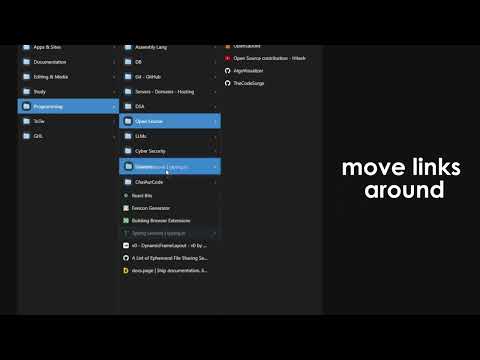
Tired of digging through endless dropdown menus or a cluttered bookmarks bar? Bookmarks Glance replaces your New Tab page with a clean, column-based view of your bookmarks, so you can move through deep folder hierarchies without losing your place. 🚀 KEY FEATURES 📂 Column navigation with breadcrumbs Folders open side by side, like Finder on macOS (Miller columns). Click a folder and its contents slide into the next column. A breadcrumb trail shows where you are, and you can click any level to jump back to it. Click outside the columns to collapse them. 🔎 Instant search Search titles and URLs as you type. Press /, Ctrl+K or Ctrl+F to focus the search box. The first match is selected automatically, so you can use the arrow keys and Enter without touching the mouse. Press Esc to clear. ⌨️ Keyboard-first navigation ↑ ↓ move within a column, ← → move between folder levels Enter opens a bookmark, Shift+Enter opens it in a new tab Ctrl+B quick add, Ctrl+Home back to the root, , opens settings, ? opens About All shortcuts are listed in Settings. 🗂️ Manage bookmarks without leaving the tab Add, edit and delete bookmarks and folders Right-click any item or empty column space for a context menu Quick Add button (+) for fast capture Drag a bookmark or folder onto a folder to move it, with a highlighted drop target ⚙️ You choose how links open Open in the current tab or a new tab For new tabs: in the background (stay on the page) or switch to it Hover a bookmark and click ↗ to open it in a new tab 🎨 Minimal design, your way Light and dark themes. The default follows your browser or system, and the header toggle saves your choice. Choose your accent color and display name Time-based greeting (Morning, Afternoon, Evening, Night) Sort bookmarks as saved or A–Z Favicons for every bookmark No ads, no news feeds, no clutter ✨ New in v4.2 Redesigned Settings, About and Add/Edit dialogs with a cleaner, consistent look Keyboard shortcuts now sit in a collapsible section of Settings Simplified floating buttons and About page Shared design across the extension and the website 🔒 Privacy & permissions No tracking, no analytics, no backend, and no accounts. Your bookmarks stay in your browser. bookmarks: read, create, edit, move and delete your bookmarks and folders favicon: show site icons storage: save your settings (name, color, theme, open behavior) Great for Developers with libraries of docs and tools Designers collecting inspiration and assets Students organizing research and course material Power users with large bookmark collections Works in Chrome, Brave and Edge.
5 out of 51 rating
Details
- Version4.2
- UpdatedSeptember 30, 2026
- Offered byAbdullah Kaleem
- Size57.43KiB
- LanguagesEnglish
- Developer
Email
abdullahkalim216@gmail.com - Non-traderThis developer has not identified itself as a trader. For consumers in the European Union, please note that consumer rights do not apply to contracts between you and this developer.
Privacy

This developer declares that your data is
- Not being sold to third parties, outside of the approved use cases
- Not being used or transferred for purposes that are unrelated to the item's core functionality
- Not being used or transferred to determine creditworthiness or for lending purposes
Support
For help with questions, suggestions, or problems, please open this page on your desktop browser