

Bookmark with full page screenshots - YesKeeper Clipper

Overview
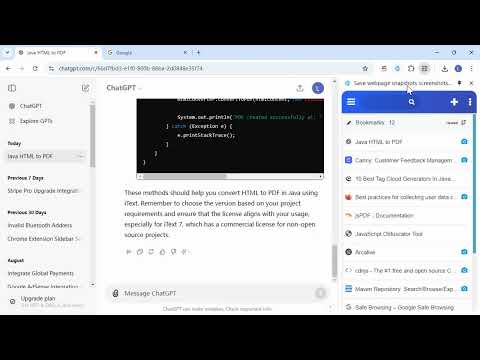
Save full page snapshots, links, text to cloud with one click. Sync and back up bookmarks. View and manage them in the sidebar.
Take full webpage screenshots. Capture, edit, annotate and save them as snapshots to local or YesKeeper (a free cross-platform collection space). Easily search and view Later without worrying about page expiry. Key Features: 1️⃣ Bookmark pages with full-page snapshots to the cloud, and access them anytime, anywhere.🔥 2️⃣ Webpage snapshots are private and can be saved in image or HTML format.🔥 3️⃣ Clip content from any web page and save it as a note. 4️⃣ You can open the sidebar to access cloud bookmarks. 5️⃣ One click synchronization of local browser bookmarks to the cloud. Also an excellent full-page screenshot tool: 1️⃣ Capture entire page, visible part of the web page or just a selection🔥 2️⃣ Add annotations directly to your page screenshots.🔥 3️⃣ Save screenshots as PDF/JPEG/PNG, print, or copy to clipBoard. YesKeeper capture extension —without requesting any extra permissions! This browser extension does not run automatically by default. It only activates when the user clicks on the extension icon or triggers it through the menu. This design ensures that user privacy is protected, preventing any unauthorized automatic actions or data collection. Users have full control over when to enable the extension's functionality, enhancing both security and privacy during use. YesKeeper is a free cross-platform cloud storage space that allows you to access your web page snapshots anytime, anywhere, with multi-tag classification, full-text indexing, and support for multiple sorting options.
4.8 out of 55 ratings
Details
- Version5.5.6
- UpdatedOctober 20, 2025
- Size1.21MiB
- Languages10 languages
- DeveloperWebsite
Email
webman.ling@gmail.com - Non-traderThis developer has not identified itself as a trader. For consumers in the European Union, please note that consumer rights do not apply to contracts between you and this developer.
Privacy

Bookmark with full page screenshots - YesKeeper Clipper has disclosed the following information regarding the collection and usage of your data. More detailed information can be found in the developer's privacy policy.
Bookmark with full page screenshots - YesKeeper Clipper handles the following:
This developer declares that your data is
- Not being sold to third parties, outside of the approved use cases
- Not being used or transferred for purposes that are unrelated to the item's core functionality
- Not being used or transferred to determine creditworthiness or for lending purposes
Support
For help with questions, suggestions, or problems, visit the developer's support site