

Bookmark Sorter - Automatically Sort Bookmarks
32 ratings
)
Overview
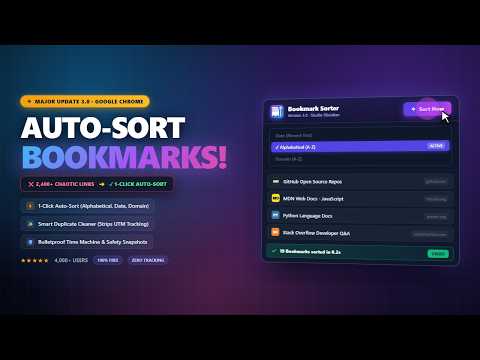
Auto & manual bookmark sort (date, A-Z, domain). Pre-action safety snapshots, instant undo, duplicate cleaner & dark mode.
⭐ The Ultimate Bookmark Organizer & Smart Sorter for Google Chrome! Automatically sort, clean, inspect, and organize your bookmarks with zero risk of data loss. Version 3.0 is our biggest update ever — completely rebuilt based on user feedback to provide maximum control, studio-grade interaction, bulletproof safety, and modern performance. ━━━━━━━━━━━━━━━━━━━━━━━━━━━━━━━━━━━━━━━━━━━━ 🚀 WHAT'S NEW IN VERSION 3.0.0? ━━━━━━━━━━━━━━━━━━━━━━━━━━━━━━━━━━━━━━━━━━━━ We listened closely to your reviews and emails! Here is what's new: 🛡️ Bulletproof Safety & Time Machine (Never Lose a Bookmark Again!) • Automatic Safety Snapshots: A safety snapshot is automatically created before any sort, cleanup, move, or restore operation. • Instant 1-Click Undo: Made a mistake? Hit "Undo" in the notification to restore your exact previous state instantly. • 5 Rollback Snapshots: Restore your bookmark tree to any recent point in time with one click. • Discrepancy Warnings: Safeguards prevent accidental overwrites if a file has fewer bookmarks than your browser. ⚡ Studio-Grade Interaction & Management • Context Menu for Bookmarks & Folders: Right-click any item for instant actions (Open in Tab/Window/Incognito/Group, Edit, Copy URL, Cut, Delete, Sort Folder). • Multi-Select & Batch Toolbar: Select multiple bookmarks or folders with checkboxes or Shift-range selection to open, move, or delete them together. • Drag & Drop Reorganization: Drag bookmarks or folders directly into sidebar folders, content folders, breadcrumbs, or the up-button with full circularity prevention. • Technical In-App Edit Modal: Deeply inspect and edit titles, validate URLs, change parent folders, and view creation dates and item counts. • Elegant Micro-Tooltips: Non-intrusive micro-tooltips for all buttons, actions, and dropdown options. ✨ Smart Multi-Criteria Sorting • New Sort Criteria: Sort by Website / Domain (A-Z) and Full URL (A-Z) in addition to Date (Newest/Oldest) and Alphabetical (A-Z / Z-A). • Scope Selection: Choose exactly what to sort: "Current Folder", "Folder + Subfolders", or "All Bookmarks". • Quick Sort Button ("⚡ Sort Now"): Instant manual sorting whenever you need it. • Keyboard Shortcut: Press Alt+Shift+S (Option+Shift+S on Mac) to sort instantly with badge confirmation. 📊 Bookmark Insights & Health Score • Instant Library Stats: View total bookmark and folder counts, oldest and newest bookmark dates, and your top 4 most saved domains. • Health Score Badge: Live indicator showing whether your bookmarks are optimal or need duplicate/empty-folder cleanup. 💾 Universal Netscape HTML & JSON Backup • Universal Netscape HTML Export/Import: Full cross-browser compatibility to export and import bookmarks to and from Chrome, Firefox, Safari, Edge, and Brave. • JSON Snapshots: Complete structural backups with safety snapshot verification. 🧹 Bookmark Optimizer (Duplicate & Empty Folder Cleaner) • Smart Duplicate Detection: Finds true duplicates by stripping 20+ tracking parameters (utm_*, gclid, fbclid, etc.) and normalizing protocols & slashes. • Quick Selection: Keep oldest, keep newest, or select manually. • Empty Folder Cleaner: Recursively cleans empty folders deep within your structure without touching root system folders. 🎨 Modern Obsidian Design System & Dark Mode • Beautiful Dark & Light Mode: Seamless auto/system detection or manual toggle. • Clickable Breadcrumb Bar: Easy navigation through deep folder structures with "Up one level" navigation. • 100% Crisp Vector Iconography: Platform-agnostic Lucide/Heroicons SVG icons with zero generic emojis. • Native Offline Favicons: High-resolution local browser favicons with SVG globe fallback. • Full Multi-Browser Support: Fully compatible with Chrome, Brave, Vivaldi, Edge, and Opera. ━━━━━━━━━━━━━━━━━━━━━━━━━━━━━━━━━━━━━━━━━━━━ 💡 KEY FEATURES AT A GLANCE ━━━━━━━━━━━━━━━━━━━━━━━━━━━━━━━━━━━━━━━━━━━━ • Real physical bookmark reordering (syncs automatically across your devices via Chrome Sync). • Automatic background sorting with configurable debouncing. • Folder-specific custom sort orders (keep "Work" alphabetical and "Read Later" by newest date). • Instant Live Search with highlighted folder locations. • Complete JSON & HTML Backup & Restore with safety snapshots. • 100% Private & Offline: Operates entirely locally in your browser. No external servers, no tracking, no ads. ━━━━━━━━━━━━━━━━━━━━━━━━━━━━━━━━━━━━━━━━━━━━ 🔒 PERMISSIONS TRANSPARENCY ━━━━━━━━━━━━━━━━━━━━━━━━━━━━━━━━━━━━━━━━━━━━ • bookmarks: Required to read, reorder, move, and clean your bookmarks. • storage & unlimitedStorage: Required to save your sorting preferences, safety snapshots, and Time Machine backups locally. • contextMenus: Allows quick bookmark management and opening popups from the right-click menu. • favicon: Uses Chrome's native offline Favicon API to display site icons without connecting to third-party services. • downloads: Allows exporting your bookmark backup JSON & HTML files to your Downloads folder. 🎁 100% Free — No Ads, No Subscriptions, No Hidden Costs! ➡️ Install Bookmark Sorter now and take full control of your bookmarks!
3.6 out of 532 ratings
Details
- Version3.0.1
- UpdatedNovember 16, 2026
- Offered bypixellent
- Size138KiB
- Languages13 languages
- Developer
Email
dev.pixellent@gmail.com - Non-traderThis developer has not identified itself as a trader. For consumers in the European Union, please note that consumer rights do not apply to contracts between you and this developer.
Privacy

This developer declares that your data is
- Not being sold to third parties, outside of the approved use cases
- Not being used or transferred for purposes that are unrelated to the item's core functionality
- Not being used or transferred to determine creditworthiness or for lending purposes