


Overview
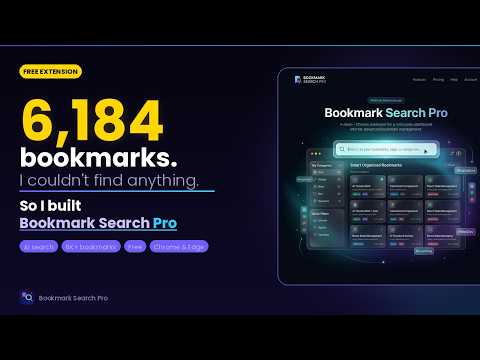
Powerful bookmark search with smart categories, filters, and history browsing
Bookmark Search Pro — The Ultimate Bookmark Manager & New Tab Experience Transform your new tab page into a powerful command center for all your bookmarks and browser history. Bookmark Search Pro gives you instant full-text search, smart categorization, AI-powered organization, and a beautiful customizable interface — all in one extension. 🔍 LIGHTNING-FAST SEARCH Stop scrolling endlessly through your bookmark bar. Bookmark Search Pro features instant fuzzy multi-word search across titles, URLs, categories, tags, folders, and domains. Results appear as you type, with matched terms highlighted so you immediately see why each result was found. Save your most-used searches as one-click shortcuts so you never have to retype the same query. 📂 7 POWERFUL VIEW MODES Switch between views to see your bookmarks the way that makes sense for your current task: • List — classic compact list sorted by relevance or date • Category — nested tree organized by your custom category hierarchy • Folder — mirrors your browser's native folder structure • Domain — group by website, perfect for research projects • Date — timeline view organized by when bookmarks were added • Tags — label-based clusters for cross-cutting topics • Mind Map — interactive visual graph showing relationships between bookmarks, categories, domains, and tags 🗂️ INTELLIGENT FILTER SIDEBAR Seven independent filter dimensions work together to let you zero in on exactly what you need: • Category tree — drill into any branch of your category hierarchy • Folder tree — filter by browser folder path • Tag chips — toggle one or more tags • Domain chips — group and filter by website with custom domain groupings • Date tree — filter by year or month added • File type tree — separate PDFs, images, documents, videos • Context chips — workspace-style context labels (Work, Research, Personal, etc.) All filters combine naturally. Each dimension shows only the values that exist in your current filtered set — no dead ends. 🤖 AI-POWERED CATEGORIZATION Tame thousands of uncategorized bookmarks in minutes. Connect your preferred AI provider and let it analyze titles and URLs to suggest the right category for each bookmark: • OpenAI (GPT-4o, GPT-3.5-Turbo, and more) • Anthropic (Claude 3.5 Sonnet, Haiku) • Google Gemini (Flash, Pro) • Ollama — run any local model completely offline and privately • Rule-Based — fast built-in heuristics with zero API costs All AI suggestions are shown for review before any changes are saved. You stay in control. ⚙️ RULES ENGINE Build a permanent system that automatically categorizes future bookmarks: • Domain rules — map entire websites to a category (e.g., github.com → Development) • Pattern rules — use URL patterns or title keywords • Apply rules in bulk to re-categorize your entire library in one click • Rules run automatically as you import or sync new bookmarks ✏️ POWERFUL EDIT MODE Manage your bookmark library without opening the browser's built-in manager: • Select individual bookmarks or entire groups with one click • Inline add, rename, and delete categories and folders • Drag-and-drop bookmarks between categories • Bulk assign categories, folders, tags, or contexts • Pending changes system — all edits are staged and only committed when you click Save, so you can review or discard any changes before they persist ⚡ TRIAGE MODE Quickly process unreviewed bookmarks one by one. Each bookmark is presented with its title, URL, and suggested category. Accept, reassign, or delete with a single keystroke. Clear your backlog in a fraction of the time it would take manually. 📊 HISTORY INSIGHTS Switch from Bookmarks to History mode to explore your full browser history: • Full-text search across all visited pages • Filter by the same 7 dimensions as bookmarks • "Visits by Month" bar chart showing your browsing activity over time • Click any bar to filter results to that month • Optionally save history items as bookmarks directly from the results list 🌐 DYNAMIC HOME PAGE GENERATOR Create a beautiful standalone HTML home page from your bookmarks, ready to use as your browser's homepage or share with others: • Live search bar with instant filtering • Expandable/collapsible panels organized by folder, category, domain, tag, file type, or year • Expand All / Collapse All controls • Bookmark count per section • Self-contained — works entirely offline, no server required 💾 SNAPSHOTS & BACKUPS Never lose your work: • Create named snapshots of your entire bookmark library at any point • Restore any snapshot with a single click • Export to JSON (full data), HTML (compatible with all browsers), CSV, or Markdown • Import bookmarks from HTML files exported by Chrome, Edge, Firefox, or Safari • Sync with your browser's live bookmark tree on demand 🔗 BROKEN LINK DETECTOR Identify dead bookmarks before they waste your time: • Scan your entire library for broken or unreachable URLs • Results grouped by error type (404, timeout, SSL error, etc.) • Remove dead links in bulk directly from the results list 🎨 THEMES & CUSTOMIZATION Make the extension feel like yours: • 7 built-in themes: Dark, Light, Nord, Cyberpunk, Vaporwave, Glass Bento Dark, Pro Linear • Toggle between compact and large layout modes • Responsive auto-compact: automatically switches to compact mode when the window narrows below 1100px • Fully customizable sidebar: reorder dimensions via drag-and-drop, show/hide sections independently for Bookmarks and History modes, configure each section's header, collapsible behavior, and default state • Pin the History chart above the sidebar as a featured widget 🔒 PRIVACY FIRST • Privacy mode hides all URLs and sensitive content from the visible interface • Ollama support means AI categorization can run 100% locally with no data leaving your machine • Optional privacy-first analytics (Aptabase) — no raw URLs, titles, or query text is ever collected • All bookmark data stays in your browser's local storage — no external sync servers 🗨️ QUICK-SAVE POPUP Click the extension icon on any page to instantly bookmark the current tab: • Add tags and assign a folder without leaving the page • Toggle auto-sync so new bookmarks appear immediately in the main view • Open the full manager directly from the popup REQUIREMENTS & PERMISSIONS • bookmarks — read and manage your bookmark library • history — browse and search your browser history • storage / unlimitedStorage — save your categories, tags, rules, and settings locally • activeTab — identify the current page when saving from the popup No account required. No cloud sign-in. Your data never leaves your browser. PERFECT FOR Researchers with thousands of saved articles · Developers tracking documentation and tools · Students organizing study materials · Anyone who's ever lost a bookmark they knew they saved
5 out of 51 rating
Details
- Version1.9.1
- UpdatedSeptember 30, 2026
- Size206KiB
- LanguagesEnglish
- DeveloperWebsite
Email
luigivargas@gmail.com - Non-traderThis developer has not identified itself as a trader. For consumers in the European Union, please note that consumer rights do not apply to contracts between you and this developer.
Privacy

Bookmark Search Pro has disclosed the following information regarding the collection and usage of your data. More detailed information can be found in the developer's privacy policy.
Bookmark Search Pro handles the following:
This developer declares that your data is
- Not being sold to third parties, outside of the approved use cases
- Not being used or transferred for purposes that are unrelated to the item's core functionality
- Not being used or transferred to determine creditworthiness or for lending purposes
Support
For help with questions, suggestions, or problems, please open this page on your desktop browser