


Overview
Save pages to the right folder fast: type part of a folder name or let AI suggest one. Plus bookmark search and cleanup tools.
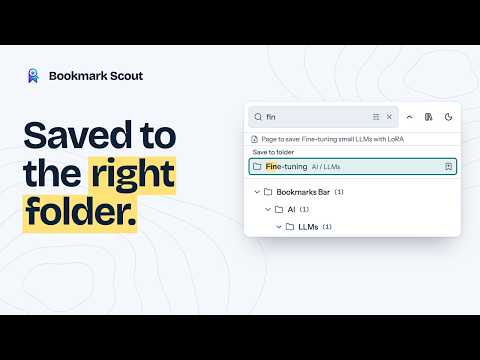
Bookmark Scout saves every page to the right folder in seconds, from the toolbar or with one keyboard shortcut, then helps you find and tidy your bookmarks without leaving the browser. Free, with no account and no ads. SAVE TO THE RIGHT FOLDER IN SECONDS • Click the Bookmark Scout button, type part of any folder's name, even one nested deep in the tree, and save the page there without leaving the keyboard • Type a path such as ai/llms; a small typo still finds the folder, and folders you used recently come first • A page already in that folder is not saved twice • Optional AI suggests the best folder for the page, or a new folder that you review before it is created • Optional right-click menu (off at first; turn on Right-Click Menu in Settings) to save a link, or the page you are on, into a recent folder QUICK SAVE SHORTCUTS • Press ⌥⇧S on Mac (Alt+Shift+S on Windows and Linux) on any page to save it without opening Bookmark Scout: by default to the folder that best matches the page (worked out on your device), or to the folder you used last or one you choose • A small notification in the page says where it went, with Undo and other folders to move it to • With AI turned on, ⌥⇧D on Mac (Alt+Shift+D on Windows and Linux) saves the page to the first AI folder suggestion • Change the keys on the browser's shortcut page. You can also give quick save ⌘D on Mac (Ctrl+D on Windows and Linux) there, so it replaces the browser's bookmark dialog; Settings shows how FIND YOUR BOOKMARKS • Search all your bookmarks as you type, right from the toolbar: titles, addresses, folders, tags, and summaries, with operators such as tag:, domain:, and folder: • Folder tree with drag and drop, expand and collapse all, and new folders • Side panel with the same tree, search, and folder matches • Rest the pointer on a bookmark to see its address, folder, tags, and summary • Delete with a confirmation (on by default) and a 10-second Undo BOOKMARKS MANAGER Bookmark Scout replaces the browser's Bookmarks page with a manager that works like the browser's own, plus breadcrumbs, a sortable table, and saved searches that always show current results. • Right-click menus on bookmarks, folders, and empty space: edit, rename, cut, copy, paste, open in new tabs or windows, show in folder, and delete • Drag and drop to move bookmarks into folders or reorder them; links dropped from other pages become bookmarks • Select several rows with Cmd+click and Shift+click, and use the keyboard shortcuts of the browser's own manager: ⌘A, ⌘C, ⌘X, ⌘V, ⌘⌫, ⌘Z to undo, and ⇧⌘Z to redo on Mac (Ctrl+click, Ctrl+A, Ctrl+C, Ctrl+X, Ctrl+V, Delete, Ctrl+Z, and Ctrl+Shift+Z on Windows and Linux) • Undo and redo cover edits, moves, sorting, and deletions, including changes made by Ask AI • Show a folder or a search as a list or as cards with each page's cover picture, tags, and summary, and preview a bookmark without opening it • Bookmark history: every change to your bookmarks, with what each item was before, Undo, and Restore for deleted items even after Undo is gone • Arrange the menus, columns, cards, sidebars, and keyboard shortcuts of the manager and the popup in Settings CLEAN UP YEARS OF BOOKMARKS • Duplicate Cleaner: review duplicate groups and choose which copy to keep • URL Cleaner: preview and remove tracking codes from web addresses • Dead Link Checker: find links that no longer work, then review repairs (delete, use the new address, point to an archived copy, or edit it) with Undo • Metadata Fetcher: suggest page titles and apply only the ones you pick • Privacy Scanner: find private details in your bookmarks, such as email addresses and login codes in links • Statistics: sites, folders, depth, and duplicates • Refresh Site Icons: fetch each site's own icon, with no third-party icon service • Smart Rules: tag the bookmarks that match a search and move them to a folder, after a review, or as new bookmarks arrive if you turn that on • Index Page Text: keep the text of the pages you choose on this device, so search finds words inside them • Fetch Covers: keep each page's preview picture on this device for the cards view. Capture Covers While Browsing (off by default) takes the picture as you open a bookmarked page instead • Long tools keep running in the background after you close the manager, with Pause and Resume, and every review lets you set many items at once • Import a bookmarks file with a preview, duplicate handling, and Undo • Export to HTML, JSON, Markdown, or CSV, with an optional privacy review that can hide private details WHAT YOUR BROWSER WILL ASK, AND WHY At install, the browser asks for one thing: "Read and change your bookmarks", so Bookmark Scout can save, search, and organize them. Anything else is asked for only when you use the feature that needs it, after a short explanation. If you say no, only that feature stays off. • "Read the icons of the websites you visit": when you click Show browser icons on Refresh Site Icons, or turn on Use the browser's icon cache, to show the icons your browser already saved next to your bookmarks • "Read and change your data on all example.com sites" (or "on a number of websites"): when you run the Dead Link Checker, Metadata Fetcher, Refresh Site Icons, Index Page Text, or Fetch Covers, for only the sites in that run. A run over more than 20 sites, the Read page content AI setting, and Capture Covers While Browsing ask for "Read and change all your data on all websites"; the pictures Capture Covers While Browsing takes stay on this device. Requests are sent without cookies. Once all websites are allowed, Ask AI can also check whether bookmarked links still work • "Read your browsing history": only to save the current page or get folder suggestions from the side panel. The toolbar button and the quick save shortcut need no permission, and Bookmark Scout reads only the open tab's title and address • "Communicate with cooperating native applications": only when you turn on Local AI agents (see For developers below) The right-click menu is optional too, but has no warning, so the browser adds it without asking. PRIVACY • No account, no analytics, no tracking, no ads • Your bookmarks stay in your browser; tags, summaries, saved searches, Smart Rules, page text, covers, and the Bookmark history stay on this device • The settings you change and your custom prompts and About me sync through your browser account where the browser supports it OPTIONAL AI (OFF BY DEFAULT) AI is optional, and everything above works without it. To use it, you need an account with an AI company, which may charge a little each time you use it, or a free AI program on your own computer. Bookmark Scout has no AI service of its own: turn on AI in Settings and add the service you chose. • Folder suggestions for the current page, including a new folder that you review first • In Chrome, free folder suggestions from Chrome's built-in AI, which runs on your computer with no account or key, where the computer can run it • Tag suggestions and short summaries that you review before saving • Folder reorganization plans, always previewed before anything changes • Ask AI: chat about your bookmarks. It can search them by words, folder, tag, site, or date added, find duplicates, suggest folders, and look at the current page • Ask AI makes changes only when you ask: it saves pages, and it proposes moves, renames, deletions, and new folders as a plan that changes nothing until you approve it. Every change can be undone • Answers can end with buttons: a follow-up question, options to pick from, saving the page to a suggested folder, or opening a bookmark. Nothing happens until you click • Choose what Ask AI may look up or change (Settings > AI) • Read page content (off by default): send each page's readable text, not only its title and address, for better suggestions • Tags, summaries, and new folder names come back in your language, in one you pick, or in each page's own language (Settings > AI) When you use an AI feature, the data it needs is sent directly from your browser to the AI service you chose, under that service's terms: bookmark titles, addresses, folder names, the dates bookmarks were added, and saved tags and summaries; the current page's title and address; your Ask AI messages; the About me text you write, if any; whether the links Ask AI checks still work; and, only with Read page content on, the text of the pages involved. Nothing is sent to Bookmark Scout. Your API key is kept in this browser's local extension storage and is not synced. Using an AI service may cost money. SETTINGS AND BACKUP • Back up settings, at the bottom of Settings, saves the parts you choose: your settings, this computer's settings, saved searches and table view, prompts and About me, Smart Rules, AI services, and covers. API keys go in only if you select them, and then protected with a password • Restore settings shows what each part would change first, then merges or replaces, and Undo import puts it back • Only the settings you change are saved, so improved defaults in later versions still reach you FOR DEVELOPERS • Search operators: title:, url:, domain:, folder:, tag:, summary:, content: (page text), is:, has:, after:, before:, -word, OR, and parentheses; plus match case, whole word, and regular expressions. The manager's address keeps the search and the folder, so a link can open it already searching (?q=react), and Back and Forward restore both • AI services can be cloud AI providers, any OpenAI-compatible endpoint, or a model server on your own computer, with or without an API key • Export selected bookmarks as Markdown or XML context for an AI chat (works without AI and sends nothing) • The Privacy Scanner also flags sensitive query parameters, URL fragments, and UUIDs • Local AI agents (off by default): let AI agents on your computer, such as Claude Code, look up your bookmarks through the separate open-source bookmark-scout-mcp program. With Allow changes also on, they can save and reorganize bookmarks, and every change waits for your approval in a Bookmark Scout window • Open source under AGPL-3.0: https://github.com/isandrel/bookmark-scout UPDATING FROM AN EARLIER VERSION Version 0.3.3 stores its data in a new format and does not convert older data: settings return to their defaults, AI services and API keys need to be added again, and custom prompts, saved searches, tags, summaries, and saved site icons are cleared. Your bookmarks themselves are not touched. Made by an independent developer: no company, no ads, no account. Available in 12 languages. Light, dark, and system themes. Documentation: https://docs.bookmark-scout.com
0 out of 5No ratings
Details
- Version0.3.5
- UpdatedOctober 29, 2026
- Size2.14MiB
- Languages12 languages
- DeveloperWebsite
Email
support@bookmark-scout.com - Non-traderThis developer has not identified itself as a trader. For consumers in the European Union, please note that consumer rights do not apply to contracts between you and this developer.
Privacy

This developer declares that your data is
- Not being sold to third parties, outside of the approved use cases
- Not being used or transferred for purposes that are unrelated to the item's core functionality
- Not being used or transferred to determine creditworthiness or for lending purposes
Support
For help with questions, suggestions, or problems, visit the developer's support site