

BookFolio — Visual Bookmark Manager

Overview
Visual bookmark manager and new-tab dashboard for organizing Chrome bookmarks into daily tools, projects, research, and groups.
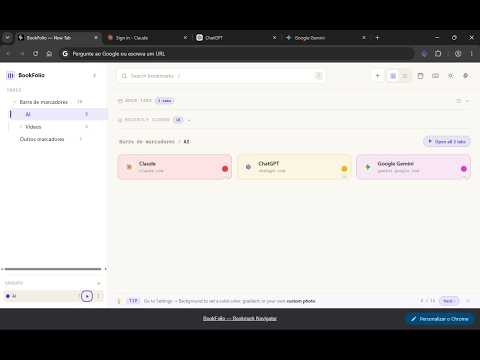
BookFolio is a visual bookmark manager and new-tab dashboard for Chrome. It transforms the bookmarks already stored in your browser into an organized, searchable web navigation system—with visual folders, functional groups, address-bar search, a side panel, pinned links, and keyboard shortcuts. Instead of leaving useful websites buried inside bookmark menus, you can organize them around the way you actually use the web: 🚀 Daily tools and frequently visited websites 🧩 Links and dashboards for each project 📚 Research materials, articles, and documentation 💼 Work and administrative systems 🎓 Study resources and reference libraries 🔁 Reusable groups of websites you often open together No migration to another bookmark service is required. Install BookFolio, open a new tab, and your existing Chrome bookmark hierarchy is already available. ──────────────────────────────────────── ✦ YOUR BOOKMARKS, EVERYWHERE ──────────────────────────────────────── → New-tab dashboard — browse your entire bookmark library as a visual workspace → Side panel — access and search bookmarks while keeping the current website open → Address-bar search — type “bf” in the Chrome omnibox to search bookmarks from anywhere → Command palette — press Ctrl+Shift+F, or Cmd+Shift+F on Mac, to jump directly to search → Context-menu saving — right-click a page or link and save it to a selected bookmark folder ──────────────────────────────────────── ✦ ORGANIZE THE WEB AROUND YOUR WORKFLOW ──────────────────────────────────────── → Browse bookmarks using grid or list views → Navigate the complete folder hierarchy from a collapsible and resizable sidebar → Add colors and emoji to folders for faster visual recognition → Pin frequently used websites to a permanent shortcut strip → See recently accessed bookmarks automatically → Drag and drop bookmarks between folders → Create, reorder, move, and organize subfolders BookFolio works with Chrome’s existing bookmark structure. You do not need to import your bookmarks into a separate BookFolio database. ──────────────────────────────────────── ✦ CREATE FUNCTIONAL GROUPS ──────────────────────────────────────── Folders organize where links are stored. Groups organize how links are used. Create named groups containing websites from different bookmark folders, then open the entire group when you begin a task. Examples: → Daily Start — email, calendar, task manager, and dashboards → Development — repository, documentation, hosting, and monitoring → Research — search engines, databases, articles, and references → Finance — banking, investments, reports, and spreadsheets → Study — learning platform, notes, readings, and exercises You can also open all bookmarks inside a folder at once. BookFolio asks for confirmation before opening a large number of tabs. ──────────────────────────────────────── ✦ FIND SAVED LINKS FASTER ──────────────────────────────────────── → Instant search by bookmark name or URL → Search results display the complete folder path → Press “/” from the dashboard to focus the search field → Search from the new tab, side panel, or Chrome address bar Instead of searching the web again for a website you already saved, BookFolio helps you navigate your own collection. ──────────────────────────────────────── ✦ VISUAL AND KEYBOARD NAVIGATION ──────────────────────────────────────── → Light, dark, and automatic system themes → Custom background using a color, gradient, or personal image → Resizable sidebar and compact mode → Full keyboard navigation using arrows, Enter, and Backspace → Quick shortcuts for search, adding bookmarks, changing layouts, dark mode, and calendar → Built-in shortcut reference panel ──────────────────────────────────────── ✦ ADDITIONAL BROWSER TOOLS ──────────────────────────────────────── → Open Tabs panel for switching between or closing active tabs → Recently Closed panel for restoring closed tabs → Toolbar badge showing how many bookmarks are saved for the current website → Optional calendar and clock panel These tools complement the bookmark workspace without replacing Chrome’s native browsing features. ──────────────────────────────────────── ✦ LOCAL-FIRST PRIVACY ──────────────────────────────────────── BookFolio does not require an account and does not use advertising or analytics trackers. Bookmark organization, search, folder customization, and per-site bookmark counts are processed through Chrome’s extension APIs. BookFolio does not operate an external server that receives your bookmarks or browsing history. Your existing bookmarks remain part of your Chrome profile. ──────────────────────────────────────── ✦ START IMMEDIATELY ──────────────────────────────────────── BookFolio is free. Install it, open a new tab, and your existing bookmarks are already there—organized, searchable, and accessible from different parts of the browser. Turn saved links into: • a daily launcher; • a project workspace; • a personal research library; • a directory of useful websites; • a navigation system for the web.
5 out of 52 ratings
Details
- Version1.2.1
- UpdatedJuly 21, 2026
- Size91.35KiB
- LanguagesEnglish
- DeveloperWebsite
Email
adrianomal@gmail.com - Non-traderThis developer has not identified itself as a trader. For consumers in the European Union, please note that consumer rights do not apply to contracts between you and this developer.
Privacy

This developer declares that your data is
- Not being sold to third parties, outside of the approved use cases
- Not being used or transferred for purposes that are unrelated to the item's core functionality
- Not being used or transferred to determine creditworthiness or for lending purposes
Support
For help with questions, suggestions, or problems, visit the developer's support site