


Overview
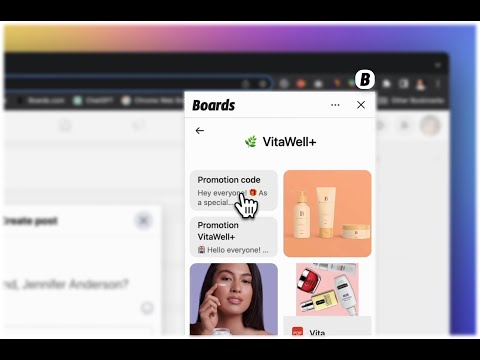
Send any script, video, image or Page to any chat. No copy, no paste, no tab switching.
Your best content, right where the conversation is happening. Boards for Chrome lets you share your Boards content inside any chat on the web. Answer customers faster, follow up without digging for links, and look professional every time. How it works Click in the message box, open the Boards extension, and click your content to add it. Works where you chat Use it in your favorite messaging apps, social inboxes, email, and almost any message box on the web. Create once, share anywhere Add your content in the Boards web app, share it with your team, and send it from your browser, phone, or keyboard. New to Boards? Sign up free at boards.com.
4.5 out of 520 ratings
Details
- Version4.1.1
- UpdatedNovember 18, 2026
- Offered byBoards.com
- Size1.54MiB
- LanguagesEnglish
- Developer
Email
support@boards.com - Non-traderThis developer has not identified itself as a trader. For consumers in the European Union, please note that consumer rights do not apply to contracts between you and this developer.
Privacy

Boards: Share Your Content in One Click has disclosed the following information regarding the collection and usage of your data. More detailed information can be found in the developer's privacy policy.
Boards: Share Your Content in One Click handles the following:
This developer declares that your data is
- Not being sold to third parties, outside of the approved use cases
- Not being used or transferred for purposes that are unrelated to the item's core functionality
- Not being used or transferred to determine creditworthiness or for lending purposes
Support
For help with questions, suggestions, or problems, visit the developer's support site