

Auto Scroll Extension
3 ratings
)
Overview
Smooth auto-scroll with speed presets, keyboard shortcuts, per-site memory, loop mode, and auto-start rules.
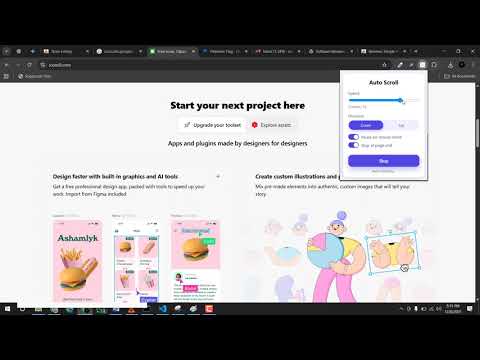
🖱️ Auto Scroll Extension: The Ultimate Hands-Free Experience Tired of manually scrolling through endless articles, e-books, social media feeds, or code documentation? Auto Scroll Controller is a premium productivity tool designed to turn your browsing into a smooth, hands-free experience. Whether you are studying long-form content, reviewing code, or reading digital music sheets and lyrics, this tool lets you focus entirely on the content—not the mouse wheel. It is best auto scroll extension tool on chrome store, it can navigate to blogs websites, book reading websites and also on many AI platforms like (Chatgpt, Gemini, Claude etc). ⚡ Why You’ll Love This Tool 🚀 Instant Speed Presets: Click-and-go with optimized speed presets: Slow (2), Normal (5), Fast (20), or the high-speed Turbo (50) mode. 🎛️ Precision Fine-Tuning: Use the slider or number input to lock in your perfect scrolling pace from 1 to 50. ↔️ Two-Way Motion: Smoothly glide down to read forward or slide back up to revisit content instantly. ⏸️ Smart Double-Pause Magic: Pause on Hover: Simply move your mouse cursor over the page to pause, and watch it automatically resume when you stop moving. Pause on Click: Briefly halts scrolling when you click a link or interaction point, resuming automatically after 1.5 seconds. 🔁 Loop & Bounce Mode: Reached the bottom? The page can automatically bounce and scroll back up in reverse, creating a continuous loop. 📈 Smooth Acceleration: Prevents sudden page jumps by gently ramping up scroll speed when starting or reversing. 🧠 Remember Per-Site Settings: The extension remembers your customized speed, direction, and options specifically for every site you visit. 🎯 Auto-Start Lists: Configure your favorite domains (like news or social feeds) to begin scrolling automatically the moment they load. ⌨️ Keyboard Shortcuts: Control everything instantly without opening the popup: Alt + S to Start/Stop. Alt + Up / Down to adjust speed. Alt + R to reverse direction. ☀️ Dark Theme Support: Switch between Light and Dark mode UI with a single click to match your browser's aesthetic. 💾 Backup & Restore: Easily export all your site profiles, auto-start configurations, and custom preferences to a JSON backup file. 🌟 Perfect For: 📖 Reading: Ideal for long-form articles, blogs, e-books, and news feeds. 💻 Developers: A fluid screen scroller for code reviews, API documentations, and logs. 🎶 Musicians: Keep hands on your instrument while digital sheets, tabs, or lyrics scroll seamlessly. ♿ Accessibility: A vital tool to reduce repetitive finger and wrist strain from mouse wheeling. 🛠️ How to Get Started Open: Click the extension icon in your browser toolbar. Configure: Pick a preset (Slow, Normal, Fast, Turbo) or slide to custom speed. Customize: Toggle settings like Pause on Hover, Loop Mode, or Smooth Acceleration. Activate: Click Start (or press Alt + S) to begin hands-free reading! 🔒 Privacy & Permissions Your data stays entirely on your local device. We never track your browsing history or collect personal information. activeTab: Allows the extension to safely inject the scrolling logic into the webpage you are viewing. scripting: Required to execute smooth page scrolling and detect your hover/pause events. storage: Saves your preferences, presets, and site profiles locally. tabs: Used to read the active tab's domain name to load your customized settings for that specific site. If you need any new feature in the extension please let us know.
5 out of 53 ratings
Details
- Version2.0.2
- UpdatedJuly 30, 2026
- Offered byMustafa Riaz
- Size35.91KiB
- LanguagesEnglish
- DeveloperGhulam Mustafa
NEAR SAGAR KARIYANA STORE MOHALLAH JAHANGEER PURA PINDI BHATTIAN DISTT, Hafizabad Punjab Pindi Bhattian 52180 PKEmail
mustafariazdev@gmail.comPhone
+92 309 6435752 - TraderThis developer has identified itself as a trader per the definition from the European Union and committed to only offer products or services that comply with EU laws.
Privacy

This developer declares that your data is
- Not being sold to third parties, outside of the approved use cases
- Not being used or transferred for purposes that are unrelated to the item's core functionality
- Not being used or transferred to determine creditworthiness or for lending purposes