


Pregled
Clip product specs and images directly to your favorites board and projects in DesignerLogic.
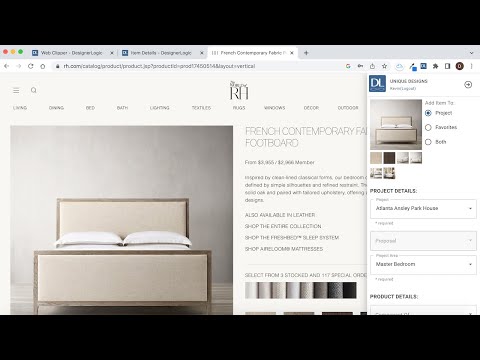
Web clipper for users of the DesignerLogic interior designer project management platform. Clip images and product information from websites and add them directly to a project and/or the Favorites Board in DesignerLogic, without the hassle of downloading images and uploading them to a project. DesignerLogic’s web clipper makes it easy: there’s no need to ever leave the web page you’re on. Version 2 just released: clip multiple images, add retail prices and discounts as well as costs and markups, and also add products as components to existing items in a DesignerLogic project. Here’s how it works: once you’re on the website of a product or image you’d like to save, click the DesignerLogic logo in your toolbar, and the clipper will open over the right side of the page. Select the project and add any other relevant data. Then just right-click (on a Mac it’s 2 fingers on the touch pad) over the image to save it to your project. Other spec info can be saved in the same way. Then voila: the image, a link to the source, and any other information you entered will be added to your selected project in the DesignerLogic application. **A DesignerLogic account is required.
0 od 5Ni ocen
Podrobnosti
- Različica2.0.4
- Posodobljeno29. marec 2023
- Velikost44.03KiB
- JezikiEnglish (United States)
- RazvijalecDesignerLogic, LLCSpletno mesto
1001 Bridgeway Ste A1 PMB 402 Sausalito, CA 94965 USE-pošta
go@designerlogic.comTelefon
+1 310-773-1011 - PosrednikTa razvijalec se je v skladu z definicijo Evropske unije opredelil kot trgovec in zavezal, da bo ponujal samo izdelke ali storitve, skladne z zakonodajo Evropske unije.
Zasebnost

Razvijalec DesignerLogic Web Clipper je razkril naslednje informacije glede zbiranja in uporabe vaših podatkov.
DesignerLogic Web Clipper obravnava to:
Ta razvijalec glede vaših podatkov izjavlja naslednje:
- Zunaj okvirov dovoljenih primerov uporabe se ne prodajajo tretjim osebam.
- Ne uporabljajo ali prenašajo se za namene, ki niso povezani s temeljno funkcijo izdelka.
- Ne uporabljajo ali prenašajo se zaradi ugotavljanja kreditne sposobnosti ali zaradi namenov posojanja denarja.