


Overview
Secure your Chrome browser profile with password protection, auto-lock timers, security questions, and customizable themes.
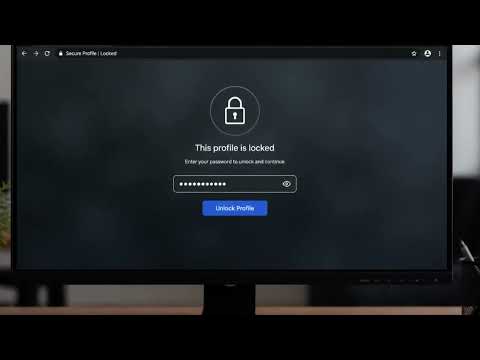
Google Chrome Profile Lock – Password Protect Your Chrome Browser & Secure Your Privacy Protect your browsing with Chrome Profile Lock, the powerful Chrome password protection and browser lock extension that lets you password protect Chrome, lock your Chrome browser with a secure password, and secure your Chrome profile from unauthorized access. Whether you use a shared computer, work in an office, study at school, or simply want more privacy, Profile Lock provides browser security, browser privacy, automatic browser locking, website protection, and offline Chrome security in one lightweight Chrome extension. What's New in This Update We’ve completely rebuilt the user interface from the ground up! Enjoy a gorgeous, modern dashboard featuring sleek glassmorphism, refined color palettes, and buttery-smooth micro-animations. Managing your security has never looked or felt this premium. Advanced Automation & Triggers (PRO) Take complete control over when and how your browser secures itself with our brand-new Advanced Triggers. - Auto-Mute on Lock: Stepping away from your desk? Instantly silence all playing audio and video tabs (YouTube, Spotify, podcasts, meetings) the second your browser locks, and seamlessly restore sound upon unlock. - Lock on System Sleep: Step away from your desk with confidence. Your profile now detects when your computer goes to sleep and locks itself instantly. - Lock on Minimize: Keep prying eyes out. If you minimize your browser window to hide what you're doing, the extension immediately locks your tabs in the background. - Custom Auto-Lock Timers: Move beyond the standard 5-minute timeout. Set precise, custom inactivity thresholds (15 min, 30 min, or custom limits) tailored to your exact workflow. General Improvements - Enhanced License Security: Completely upgraded PRO licensing engine with instant verification and clear, specific error diagnostics. - Instant Support Integration: Getting help is easier than ever. The new Feedback menu lets you launch an email or open a direct WhatsApp chat with our support team in one click. - Under-the-Hood Polish: Massive stability improvements, flawless toggle logic, and a squashed bug that previously caused minimized windows to misbehave. ## Free Features Password Protect Your Chrome Browser - Password protect your Chrome browser with a secure password. - Lock your Chrome profile to prevent unauthorized access. - Protect your tabs, bookmarks, browsing history, downloads, saved sessions, and personal accounts. - Keep your browser private and secure. One-Click & Hotkey Browser Lock - Lock your Chrome browser instantly with one click from the toolbar or via hotkey (Ctrl+Shift+L / Cmd+Shift+L). - Secure your browser before leaving your computer. Easy Security Question Password Recovery - Set a custom security question and answer during setup. - Easily reset forgotten passwords right from the lock screen without needing secret keys. Automatic Browser Lock & Brute-Force Protection - Automatically lock your browser after 5 minutes of inactivity. - Protect your browsing session even if you forget to lock it manually. - 60-second security lockout after 5 incorrect password attempts. Secure Full-Screen Lock Screen & Anti-Uninstall - Lock your Chrome browser with a secure full-screen lock screen. - Prevent access to tabs, bookmarks, downloads, browser content, and internal chrome://extensions management pages until unlocked. 100% Offline Browser Security - Works completely offline. - No cloud servers. - No account required. - No internet connection required. - No personal data collection. - Everything stays securely on your device. Profile Lock PRO Unlock advanced Chrome security and browser protection. - Premium lock screen themes (Dark Glassmorphism, Sunset Gold, Deep Ocean). - Custom auto-lock timer from 1 to 60 minutes. - - Website protection for selected websites that you want to keep protected. - Security activity logs with successful unlocks, intruder alerts, failed password attempts, and browser lock history. Easy Setup 1. Create your password & security question. 2. Click "Lock Profile Now." 3. Enter your password to unlock your Chrome browser. 4. Customize your password, auto-lock timer, themes, and website protection settings. 5. Upgrade to PRO using your license key. Privacy First - Passwords are encrypted before storage. - Data is stored locally using Chrome Storage. - No external servers or analytics tracking. - Your browsing data never leaves your device. Lightweight & Fast - Low CPU & memory usage. - Fast browser locking and unlocking. - Clean and modern interface with password visibility toggles. - Seamless Google Chrome integration.
3.9 out of 529 ratings
Details
- Version1.22
- UpdatedOctober 19, 2026
- FeaturesOffers in-app purchases
- Size99.59KiB
- LanguagesEnglish
- DeveloperSana AhmadWebsite
House Idrish Colony, Union Bank, kanta Toli Ranchi, Jharkhand 834001 INEmail
saahmed311@gmail.comPhone
+91 72093 62004 - TraderThis developer has identified itself as a trader per the definition from the European Union and committed to only offer products or services that comply with EU laws.
Privacy

This developer declares that your data is
- Not being sold to third parties, outside of the approved use cases
- Not being used or transferred for purposes that are unrelated to the item's core functionality
- Not being used or transferred to determine creditworthiness or for lending purposes
Support
For help with questions, suggestions, or problems, please open this page on your desktop browser