

Table Parser | Download tables from websites to CSV & Excel

Overview
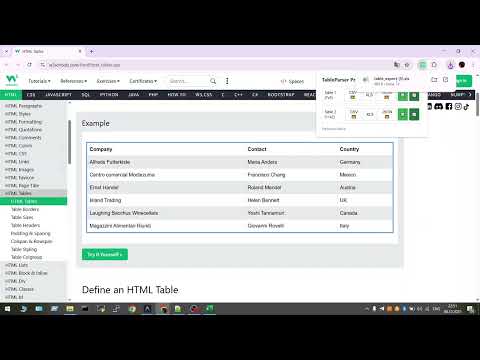
Easily extract HTML tables from any web page and export them to CSV, XLSX, or JSON
TableParser Pro — Professional Web Data Extraction Tool TableParser Pro is a powerful browser extension designed to automatically parse and export tabular data from any website. Eliminate manual copying, broken formatting, and wasted time with a tool that handles data extraction with precision. Our extension automatically detects all tables on a page and allows you to export them in your preferred format with a single click. It is the ideal solution for analysts, marketers, researchers, and anyone who regularly works with online data. Key Features: Automatic Detection: The extension scans the webpage and instantly identifies all available HTML tables, including complex or nested structures. Versatile Export Formats: Microsoft Excel (.xlsx) – Optimized for advanced processing and professional reports. CSV – The standard format for database imports and data science applications. JSON – Structured data ready for developers and custom integrations. Cloud Integrations (Premium): Direct Cloud Export: Save data directly to Google Sheets or Excel Online without downloading files to your computer. Smart Preview: Inspect detected tables and select only the data you need before exporting. Data Cleaning: Integrated tools to refine and prepare your data for immediate use. Why Choose TableParser Pro: Efficiency: Turn tedious data collection into an instant action. Tasks that used to take hours are now completed in seconds. Data Accuracy: Maintain the absolute integrity of table structures, headers, and cell relationships. Eliminate the errors common with manual copying (Ctrl+C / Ctrl+V). Ease of Use: An intuitive, professional interface that requires no configuration. Simply install and begin your workflow immediately. Universal Compatibility: Engineered to work on any website — from Wikipedia and news portals to complex dynamic dashboards and enterprise reports. Install TableParser Pro now and streamline your data workflow! Support: alisher@title.kz support@docgen.kz
5 out of 51 rating
Details
- Version1.0.3
- UpdatedMay 12, 2026
- FeaturesOffers in-app purchases
- Size44.88KiB
- Languages5 languages
- DeveloperWebsite
Email
alisher1.kz@gmail.com - Non-traderThis developer has not identified itself as a trader. For consumers in the European Union, please note that consumer rights do not apply to contracts between you and this developer.
Privacy

Table Parser | Download tables from websites to CSV & Excel has disclosed the following information regarding the collection and usage of your data. More detailed information can be found in the developer's privacy policy.
Table Parser | Download tables from websites to CSV & Excel handles the following:
This developer declares that your data is
- Not being sold to third parties, outside of the approved use cases
- Not being used or transferred for purposes that are unrelated to the item's core functionality
- Not being used or transferred to determine creditworthiness or for lending purposes
Support
For help with questions, suggestions, or problems, please open this page on your desktop browser