

Blurry Site
1 rating
)
Overview
Blur anything you want on a website. Configure and forget...
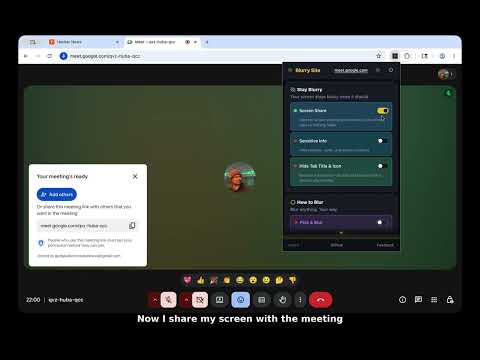
Blurry Site lets you hide arbitrary content on any web page: text, images, videos, form fields, entire sections; So what's on your screen stays yours during screen shares, presentations, and over-the-shoulder moments. STAY BLURRY Screen share protection: When you start sharing your screen, every other tab blurs automatically until the share ends. Suppress sites or tabs if you need to exempt something mid share. Sensitive info auto-detect: Finds emails, phone numbers, card numbers and other Personal Information patterns in page text and blurs them automatically. Choose blur, frosted, redacted, or starred rendering for matches. Tab privacy: Replaces the tab title with a generic string so the title bar does not leak page names or unread counts during a share. Favicon is swapped too. HOW TO BLUR Blur all: One shortcut blurs every element matching your category mix. Five categories are independently toggleable: text, images and video, forms, tables, and layout blocks under customize option. Four blur modes: standard Gaussian blur, frosted glass, redacted bars, and censored disc font. Adjustable strength for the blur. Pick and blur: Target individual elements or draw rectangles. Three picker modes: Dynamic — click an element, blur follows it as the page changes and survives on page reloads. Sticky page — Draw a rectangle that scrolls with the page. Sticky screen — Draw a rectangle that stays in place during scroll, ideal for streaming. Pick and blur supports blur, frosted, and solid color types. Up to 10 items stored per site under customize option. BLUR STYLES Different blur modes: Standard blur, Frosted glass, Redacted bars, Censored disc font substitution, Color (pick & blur), Starred (Sensitive auto-detect) Selection blur: Select text, hit a shortcut, blur just that range. No need to blur the whole element. SMART TRIGGERS Tab switch: Blur the page when it loses focus. Clears automatically when you come back. Idle timer: Blur after a configurable period of inactivity, from 15 seconds up to 60 minutes. Clears when you return. REVEAL Hover or click to peek at blurred content, release to re-blur. Reveal mode is configurable: hover, click, or disabled entirely. Works across all websites. SITE RULES Pin a full settings snapshot to a web site. Supports exact match, wildcard patterns, and regex. Visit the page, and the right blurs are already there — no manual setup each time. The popup shows a "managed by site rule" banner when a rule is active. SCREENSHOT Capture with all blurs preserved and download as PNG. What you see is what you capture. KEYBOARD SHORTCUTS Five actions: toggle blur all, toggle picker, clear all blur, take screenshot, and selection blur. Make you own shortcuts in shortcuts page. SETTINGS Transition duration — instant or smooth animations Dark and light theme for the popup Full settings export and import as JSON PRIVACY Zero network requests. No analytics. No telemetry. No tracking. No accounts. No payments. Everything stays in Chrome on your device. The extension does not even have a remote update channel beyond the browser's own. Open source under GPL-3.0-or-later on Github I built this for fun. Hope you find it useful. If you have ideas or feature requests, post in the comments or open an issue on GitHub.
5 out of 51 rating
Details
- Version0.69.4
- UpdatedMay 10, 2026
- Offered bychennakeshava
- Size637KiB
- LanguagesEnglish
- Developer
Email
gudapallichennakeshava@gmail.com - Non-traderThis developer has not identified itself as a trader. For consumers in the European Union, please note that consumer rights do not apply to contracts between you and this developer.
Privacy

This developer declares that your data is
- Not being sold to third parties, outside of the approved use cases
- Not being used or transferred for purposes that are unrelated to the item's core functionality
- Not being used or transferred to determine creditworthiness or for lending purposes
Support
For help with questions, suggestions, or problems, please open this page on your desktop browser