


Overview
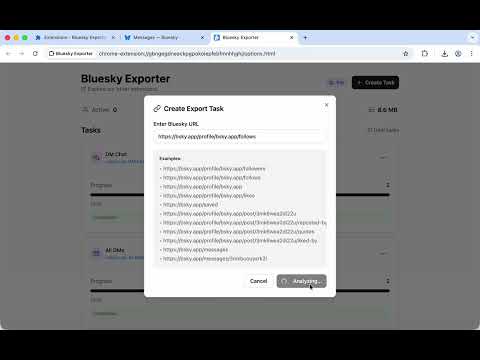
Export Bluesky followers, following, posts, likes, bookmarks, replies and DMs to CSV, plus download images and videos as ZIP.
Export Bluesky data to CSV or ZIP in clicks: followers, following, posts, replies, media, videos, likes, saved bookmarks, post comments, quotes, reposts, post likers and direct messages (DMs). Public Bluesky profiles and threads can be exported immediately without logging in. For private data like saved bookmarks and DMs, the extension uses your existing browser session locally — no app passwords or external servers. ========== All 14 Export Types ========== • Profile lists: Followers and Following • Content feeds: Posts, Replies, Media posts, Video posts, Likes and Saved bookmarks • Post engagement: Comments/replies, Quotes, Reposted-by and Liked-by users • Direct messages: a single DM chat or all DM conversations ========== Why Bluesky Exporter ========== • Clean CSV files ready for Excel, Google Sheets or data analysis • Download original images and videos bundled as a ZIP archive (Pro) • No login required for public Bluesky profiles, posts and follower lists • Smart rate limiting: automatically pauses on rate limits and resumes on its own • Background processing: keep browsing while large exports run ========== Free vs Pro ========== Free: all 14 export types to CSV, up to 1,000 records per export, one export at a time. Pro (one-time purchase, no subscription): unlimited records per export, image & video download as ZIP, unlimited concurrent exports. ========== Privacy ========== All processing happens locally in your browser. No data is sent to third-party servers; exported files save directly to your computer. ========== Support ========== Website & guides: https://store.rxliuli.com/extensions/bluesky-exporter/ Support: https://store.rxliuli.com/support/ Bluesky Exporter is an independent extension and is not affiliated with or endorsed by Bluesky.
1 out of 51 rating
Details
- Version0.0.12
- UpdatedNovember 19, 2026
- FeaturesOffers in-app purchases
- Size599KiB
- LanguagesEnglish
- DeveloperWebsite
Email
rxliuli@gmail.com - Non-traderThis developer has not identified itself as a trader. For consumers in the European Union, please note that consumer rights do not apply to contracts between you and this developer.
Privacy

This developer declares that your data is
- Not being sold to third parties, outside of the approved use cases
- Not being used or transferred for purposes that are unrelated to the item's core functionality
- Not being used or transferred to determine creditworthiness or for lending purposes
Support
For help with questions, suggestions, or problems, please open this page on your desktop browser