

Overview
MCP-powered LinkedIn intent intelligence: company briefings, decision makers, and buying alerts via the BlueChimp MCP server.
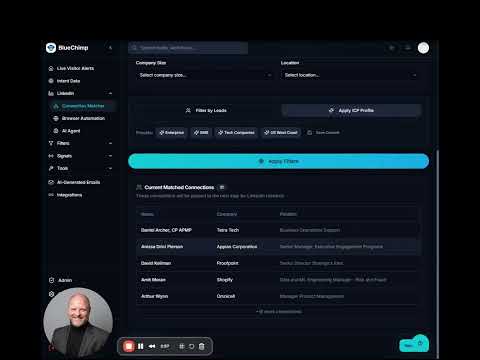
BlueChimp scans your network to surface warm leads at companies showing real buying signals. The BlueChimp LinkedIn Intelligence Chrome extension (v2.4.0) brings your BlueChimp account data—buying signals, warm connections, and saved decision makers—directly into LinkedIn company and profile pages. Core purpose When you browse a LinkedIn company page or profile, the extension extracts the company name and, when available, its domain. It calls BlueChimp’s get_company_brief tool to retrieve the company intelligence available in your account. It displays the evidence returned by BlueChimp without inventing scores or confidence values. What it shows Buying signals available in your BlueChimp data: - Hiring activity and open roles from the last 90 days. - Recent funding and news. - Recorded intent research topics. Warm paths and contacts: - LinkedIn connections at the company available through your connected BlueChimp network. - Decision makers you have already saved in BlueChimp. How information appears The extension evaluates the available evidence and displays: - Critical or high alerts: A banner at the top of the LinkedIn page when combinations of buying signals, warm connections, and contact seniority warrant attention. - Medium alerts: A sidebar with supporting company intelligence, without a banner. - No company match: A lookup sidebar where you can search companies already synced to your BlueChimp account. Automatic sidebar display can be disabled in settings. Results depend on the data available in your account. One-click actions - Draft Email: Uses generate_outreach_email to create a personalized draft and opens your email application for review. It does not automatically send the message. - Save Lead: Saves the lead locally and, when a person and company are identified, attempts to save the contact to your BlueChimp account using save_decision_maker. - CSV Export: Downloads your locally saved leads. Sign-in and connection The extension uses OAuth2 with PKCE through Chrome’s identity flow, so there are no tokens to copy and paste. Credentials are stored locally in Chrome, and access tokens refresh automatically while the session remains valid. Reconnection is required when the refresh-token family expires. It uses Manifest V3 and runs its content script on supported LinkedIn pages. A BlueChimp account and an active connection are required to display company intelligence. Data handling For automatic company lookups, the extension sends the extracted company name and available domain to BlueChimp—not the full LinkedIn page contents. Actions you initiate can transmit additional information. Saving a lead sends contact details such as name, title, company, and LinkedIn URL. Generating an email draft sends the relevant recipient details and your configured product description. The guiding principle is to show available evidence clearly, without presenting invented scores or unsupported claims as company intelligence. Source and documentation The extension code lives in chrome-extension/. Technical documentation is in chrome-extension/README.md, and store-listing copy is maintained in docs/chrome-extension-store-listing.md.
0 out of 5No ratings
Details
- Version2.4.0
- UpdatedSeptember 18, 2026
- Size39.92KiB
- LanguagesEnglish (United States)
- DeveloperFindable LLCWebsite
163 Elton Ct Thomasville, NC 27360-9460 USEmail
israel@blue-chimp.comPhone
+1 540-287-4154 - TraderThis developer has identified itself as a trader per the definition from the European Union and committed to only offer products or services that comply with EU laws.
Privacy

BlueChimp LinkedIn Intelligence has disclosed the following information regarding the collection and usage of your data. More detailed information can be found in the developer's privacy policy.
BlueChimp LinkedIn Intelligence handles the following:
This developer declares that your data is
- Not being sold to third parties, outside of the approved use cases
- Not being used or transferred for purposes that are unrelated to the item's core functionality
- Not being used or transferred to determine creditworthiness or for lending purposes
Support
For help with questions, suggestions, or problems, please open this page on your desktop browser