

BlockWise - Focus & Productivity
1 rating
)
Overview
Block distracting sites with hard blocks, timed friction delays or schedules. 100% local. No account, no tracking, no cloud.
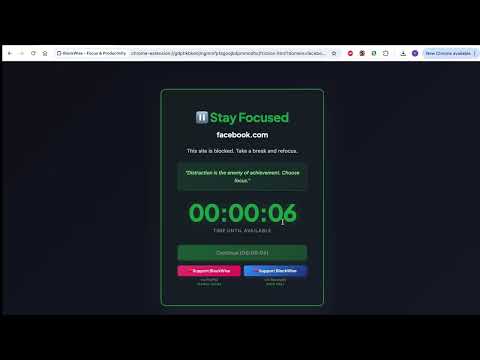
Stay Focused. Stay in Control. BlockWise is a website blocker helps you reduce digital distractions by blocking websites you've chosen yourself. Whether you're studying, working, parenting, or simply trying to build healthier browsing habits, BlockWise makes it easier to stay focused—without sacrificing your privacy. Everything runs entirely on your device. There are no accounts to create, no subscriptions, no analytics, and no cloud services. Why Choose BlockWise? ✔ 100% local — your data never leaves your device ✔ No account or sign-up required ✔ No tracking or analytics ✔ No subscriptions or hidden fees ✔ Block unlimited websites ✔ Simple, fast, and lightweight ✔ Works with your own browsing habits Three Flexible Blocking Modes 🔒 Hard Block Completely block access to selected websites until you choose to disable the rule. Perfect for eliminating distractions during work, study, or family time. ⏳ Friction Mode Instead of blocking instantly, BlockWise introduces a short countdown before the website opens. That small pause helps interrupt impulsive browsing and gives you a moment to decide whether you really want to visit the site. Ideal for reducing mindless scrolling on social media, news sites, or streaming platforms. 📅 Schedule Mode Automatically block websites during specific hours. Create distraction-free study sessions, work hours, bedtime routines, or family screen-time schedules. Set it once and let BlockWise do the rest. Guardian Lock Protect your settings with an optional passcode. When enabled, changes to BlockWise require the passcode before users can: • Add or remove blocked websites • Change blocking modes • Modify schedules • Reset statistics Perfect for parents or anyone who wants extra accountability. Focus Dashboard Stay motivated with simple local statistics. • See how many distractions you've avoided • Track blocked website attempts • View estimated focus time saved • Watch your progress over time Everything is stored only on your device. Block Any Website Choose exactly what you want to block. BlockWise supports: • Social media • Video streaming • News websites • Custom websites you add yourself There are no limits on how many websites you can block. Built For 👨👩👧 Parents Help children stay focused during homework and study time using schedules and Guardian Lock. 📚 Students Reduce procrastination by blocking social media and entertainment during study sessions. 💼 Professionals Protect deep work by automatically blocking distractions during working hours. 🌱 Anyone Building Better Habits Whether you're trying to reduce screen time or improve productivity, BlockWise helps make intentional browsing easier. Privacy First Privacy isn't an extra feature—it's the foundation of BlockWise. BlockWise: • Stores all settings locally using Chrome's extension storage • Does not create user accounts • Does not collect personal information • Does not upload browsing activity • Does not sell or share user data • Does not include analytics or advertising • Does not use remote code Your browsing decisions stay on your device. Getting Started Install BlockWise. Choose websites or categories to block. Select Hard Block, Friction Mode, or Schedule Mode. (Optional) Enable Guardian Lock. Stay focused.
5 out of 51 rating
Details
- Version1.0.5
- UpdatedAugust 5, 2026
- Offered byextender
- Size64.87KiB
- LanguagesEnglish (United States)
- Developer
Email
anandanvivek231@gmail.com - Non-traderThis developer has not identified itself as a trader. For consumers in the European Union, please note that consumer rights do not apply to contracts between you and this developer.
Privacy

This developer declares that your data is
- Not being sold to third parties, outside of the approved use cases
- Not being used or transferred for purposes that are unrelated to the item's core functionality
- Not being used or transferred to determine creditworthiness or for lending purposes
Support
For help with questions, suggestions, or problems, please open this page on your desktop browser