

BlackStack Text Expander: Text Shortcuts & Snippets

Overview
Save clipboard history, text snippets, replies, and message templates across Gmail, Outlook, LinkedIn, Reddit, and CRMs.
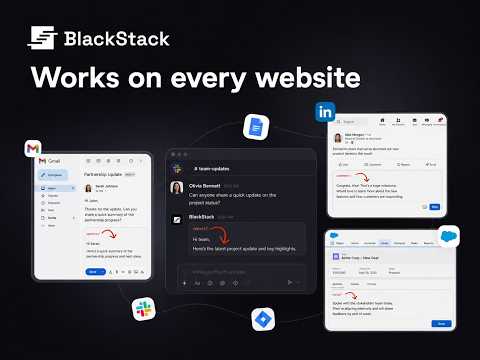
Work smarter and type faster with text shortcuts! Use text expander to turn text snippets into words or sentences anywhere online Save and Reuse Text Snippets on Any Website BlackStack helps you save, organize, and reuse text snippets, replies, canned responses, and message templates across Gmail, Outlook, LinkedIn, Reddit, ChatGPT, CRMs, and other tabs. BlackStack helps you stop rewriting the same messages from scratch. Save your best messaging once, then quickly paste or trigger it wherever you work. Built for people and teams who send repeat messages but still want control over quality, context, and tone. 🚀 How to use BlackStack: Text Shortcuts & Snippets? 1. Install our text expander in Chrome. 2. Sign up 3. Create your shortcut and enter the corresponding expanded message in the dashboard 4. When you need to use the snippet, just type your shortcut, and the message will expand automatically. 4. Open the extension to quickly add, edit, and delete text shortcuts. == Key Features == ✓ Snippet Management Create, edit, organize, and reuse your best text snippets, replies, message templates, tables, and rich text blocks. ✓ Rich Text Snippets Save structured messages, formatted text, tables, and reusable blocks that are ready to paste into your workflow. ✓ Instant Text Insertion Insert saved snippets directly into text fields across the web without switching tabs or searching through scattered documents. ✓ Keyboard Shortcuts Find and insert the right snippet quickly using keyboard shortcuts designed for fast execution. ✓ Trigger Shortcuts Use slash commands and trigger (/trigger) shortcuts to instantly expand saved messages when you need them. ✓ Shared Libraries Create shared snippet libraries so sales, support, marketing, recruiting, legal, and operations teams can stay aligned with approved messaging. ✓ Works Across Tabs Use BlackStack across Gmail, Outlook, LinkedIn, Reddit, ChatGPT, CRMs, and other browser-based tools. ✓ Web Portal Dashboard Use our website dashboard to structure and format snippets with ease. BlackStack is a Chrome first tool but we want you to have easy access to polishing your snippets. ✓ Very Beautiful UI/UX We took pride in building this user interface and user experience so that it feels natural to use and makes it easy to find and use the best snippets fast. BlackStack is useful for: 📧 Email Outreach Reuse cold emails, follow ups, intros, signatures, and sales messages. 💬 Customer Support Reply faster with approved answers to frequent customer questions. 💼 Sales Teams Keep objection handles, discovery questions, cold call scripts, follow ups, and outbound templates ready to use. 🧑💼 Recruiting Save candidate outreach, interview follow ups, screening replies, and hiring messages. ⚖️ Legal and Operations Reuse clauses, internal responses, process explanations, and standard messages. 📝 Marketing Keep launch copy, positioning lines, social replies, campaign snippets, and reusable messaging blocks in one place. 📌 Managing Prompts for LLMs Save your best prompts for each use case and use them across ChatGPT, Claude, Perplexity or Gemini. == Why Choose BlackStack? == ★ Save Time Stop rewriting the same replies, explanations, and message templates every day. ★ Stay in Control Reuse messages that already work instead of relying on generic AI output or rushed manual writing. ★ Rich Formatting Upload Images or Tables with ease and paste them with the same formatting. ★ Work Anywhere Insert saved snippets across the websites and tools where you already communicate. ★ Privacy and Security We take your privacy seriously. Your data is stored securely and never shared with third parties. == Get Started with BlackStack == Install BlackStack to save your best messages once and reuse them anywhere. Use it for text snippets, canned responses, sales templates, support replies, recruiting messages, legal clauses, marketing copy, and any repeat message you send across the web. 📧 Contact us Do you have questions, suggestions, or feature requests? Feel free to send a message to contact@blackstack.io anytime. Let us know what you think! Thank you.
5 out of 52 ratings
Details
- Version1.0.1
- UpdatedJune 1, 2026
- FeaturesOffers in-app purchases
- Size1.42MiB
- LanguagesEnglish
- DeveloperWebsite
Email
tristan@findprospectsnow.com - Non-traderThis developer has not identified itself as a trader. For consumers in the European Union, please note that consumer rights do not apply to contracts between you and this developer.
Privacy

BlackStack Text Expander: Text Shortcuts & Snippets has disclosed the following information regarding the collection and usage of your data. More detailed information can be found in the developer's privacy policy.
BlackStack Text Expander: Text Shortcuts & Snippets handles the following:
This developer declares that your data is
- Not being sold to third parties, outside of the approved use cases
- Not being used or transferred for purposes that are unrelated to the item's core functionality
- Not being used or transferred to determine creditworthiness or for lending purposes
Support
For help with questions, suggestions, or problems, visit the developer's support site