

BlackBeltDesigns Audio Manager
1 rating
)
Overview
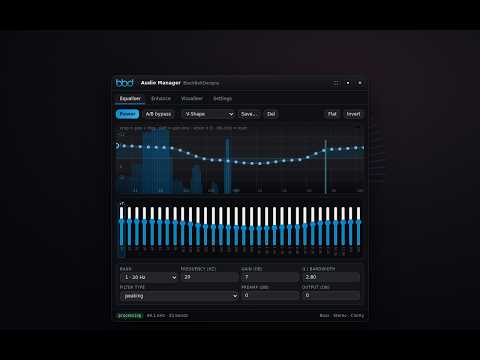
32-band parametric EQ, enhancement modes and a real-time visualiser for YouTube Music. All processing stays on your machine.
BlackBeltDesigns Audio Manager turns YouTube Music into a proper listening rig — a real 32-band parametric equaliser, four enhancement modules, and a full-screen visualizer, all inside the page you're already using. EQUALISER • 32 bands on 1/3-octave spacing, 20 Hz to 20 kHz • Fully parametric: frequency, gain, Q and filter type per band • Drag the curve, or use the familiar 32 faders — whichever you prefer • 19 factory presets plus unlimited presets of your own • Band-interaction compensation: a solver works out the filter gains that make the curve you drew the curve you actually hear, to within a fifth of a dB. Most 32-band equalisers overshoot by several dB where bands overlap. • Automatic gain compensation so boosting never clips ENHANCEMENT MODULES • Bass & Sub Harmonics — low shelf plus a harmonic exciter, so small speakers and earbuds imply bass they physically can't reproduce • Stereo Width & Crossfeed — true mid/side widening, mono bass, and headphone crossfeed that takes the edge off long listening sessions • Dynamics & Loudness — compressor, brickwall limiter, one-click night mode, and slow loudness normalisation that evens out level jumps between tracks • Clarity, Vocals & De-esser — presence and air, a centre-channel vocal lift, and a dynamic de-esser that only acts when sibilance is actually there VISUALIZER • Spectrum bars, scrolling spectrogram, and an oscilloscope with a stereo phase scope • A live spectrum behind the EQ curve, so you can see what you're shaping • Overlay mode paints across YouTube Music at your chosen opacity and blend • Solo mode hides the page entirely: just the visualizer, with album art, track info, a seekable progress bar and transport controls — and the EQ shrunk to a compact toolbar • Four background styles, five colour themes, adjustable sensitivity and FFT PRIVACY Everything happens locally in your browser using the Web Audio API. This extension records nothing, sends nothing, and has no servers, analytics or accounts. Your settings live in Chrome's local storage and never leave your machine. The only site it can touch is music.youtube.com. SHORTCUTS Alt+E panel · Alt+B bypass · Alt+V solo visualizer · Esc leave solo TIP: install YouTube Music as an app (⋮ menu → Cast, save and share → Install page as app) and the Audio Manager runs inside that window too — a desktop music app with a 32-band EQ built in. BlackBeltDesigns Audio Manager is an independent product of BlackBeltDesigns. It is not affiliated with, endorsed by, or sponsored by Google LLC. YouTube and YouTube Music are trademarks of Google LLC.
5 out of 51 rating
Details
- Version1.2.0
- UpdatedSeptember 14, 2026
- Offered byBBDOKC
- Size97.4KiB
- LanguagesEnglish (United States)
- DeveloperBBDOKC
2704 Woodhollow Trail, Edmond, OK, USA Edmond, OK 73012 USEmail
bbdokc@gmail.com - Non-traderThis developer has not identified itself as a trader. For consumers in the European Union, please note that consumer rights do not apply to contracts between you and this developer.
Privacy

This developer declares that your data is
- Not being sold to third parties, outside of the approved use cases
- Not being used or transferred for purposes that are unrelated to the item's core functionality
- Not being used or transferred to determine creditworthiness or for lending purposes
Support
For help with questions, suggestions, or problems, visit the developer's support site