

SiteDrawer

Overview
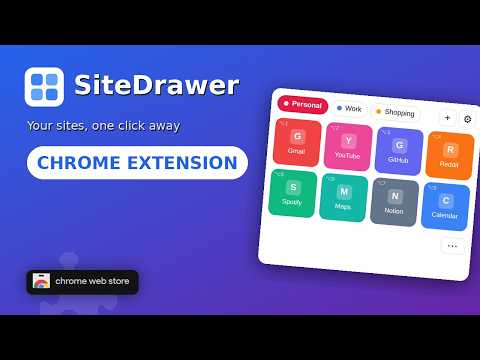
A fast, free speed-dial launcher for your most-used sites, organized into Spaces. Shortcuts, tab groups, no tracking.
SiteDrawer puts the sites you use most one click away, in a toolbar popup, Chrome's side panel, or a full-page Launchpad. Organize your sites into Spaces (Personal, Work, Reading, and so on), as many as you like, each with its own sites and layout. Add the current tab with a single button or Alt+Shift+A, or right-click any link, page, or tab and drop it straight into a Space (or a brand-new one). Open one site, or open a whole Space at once: as tabs, in a new window, or as a named Chrome tab group. Features • Three views of one library: toolbar popup, side panel, and the full-page Launchpad (which can also be your new tab page) • Grid or Row view, four tile sizes, and drag-and-drop ordering, or sort A to Z • Keyboard shortcuts: Alt+Shift+D opens the drawer, Alt+Shift+A adds the current site, Alt+1 and Alt+2 open your first sites (assign more at chrome://extensions/shortcuts) • Type "sd" in the address bar to jump to a Space or a site • Tabs to Spaces: turn your open tabs and tab groups into Spaces in one go • Get started fast: import your bookmarks, paste a list of links, or pick from a regional list of popular sites • Launchpad Manager: edit sites in bulk, merge Spaces, clean up site names, and export to bookmarks • Link Health Check: finds dead and moved links, and fixes the moved ones for you • Tile icons: the site's own icon, a logo you search for, an image you upload or drag in, or a colored letter • Tiles show which sites are already open; click to jump straight to that tab • Undo for deletes, bulk edits, and imports • Backups: back up now or on a schedule, and restore on another profile or machine • Optionally keep a copy of your Spaces in Chrome bookmarks, kept in sync • Light and dark themes (follows your system, or force one) • Syncs through your Chrome profile (Chrome Sync) Private by design SiteDrawer has no accounts, no servers, and no telemetry. Your data stays in your browser. Site icons are loaded directly from each site, with a colored letter fallback. When a site has no usable icon, SiteDrawer asks the icon service icons.duckduckgo.com, which is sent that site's domain name and nothing else. This fallback is on by default and can be turned off in Settings, which makes SiteDrawer fully local. Free and open. MIT licensed. Privacy policy: https://sitedrawer.net/privacy.html
0 out of 5No ratings
Details
- Version2.0.1
- UpdatedOctober 28, 2026
- Offered bysndcats
- Size1.01MiB
- LanguagesEnglish
- Developer
Email
admin@sndcats.com - Non-traderThis developer has not identified itself as a trader. For consumers in the European Union, please note that consumer rights do not apply to contracts between you and this developer.
Privacy

This developer declares that your data is
- Not being sold to third parties, outside of the approved use cases
- Not being used or transferred for purposes that are unrelated to the item's core functionality
- Not being used or transferred to determine creditworthiness or for lending purposes
Support
For help with questions, suggestions, or problems, visit the developer's support site