

Bitbucket PR review
1 rating
)
Overview
Create PR review message with template
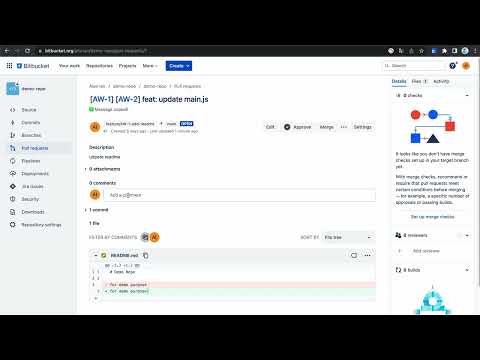
As a developer, you may need to notify your team to review your pull request in different instant messaging, such as Slack, Microsoft Teams, etc. Bitbucket PR review provide a easy way to copy PR link and related Jira Card link with customize template. Basic usage: 1. Go to the bitbucket pull request page that you want to get review 2. click "📋 Copy review message" to copy message 3. message can be paste to slack How to customize text template: 1. click the extension icon on toolbar to show the popup 2. update the template in the popup Special template key: 1. {PR_LINK} You can place {PR_LINK} in the template to represent the pull request link. It will capture the url in current window as the pull request link. 2. {JIRA_CARD} You can place {JIRA_CARD} in the template to represent the Jira card link. It will use the Jira card number and link on the pull request header as the linked text and link. 3. {PR_HEADER} You can place {PR_HEADER} in the template to represent the pull request header content. It will use the pull request header content and remove the Jira card link content. 4. {JIRA_HEADER} You can place {JIRA_HEADER} in the template to represent the related Jira card title content.
5 out of 51 rating
Details
- Version1.0.0
- UpdatedJune 11, 2024
- Offered byalexian853
- Size27.82KiB
- LanguagesEnglish
- Developer
Email
alexian853@gmail.com - Non-traderThis developer has not identified itself as a trader. For consumers in the European Union, please note that consumer rights do not apply to contracts between you and this developer.
Privacy

This developer declares that your data is
- Not being sold to third parties, outside of the approved use cases
- Not being used or transferred for purposes that are unrelated to the item's core functionality
- Not being used or transferred to determine creditworthiness or for lending purposes
Support
For help with questions, suggestions, or problems, visit the developer's support site