

BigQuery AI

Overview
Text-to-SQL for BigQuery
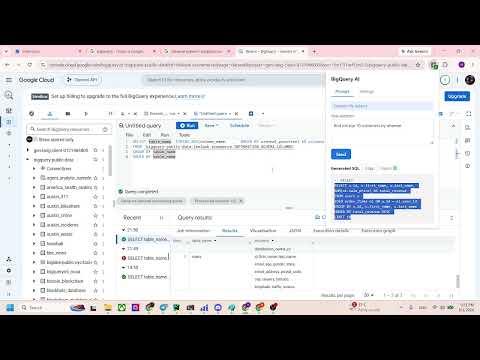
BigQuery AI helps you write SQL faster by turning natural-language questions into ready-to-run BigQuery queries. HOW IT WORKS 1. Open your BigQuery console and scan a dataset - the extension captures table and column names directly from the console (no manual schema entry). 2. Save up to 3 dataset profiles and switch between them anytime. 3. Type your question in plain English (e.g. "top 10 customers by revenue") and get back a generated SQL query, tailored to your schema. FEATURES • One-click dataset scanning from the BigQuery console (you have to input command manually) • Save and manage multiple dataset profiles with their table/column schemas • Natural-language to SQL generation via an LLM backend • Automatic query-quality check with a warning if the generated SQL looks off • Bring your own API key, model, and provider - or use the free default PRIVACY Your question and dataset schema are sent to my backend to generate the SQL response. It is not saved anywhere. Detailed Privacy Policy: https://sites.google.com/view/bigquery-ai-privacy-policy/home Built for analysts and engineers who want to move from question to query without leaving the console.
0 out of 5No ratings
Details
- Version0.1
- UpdatedAugust 2, 2026
- Size18.62KiB
- LanguagesEnglish
- Developer
Email
nkforworkmail@gmail.com - Non-traderThis developer has not identified itself as a trader. For consumers in the European Union, please note that consumer rights do not apply to contracts between you and this developer.
Privacy

This developer declares that your data is
- Not being sold to third parties, outside of the approved use cases
- Not being used or transferred for purposes that are unrelated to the item's core functionality
- Not being used or transferred to determine creditworthiness or for lending purposes