

YouTube Spoiler Blocker

Overview
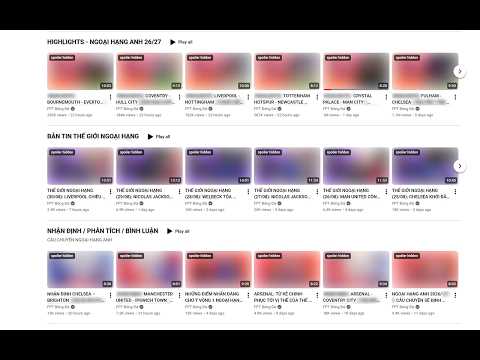
Blur YouTube thumbnails and hover previews so nothing spoils a video — and hide sports scores in titles, keeping team names.
Tired of YouTube thumbnails, hover previews, and titles giving away what happens before you even press play? YouTube Spoiler Blocker blurs every video's thumbnail, stops the hover-preview from playing, and hides the hover tooltip that leaks the full title — so nothing is spoiled before you watch. Click a thumbnail to open the video as usual. Great for sports highlights: it hides the score in the title while keeping the two team names readable, so you still know which match it is. Click the title to reveal the hidden part when you're ready. Features • Blurs every video thumbnail (where scores/spoilers often show) • Stops the hover-preview from playing • Hides the hover tooltip that leaks the full title • For sports: hides the score in titles, keeps team names visible • Click a title to reveal the hidden score/description • One On/Off toggle — nothing else to configure No account, no tracking, no data collection. Works entirely in your browser.
0 out of 5No ratings
Details
- Version1.0.2
- UpdatedAugust 31, 2026
- Size21.4KiB
- LanguagesEnglish (United States)
- Developer
Email
ledangtuanbk@gmail.com - Non-traderThis developer has not identified itself as a trader. For consumers in the European Union, please note that consumer rights do not apply to contracts between you and this developer.
Privacy

This developer declares that your data is
- Not being sold to third parties, outside of the approved use cases
- Not being used or transferred for purposes that are unrelated to the item's core functionality
- Not being used or transferred to determine creditworthiness or for lending purposes