

BidPilotPro - AI Upwork Proposal Generator & Smart Past-Work Finder

Overview
AI coverletter generator for upwork, client & job analyzer, smart past-work finder, AI messages copilot for upwork.
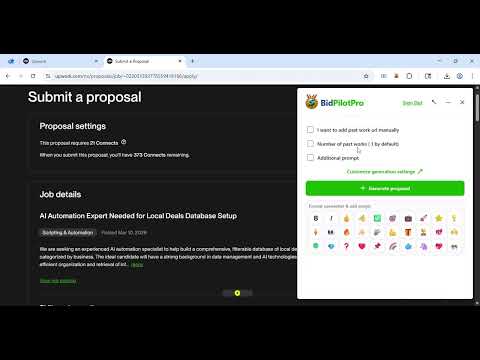
BidPilotPro is an intelligent Chrome extension designed to help Upwork freelancers create winning proposals based on best matching past work and professional messages faster and more effectively. KEY FEATURES: CLIENT & JOB ANALYZER: • Instant Job & Client Analysis: One-click analysis on Upwork job detail pages with AI-generated insights in seconds. • Job & Client Trust Score: Clear 0–100 score based on risk and quality signals (hire behavior, ratings, spend, invites, and more). • Risk Alerts: Highlights warning signs like poor historical feedback patterns, low hiring behavior, and other red flags. • Client Profile Insights: Surfaces likely client name, spend context, membership recency, and hiring tendencies. • Rate & Budget Intelligence: Shows max historical hourly/fixed ranges and billed-hour context to help price proposals better. • Smart Job Summary: Converts long descriptions into concise summaries so freelancers can qualify opportunities faster. • Project Classification Badges: Auto-tags technical level, client type, project stage, urgency, complexity, and engagement style. • Proposal Guidance: Suggests a recommended proposal format tailored to the analyzed job and client profile. PROPOSAL GENERATOR: • AI-Powered Proposal Generation: Automatically generates personalized proposals using advanced AI • Intelligent Past Work Matching Algorithm: Advanced AI algorithm analyzes job requirements and intelligently matches them with your past work portfolio. The system uses semantic analysis to find the most relevant past projects, ensuring your proposals highlight the most applicable experience • Smart Job Analysis: Analyzes job postings to understand requirements, skills needed, and project scope to tailor proposals perfectly • Best Match Selection: Automatically selects the most relevant past work examples based on skills, industry, project type, and complexity matching • Past Work Integration: Leverages your portfolio and past work to create highly relevant, personalized proposals that showcase your best-fit experience • Auto-Fill Forms: Automatically fills cover letter and additional questions with contextually relevant content • Save & Regenerate: Save proposals and regenerate with different parameters or past work selections MESSAGE COPILOT: • AI-Powered Message Generation: Automatically generates and refines professional messages for Upwork conversations using advanced AI • Context-Aware Messaging: Analyzes recent conversation history to understand context and generate appropriate responses • Smart Message Refinement: Refines your draft messages to make them more professional, clear, and effective • Seamless Integration: Injects a convenient copilot button directly into Upwork message composer for instant access • Conversation Context Analysis: Extracts and analyzes the last 10 messages to maintain conversation flow and relevance • One-Click Generation: Generate or refine messages with a single click, saving time on client communication GENERAL: • Secure & Private: All data handled securely with website API authentication HOW IT WORKS: PROPOSAL GENERATOR: 1. Navigate to any Upwork job posting 2. Click the extension icon 3. The AI analyzes the job posting and automatically finds your best-matching past work using intelligent semantic matching 4. Configure your preferences (number of past works to include, additional prompts) 5. Click "Generate Proposal" - the AI creates a personalized proposal using the best-matched past work 6. Review and submit your proposal MESSAGE COPILOT: 1. Navigate to any Upwork message conversation 2. Start typing your message in the composer or leave it empty to generate a new message 3. Click the copilot button (green circular button) that appears in the message composer 4. The AI analyzes the conversation history (last 10 messages) and your current draft 5. The AI generates or refines your message based on the conversation context 6. The generated message is automatically inserted into the composer 7. Review, edit if needed, and send your professional message INTELLIGENT MATCHING ALGORITHM: Our advanced AI algorithm goes beyond simple keyword matching. It uses semantic analysis to: • Understand the core requirements and skills needed for each job • Analyze your past work portfolio for relevance, similarity, and applicability • Match projects based on industry, complexity, technologies used, and project outcomes • Rank past work by relevance score to ensure the best examples are highlighted • Contextually integrate matched past work into proposals naturally and persuasively This intelligent matching ensures your proposals always showcase the most relevant experience, significantly increasing your chances of getting hired. PERFECT FOR: • Freelancers who want to save time on proposal writing and client messaging • Professionals with extensive portfolios who want to automatically find their best-matching past work • Users who want to leverage AI for better proposals with intelligent past work matching • Freelancers seeking to highlight the most relevant experience for each job automatically • Anyone looking to increase their Upwork proposal acceptance rate through better-matched proposals • Professionals who want AI to do the heavy lifting of finding which past projects best demonstrate their fit • Freelancers who want to communicate more professionally and effectively with clients • Users who want to quickly generate contextually appropriate responses in message conversations • Professionals who want to refine their draft messages to be more clear and persuasive • Anyone looking to maintain professional communication standards while saving time PRIVACY & SECURITY: We take your privacy seriously. All data is encrypted and handled securely. We only access Upwork job pages and message conversations to generate proposals and messages. Your personal information and conversation data is never shared with third parties. • Privacy Policy: https://www.bidpilotpro.com/privacy-policy • Terms of Service: https://www.bidpilotpro.com/terms-of-service
5 out of 527 ratings
Details
- Version4.2.3
- UpdatedJune 29, 2026
- Size283KiB
- LanguagesEnglish (United States)
- DeveloperJames Wesley WhatleyWebsite
5617 Desert Willow Court Fort Worth, TX 76137 USEmail
admin@bidpilotpro.comPhone
+1 940-901-4001 - TraderThis developer has identified itself as a trader per the definition from the European Union and committed to only offer products or services that comply with EU laws.
Privacy

BidPilotPro - AI Upwork Proposal Generator & Smart Past-Work Finder has disclosed the following information regarding the collection and usage of your data. More detailed information can be found in the developer's privacy policy.
BidPilotPro - AI Upwork Proposal Generator & Smart Past-Work Finder handles the following:
This developer declares that your data is
- Not being sold to third parties, outside of the approved use cases
- Not being used or transferred for purposes that are unrelated to the item's core functionality
- Not being used or transferred to determine creditworthiness or for lending purposes
Support
For help with questions, suggestions, or problems, visit the developer's support site