

BibleVerse Gate | Website Blocker & Screen Time Control
6 ratings
)
Overview
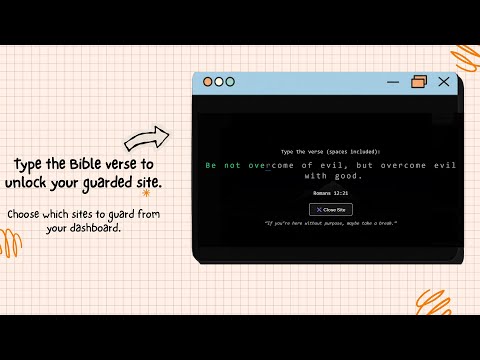
Block distracting sites with a mindful Bible verse typing challenge. Stay focused and grounded in faith before you enter.
🧠 Why Pausing Works (Not Blocking) You rarely intend to waste time online. You open a website for a quick check — and minutes or hours disappear without noticing. This happens because modern websites are designed to trigger habit loops and unconscious behavior. Traditional website blockers try to solve this by force — locking you out completely. That can help temporarily, but it doesn’t address the deeper issue: acting without awareness. BibleVerse Gate takes a different approach. Instead of forcing restriction, it introduces a pause — a short moment where you become aware of your intention before continuing. That pause is where change happens. ✝️ Why Scripture Makes the Pause Stronger A pause alone helps. A pause combined with Scripture goes deeper. Bible verses naturally invite: Reflection Stillness Moral intention Self-control Whether you choose to type the verse or simply read it, Scripture shifts your mindset before you proceed. It’s not about punishment. It’s about remembrance. 🔄 Designed for Long-Term Habit Change BibleVerse Gate is built to help you change your relationship with distraction over time — not just block it temporarily. No aggressive lockouts No guilt-driven restrictions No constant interruptions With reflection cooldowns and session-smart behavior, the extension respects your workflow while still keeping you mindful. The goal is not to stop you from using the internet — but to help you use it intentionally. 🔐 Privacy & Trust BibleVerse Gate is designed with simplicity and privacy at its core. No accounts required No analytics No tracking No data collection All logic runs locally on your device. Your browsing habits remain private — always. The project is supported through optional Pro upgrades, not by selling user data. 📱 Who It’s For BibleVerse Gate is especially meaningful for Christians who want their faith reflected in their daily digital habits. At the same time, anyone seeking: Better screen time control Fewer impulsive website visits More intentional browsing can benefit from its pause-based approach.
5 out of 56 ratings
Details
- Version1.2.0
- UpdatedJanuary 15, 2026
- FeaturesOffers in-app purchases
- Size1.55MiB
- LanguagesEnglish
- Developer
Email
alfredxavierct@gmail.com - Non-traderThis developer has not identified itself as a trader. For consumers in the European Union, please note that consumer rights do not apply to contracts between you and this developer.
Privacy

BibleVerse Gate | Website Blocker & Screen Time Control has disclosed the following information regarding the collection and usage of your data. More detailed information can be found in the developer's privacy policy.
BibleVerse Gate | Website Blocker & Screen Time Control handles the following:
This developer declares that your data is
- Not being sold to third parties, outside of the approved use cases
- Not being used or transferred for purposes that are unrelated to the item's core functionality
- Not being used or transferred to determine creditworthiness or for lending purposes
Support
For help with questions, suggestions, or problems, visit the developer's support site