


Overview
Like an analyst reading alongside you, powered by AI: see through the spin and make sense of any article or YouTube video.
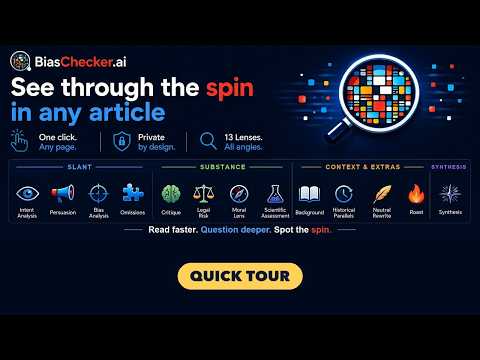
Open it beside any article or YouTube video, and BiasChecker shows what the piece is doing, not just what it says: the slant, the persuasion, what was left out, whether the argument holds up, and the context behind it. No copy-pasting, no new tabs, results in seconds. 🔭 Thirteen lenses, each a different way to read Spot the slant 🔍 Bias: framing, political slant, loaded language and one-sided sourcing (29 categories) 📣 Persuasion: how you are being steered, from logical fallacies to burying the key fact (8 techniques) 👁 Intent: a short summary of the piece, what it steers you to believe or do 🧩 Omissions: the facts, context, and counterpoints a well-informed reader would expect, but the article leaves out Check the substance 🧠 Critique: does the argument hold up? What it argues, its key flaws, and a better approach when it falls short 🧪 Scientific: what does the science actually say? Methodology, evidence, and what's missing ⚖️ Legal: the legal questions the article and the actions it describes raise 🧭 Moral: the text and the actions it describes, judged through applied ethics Get the context and extras 📖 Background: orientation on the topic: what it is, how it developed, and where things stand now ⏳ Historical Parallels: events and patterns from the past that echo what's happening now 🔥 Roast: a warm, witty comedic takedown of the article's weakest moments ⏱ Short on time? Get straight to the core 📊 Synthesis: the one-tab answer. An analyst's report built from the other lenses: what the article is doing to its reader, how it does it, what checks out, and how to read it. ✍️ Neutral Rewrite: the same article, rewritten neutrally and condensed, with the loaded language and persuasion stripped out. Read what happened, not what you were supposed to feel. 🤝 The unfair advantage: don't trust one AI Every model has its own blind spots, so BiasChecker gives you two ways past them: • Compare: run the same article through several leading AIs side by side. Where they agree, you can read with more confidence. Where they split, that disagreement is the signal: it shows which claims are contested and worth a closer look. • Consensus: or let BiasChecker do it for you. Press Consensus and models from rival AI labs read the article independently. You get one result: what they agree on, and what only one model spotted, shown separately. ⚡ Built for daily reading Any article, or just part of one: highlight a passage and right-click. YouTube videos and Shorts: BiasChecker reads what is said from the video's captions, so any video with captions works. Light or dark mode, and a text size to suit you. Pick your model from leading AI labs: light and fast, or frontier-grade for the hard reads. Private by design: no ad tracking, no data resale. Anonymous usage stats only if you opt in, and you can change that in the settings. 💳 Free to try, and free to keep reading Start with a free 14-day trial at biaschecker.ai, no credit card needed. Sign in with Google straight from the extension. Results someone has already run stay free to open, during your trial and after it. Add BiasChecker to Chrome and try it on the next article you read or video you watch. Read smarter. Understand more. Spot the spin.
0 out of 5No ratings
Details
- Version1.1.9
- UpdatedOctober 24, 2026
- FeaturesOffers in-app purchases
- Size364KiB
- LanguagesEnglish
- DeveloperTautech B.V.Website
Salland 1 Beverwijk 1948 RE NLEmail
contact@biaschecker.aiPhone
+31 6 15198844 - TraderThis developer has identified itself as a trader per the definition from the European Union and committed to only offer products or services that comply with EU laws.
- D-U-N-S493944452
Privacy

BiasChecker.ai has disclosed the following information regarding the collection and usage of your data. More detailed information can be found in the developer's privacy policy.
BiasChecker.ai handles the following:
This developer declares that your data is
- Not being sold to third parties, outside of the approved use cases
- Not being used or transferred for purposes that are unrelated to the item's core functionality
- Not being used or transferred to determine creditworthiness or for lending purposes
Support
For help with questions, suggestions, or problems, visit the developer's support site