


Ülevaade
An easy-to-use font inspector to get CSS styles of the selected element
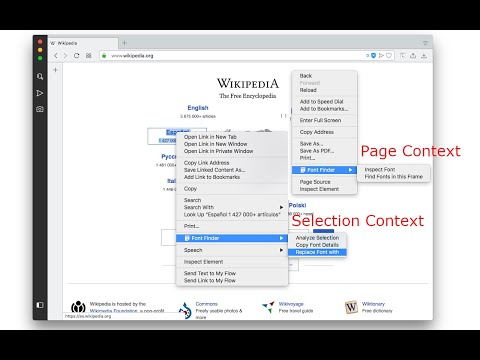
FontFinder is created for designers, developers, and typographers. It allows a user to analyze the font information of any element and copy any pieces of that information to the clipboard. Font Finder examines all the selected characters to detect the font used to display this particular character. FontFinder has three critical pieces of functionality: 1. Analyze any font on the active page. 2. Copy any piece of the element's information to the clipboard 3. Any active element can have any piece of the font's options (such as color, size, or family) adjusted inline Access these options by right-clicking the context menu over the selected text or right-clicking on the page and inspecting the element. Information Captured: 1. Font color (RGB and HEX) 2. Background color (RGB and HEX) 3. Font family (including actually rendered font!) 4. Font size 5. Line height, vertical alignment, letter, and word spacing 6. Font weight, style, variant 7. Text transform, decoration, align and indent 8. Element's type, class, and ID 9. Displays remote and local tags next to the rendered font Tools: Replace or change font family. Use custom fonts. Get the list of all fonts in the current frame. Notes: You can change the window opening mode to embedded mode from the right-click items over the toolbar button. This mode helps use the extension in full-screen mode.
4,5/5219 hinnangut
Üksikasjad
- Versioon0.6.4
- Värskendatud8. jaanuar 2026
- Pakub:unixeco
- Suurus153KiB
- Keeled15 keelt
- Arendaja
E-post
unixeco@gmail.com - MittekauplejaSee arendaja pole ennast kauplejaks määranud. Pange tähele, et Euroopa Liidu tarbijate puhul ei kehti tarbijaõigused teie ja selle arendaja vahelistele lepingutele.
Privaatsus

See arendaja kinnitab, et teie andmeid:
- ei müüda kolmandatele osapooltele väljaspool heakskiidetud kasutusjuhtumeid;
- ei kasutata ega edastata eesmärkidel, mis pole seotud üksuse põhifunktsiooniga;
- ei kasutata ega edastata krediidivõime väljaselgitamiseks ega laenu pakkumiseks.
Tugi
Abi saamiseks seoses küsimuste, soovituste või probleemidega külastage arendaja tugisaiti.