


Overview
LinkedIn Text Formatter & LinkedIn Comment Generator. Format posts with Unicode styles and save influencer profiles.
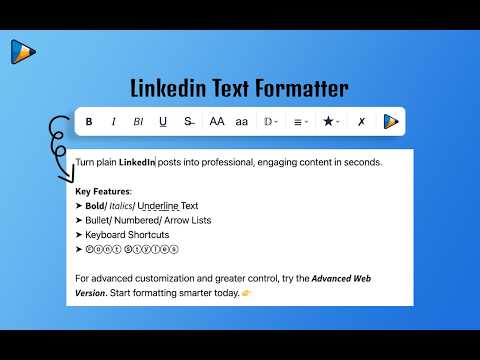
𝐋𝐢𝐧𝐤𝐞𝐝𝐈𝐧 𝐓𝐞𝐱𝐭 𝐅𝐨𝐫𝐦𝐚𝐭𝐭𝐞𝐫, 𝐂𝐨𝐦𝐦𝐞𝐧𝐭 𝐆𝐞𝐧𝐞𝐫𝐚𝐭𝐨𝐫 & 𝐏𝐫𝐨𝐟𝐢𝐥𝐞 𝐁𝐨𝐨𝐤𝐦𝐚𝐫𝐤 LinkedIn Text Formatter is the ultimate Chrome extension designed for LinkedIn content creators and professionals who want to create engaging posts, write thoughtful comments, and grow their personal brand—all without leaving LinkedIn. Use keyboard Ctrl+B, Ctrl+I, and Ctrl+U shortcuts to format your text instantly. 𝐖𝐡𝐲 𝐂𝐡𝐨𝐨𝐬𝐞 𝐋𝐢𝐧𝐤𝐞𝐝𝐈𝐧 𝐓𝐞𝐱𝐭 𝐅𝐨𝐫𝐦𝐚𝐭𝐭𝐞𝐫? With the competitive nature of LinkedIn, making your posts visually appealing is essential. LinkedIn Text Formatter helps you improve readability and engagement with bold, italic, and underline formatting. It transforms ordinary posts into professional, eye-catching content that helps you stand out in the feed. Key Features Format your LinkedIn posts using: →𝐁𝐨𝐥𝐝 →𝑰𝒕𝒂𝒍𝒊𝒄 →U̲n̲d̲e̲r̲l̲i̲n̲e̲ →Bullet Lists →Numbered Lists →➜ → ➤ Arrow styles →Multiple Unicode font styles →Keyboard shortcuts for faster formatting 𝐆𝐞𝐧𝐞𝐫𝐚𝐭𝐞 𝐦𝐞𝐚𝐧𝐢𝐧𝐠𝐟𝐮𝐥 𝐋𝐢𝐧𝐤𝐞𝐝𝐈𝐧 𝐜𝐨𝐦𝐦𝐞𝐧𝐭𝐬 𝐢𝐧 𝐬𝐞𝐜𝐨𝐧𝐝𝐬 𝐮𝐬𝐢𝐧𝐠 𝐀𝐈. The LinkedIn Comment Generator reads the content of the LinkedIn post and creates relevant, engaging comment suggestions based on your preferences and custom instructions. Whether you want professional insights, supportive comments, thoughtful questions, or networking-focused responses, the AI adapts to your preferred writing style. 𝐅𝐞𝐚𝐭𝐮𝐫𝐞𝐬 • AI reads the LinkedIn post automatically • Generate personalized comments based on your preferences • Add your own custom instructions for consistent responses • Bring your own OpenRouter API Key and use your preferred AI model • Generate comments without leaving LinkedIn • Voice Dictation Writing comments is even faster with built-in voice input. 𝐏𝐫𝐞𝐬𝐬 𝐭𝐡𝐞 𝐜𝐨𝐧𝐟𝐢𝐠𝐮𝐫𝐚𝐛𝐥𝐞 𝐡𝐨𝐭𝐤𝐞𝐲 (𝐒𝐡𝐢𝐟𝐭 𝐛𝐲 𝐝𝐞𝐟𝐚𝐮𝐥𝐭) 𝐭𝐨 𝐬𝐭𝐚𝐫𝐭 𝐝𝐢𝐜𝐭𝐚𝐭𝐢𝐧𝐠. Speak naturally and your words are inserted directly into the LinkedIn comment box. Customize the hotkey anytime from the extension Settings page. Bookmark Influencers & Profiles 𝐍𝐞𝐯𝐞𝐫 𝐥𝐨𝐬𝐞 𝐭𝐫𝐚𝐜𝐤 𝐨𝐟 𝐲𝐨𝐮𝐫 𝐟𝐚𝐯𝐨𝐫𝐢𝐭𝐞 𝐋𝐢𝐧𝐤𝐞𝐝𝐈𝐧 𝐜𝐫𝐞𝐚𝐭𝐨𝐫𝐬. Bookmark influencer profiles and professionals you follow, then quickly jump back to their profile whenever they publish new content. Instead of endlessly scrolling through your LinkedIn home feed looking for posts to engage with, simply open your bookmarked profiles and start responding to their latest posts immediately. Perfect for creators, founders, recruiters, marketers, and professionals who consistently engage with specific people on LinkedIn. You don't need to leave LinkedIn. LinkedIn Text Formatter works directly inside the LinkedIn post editor, while the LinkedIn Comment Generator integrates into the LinkedIn commenting experience. Format posts, generate AI-powered comments, dictate replies using your voice, and manage bookmarked creators—all from within LinkedIn. Everything is designed to feel like a native LinkedIn experience, helping you create content and engage with your network faster than ever. Change Log Improved formatting toolbar New list icons Additional Unicode font styles Better loading performance 𝐍𝐄𝐖: LinkedIn Comment Generator 𝐍𝐄𝐖: Voice dictation for comments 𝐍𝐄𝐖: Bookmark influencer profiles for faster engagement
3.5 out of 515 ratings
Details
- Version3.1.6
- UpdatedJuly 27, 2026
- Size154KiB
- LanguagesEnglish
- DeveloperWebsite
Email
gouravrocks247@gmail.com - Non-traderThis developer has not identified itself as a trader. For consumers in the European Union, please note that consumer rights do not apply to contracts between you and this developer.
Privacy

This developer declares that your data is
- Not being sold to third parties, outside of the approved use cases
- Not being used or transferred for purposes that are unrelated to the item's core functionality
- Not being used or transferred to determine creditworthiness or for lending purposes
Support
For help with questions, suggestions, or problems, please open this page on your desktop browser