

Makro - Text Expander: Free, Private, Encrypted

Overview
Free text expander with Smart Rewrite, encrypted cloud sync, and 25+ placeholders. Create shortcuts that expand instantly anywhere.
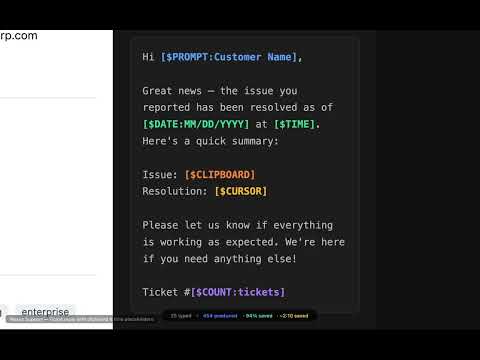
The text expander that respects your privacy. Unlimited macros, 44 placeholders, and local AI on the free tier, with no account. **How it works:** Type a short trigger word (like "sig") and Makro replaces it with the full text you defined (like your complete email signature). Works in any text field on any website. **Where Makro Differs** - Unlimited macros on the free tier - no 20-snippet cap, no paywall to start. - Zero-knowledge sync - your macros are encrypted with AES-256-GCM on your device before they sync. Our servers never receive your encryption keys and cannot read what they store. Cloud AI is the exception, and it sees only the text you send it for that one request; choose a local AI provider and even that stays on your machine. - No account required - install and start expanding immediately. No email, no sign-up. - Free local AI - use Ollama for Smart Rewrite without sending a single byte to the cloud. - Switch easily - one-click importer brings your existing snippets across from 11 popular text expander formats, with built-in converters that preserve placeholders, dates, and clipboard tokens. **Key Features** - Text Expansion - Create hotwords that expand into full text snippets. Works in plain text fields, rich text editors, and contenteditable elements. Optional preview before insertion. - 44 Placeholders on the Free Tier - Insert today's date, clipboard content, selected text, prompted input, counters, dropdown choices, text transforms, and more. Pro adds 6 advanced placeholders: math calculations [$CALC], regex find/replace [$REGEX], nested macros [$MACRO:hotword], day counts [$DAYSUNTIL:date] and [$DAYSSINCE:date], and [$OCR_RESULT] paired with Smart Copy. On Pro the free [$DATE] token also takes a custom format [$DATE:format] and date math [$DATE+Nd]. One more is in beta: the [$IF:cond]...[$ENDIF] conditional. - Category Organization - Organize macros into categories and subcategories. Drag, move, rename, and restructure as your library grows. - Markdown Editor - Write macro bodies in Markdown with a full formatting toolbar: bold, italic, headings, lists, code blocks, tables, images, and live preview. - Browser Spell Check - Native browser spell checking in the macro editor. Catches typos as you type, with right-click suggestions. Runs entirely in your browser - text never leaves your device. - Keyboard Shortcuts - Assign custom key combinations to any macro for instant expansion without typing a hotword. - Quick Search (Ctrl+Shift+Space) - Find and insert any macro from a global search popup without opening the extension. - Clipboard History - Automatically saves recent clipboard entries for quick access. Password-like entries can be auto-excluded. Auto-clear wipes entries flagged as sensitive 30 seconds after capture. - Smart Copy (OCR) - Extract text from any image on-device via tesseract-wasm. Free on every tier. Optional AI cleanup and structured extraction route through your configured AI provider and are metered against your Makro Credits (local Ollama / LM Studio stay on-device and cost nothing). - Smart Translate - Translate a macro body or a selection into 12 languages. Available on every tier, 1 credit per translation. - Right-Click Context Menu - Access your macros from any page via the right-click menu, organized by category and folder structure. - Macro Favorites & Tags - Star important macros and add tags for quick filtering and organization. - Usage Statistics - Track per-macro usage with charts, heatmaps, usage insights, and category breakdowns. - Import & Export - Back up your whole library to a password-encrypted file you keep. Built-in importer covers 11 popular text expander formats (full list shown in the in-app importer) and still reads older plain-text Makro exports. - Macro Packs - Bundle a category into a portable `.makropack` file, hand it to someone as a share link, or submit it to the public pack library. Free on every tier. Submitting needs no account, and a moderator reviews a pack before anyone else can install it. - Bulk Operations - Select, move, or delete multiple macros at once. - Dark, Light & Auto Themes - Choose dark or light mode, or let it follow your system preference automatically. - Localization - Available in English, Spanish, German, French, Japanese, Portuguese (Brazil), and Korean. **Pro Features (Cloud Sync + Smart Rewrite) - 1 month free trial** - Sync macros across up to 2 devices with end-to-end encryption (same zero-knowledge AES-256-GCM architecture). - Smart Rewrite (500 Makro Credits/month) - Rewrite text in different tones: professional, casual, concise, expanded, or custom. Runs on Cloudflare Workers AI through our own proxy, so your text never reaches a third-party AI vendor. - Semantic Search - Find a macro from what it means, for when you remember the idea but not the words you saved it under. - Version History - Track changes to individual macros over time. - Auto-Backup - Scheduled backups (daily, weekly, or monthly) downloaded to your device. - Manage connected devices and resolve sync conflicts. **Premium Features (More Credits + Everything in Pro) - 1 month free trial** - 10,000 Makro Credits per month (vs 500 in Pro). - Sync across up to 3 devices. - Priority support. **Beta Features (Early Access) - sign up at makroexpander.com/beta** Open to Pro and Premium subscribers via the beta program. Beta access is granted by signing up; features are provided as-is and may change. - Smart Variants - context-aware macro bodies that change depending on the site you're on, time of day, browser language, field type, or operating system. One hotword, multiple expansions. - Suggest with AI - let Smart Rewrite propose variant bodies for an existing macro, sanitized to your tier and conditions. - Conditional placeholders [$IF:cond]...[$ELSE]...[$ENDIF] for inline conditional text inside macro bodies. - Page Variables - capture a value from a page and recall it later with [%VarName]. - Smart Fill - Makro remembers how you filled a form and fills it again next time, on-device and scoped to the site you filled it on. **What Leaves Your Device** Most text expanders encrypt your snippets on their own servers and hold the keys, so the vendor can read what it stores. Makro's cloud sync is built so that we cannot: your encryption key never leaves your device. Two things are exceptions, both of them yours to trigger: cloud AI, noted above and again below, and submitting a pack to the public library, which publishes it on purpose. - Free tier: your data stays on your device, encrypted at rest, unless you submit a pack to the public library. A submitted pack is stored readable so other people can install it. No ads, no third-party analytics. - Cloud sync uses zero-knowledge encryption (AES-256-GCM) - our servers never receive your encryption keys and cannot read your macros. Only devices with your key can decrypt them. - Local AI option available (Ollama / LM Studio) - get AI features without sending anything to the cloud. Local providers are the default; Makro Cloud is opt-in. Choosing Makro Cloud sends the text of that one request to our Worker in readable form, which is what makes AI the exception to zero-knowledge; your synced macros stay encrypted either way. - Transparent telemetry - every privacy toggle in Settings has an (i) button that shows you the exact mock JSON payload that would be sent before you opt in. Two independent tiers (basic counts, detailed feature usage), each separately toggleable. - Minimal data - on first install we record your extension version, platform, locale, and a build-type flag (so our own test installs don't inflate the counts). A weekly heartbeat adds your plan tier and which of the two UI surfaces you use. Neither carries a device identifier unless you turn on basic analytics, and when you do, the device ID is one-way hashed (SHA-256) before transmission, so heartbeats cannot be linked to your identity. - Open privacy policy: https://makroexpander.com/privacy - Terms of Service: https://makroexpander.com/terms - Public roadmap & feature voting: https://feedback.makroexpander.com **Free vs Pro vs Premium** Free - Unlimited macros, unlimited categories, clipboard history with sensitive-data filtering and auto-clear, 44 placeholders, on-device Smart Copy (OCR), Smart Translate, usage statistics with heatmap, keyboard shortcuts, favorites & tags, bulk operations, right-click context menu, Markdown editor, macro packs (export, share links, and public library submission), dark/light/auto themes, local AI (Ollama / LM Studio), 25 Makro Credits/month for cloud Smart Rewrite and Translation, spell check, 7 languages, 1 device. No account required. Pro ($2.99/mo) - Everything in Free + cloud sync (2 devices, E2E encrypted), 500 Makro Credits/mo, semantic search, macro version history, auto-backup, 6 advanced placeholders (calc, regex, nested macros, two day counts, and [$OCR_RESULT]) plus custom date formats and date math on [$DATE], and eligibility for the beta program. 1 month free trial. Premium ($5.99/mo) - Everything in Pro + 10,000 Makro Credits/month, 3 devices, priority support. 1 month free trial. Beta program (free for Pro+ subscribers) - Smart Variants, Suggest with AI, Page Variables, Smart Fill, and conditional placeholders [$IF:]. Sign up at makroexpander.com/beta. Beta features are provided as-is.
5 out of 51 rating
Details
- Version1.17.0
- UpdatedSeptember 5, 2026
- FeaturesOffers in-app purchases
- Size4.58MiB
- Languages7 languages
- DeveloperWebsite
Email
info@techhqusa.com - Non-traderThis developer has not identified itself as a trader. For consumers in the European Union, please note that consumer rights do not apply to contracts between you and this developer.
Privacy

Makro - Text Expander: Free, Private, Encrypted has disclosed the following information regarding the collection and usage of your data. More detailed information can be found in the developer's privacy policy.
Makro - Text Expander: Free, Private, Encrypted handles the following:
This developer declares that your data is
- Not being sold to third parties, outside of the approved use cases
- Not being used or transferred for purposes that are unrelated to the item's core functionality
- Not being used or transferred to determine creditworthiness or for lending purposes
Support
For help with questions, suggestions, or problems, please open this page on your desktop browser