

Rowboat — Table to CSV & Excel

Overview
Pull any table or list from a web page into CSV or Excel. Finds every table, cleans numbers, works locally.
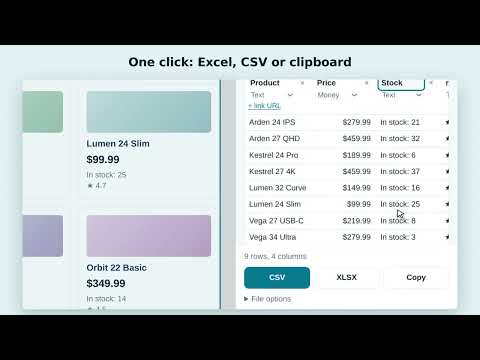
Rowboat exports any table or list from a web page to Excel (XLSX), CSV or your clipboard in one click. No copy-paste mess, no broken columns, no manual cleanup. Click the Rowboat icon and a side panel shows every table on the page — not just the first one. Hover over an item to see it highlighted on the page, click it to preview the data, then save it. WHAT YOU CAN EXPORT - HTML tables — including merged cells (rowspan/colspan) and multi-level headers - Lists of cards with no table at all: product listings, marketplace search results, catalogs, directories, job boards, real-estate listings - Grids built with CSS and ARIA tables used by modern web apps and dashboards - Tables inside shadow DOM and same-site frames - Links and images: add the link URL as its own column CLEAN DATA, READY FOR ANALYSIS - Numbers, prices, percentages and dates are exported as real values, not text — sort, sum and filter right away - Understands both 1,234.56 and 1 234,56 formats and reads dates like 01/02/2026 correctly for the page's language - Currency symbols are stripped from prices; the number stays a number - IDs and codes with leading zeros (tax IDs, ZIP codes, SKUs) stay intact - Empty rows, ad blocks and separator rows are filtered out - Rename columns, remove the ones you don't need and change a column's type before you export EXPORT FORMATS - Excel (.xlsx) with a bold, frozen header row, filters and sized columns - CSV with the right delimiter for your version of Excel (comma, semicolon or tab) and UTF-8 so non-English text opens correctly - Copy to clipboard — paste straight into Google Sheets, Excel or Numbers - Files are named automatically by site, page title and date GREAT FOR Analysts, marketers, researchers, students, e-commerce sellers and anyone who needs web data in a spreadsheet: price monitoring, competitor research, lead lists, financial and statistics tables, Wikipedia tables, sports results, reports from web dashboards. PRIVATE BY DESIGN Rowboat reads a page only when you click its icon and only on that tab. Everything is processed inside your browser. Nothing is sent to any server — no account, no sign-up, no tracking. Rowboat выгружает любую таблицу или список со страницы в Excel (XLSX), CSV или буфер обмена в один клик. Без каши после копирования, съехавших колонок и ручной чистки. Нажмите иконку Rowboat — в боковой панели появятся все таблицы на странице, а не только первая. Наведите на пункт, чтобы увидеть его на странице, нажмите, чтобы посмотреть данные, и сохраните. ЧТО МОЖНО ВЫГРУЗИТЬ - HTML-таблицы — включая объединённые ячейки и многоуровневые шапки - Списки карточек без всякой таблицы: каталоги товаров, выдачу маркетплейсов (Ozon, Wildberries, Яндекс Маркет и других), результаты поиска, справочники, вакансии, объявления - Сетки на CSS и ARIA-таблицы из современных веб-приложений и дашбордов - Таблицы внутри shadow DOM и фреймов того же сайта - Ссылки и картинки: адрес ссылки можно добавить отдельной колонкой ЧИСТЫЕ ДАННЫЕ, ГОТОВЫЕ К АНАЛИЗУ - Числа, цены, проценты и даты выгружаются значениями, а не текстом — сразу можно сортировать, суммировать и фильтровать - Понимает и 1 234,56, и 1,234.56, правильно читает даты вида 01.02.2026 с учётом языка страницы - Значки валют (₽, $, €) убираются, цена остаётся числом - Коды с ведущими нулями — ИНН, артикулы, индексы — не портятся - Пустые строки, рекламные блоки и разделители отфильтровываются - Перед выгрузкой колонки можно переименовать, удалить и сменить им тип ФОРМАТЫ - Excel (.xlsx) с закреплённой жирной строкой заголовков, фильтрами и подобранной шириной колонок - CSV с разделителем, который понимает ваш Excel (запятая, точка с запятой или табуляция), в UTF-8 — кириллица открывается без «кракозябр» - Копирование в буфер — вставляйте прямо в Google Таблицы, Excel или Numbers - Имя файла подставляется само: сайт, заголовок страницы и дата КОМУ ПРИГОДИТСЯ Аналитикам, маркетологам, исследователям, студентам, селлерам маркетплейсов и всем, кому нужны данные с сайта в таблице: мониторинг цен, анализ конкурентов, списки контактов, финансовые и статистические таблицы, таблицы из Википедии, спортивные результаты, отчёты из веб-кабинетов. ПРИВАТНОСТЬ Rowboat читает страницу только после нажатия на иконку и только на этой вкладке. Всё обрабатывается внутри браузера, ничего не отправляется на серверы — без регистрации, аккаунта и слежки.
0 out of 5No ratings
Details
- Version1.0.0
- UpdatedSeptember 29, 2026
- Offered byrowboat
- Size39.46KiB
- Languages2 languages
- Developer
Email
k1rpinew@gmail.com - Non-traderThis developer has not identified itself as a trader. For consumers in the European Union, please note that consumer rights do not apply to contracts between you and this developer.
Privacy

This developer declares that your data is
- Not being sold to third parties, outside of the approved use cases
- Not being used or transferred for purposes that are unrelated to the item's core functionality
- Not being used or transferred to determine creditworthiness or for lending purposes
Support
For help with questions, suggestions, or problems, visit the developer's support site