

BFE_Hub

Overview
Automatically commit BFE.dev solutions to GitHub
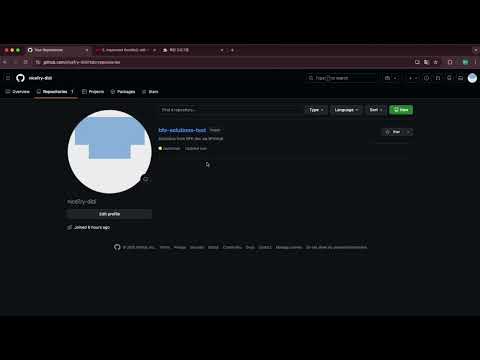
- Short Description Automatically sync your BFE.dev code solutions to GitHub. Build your portfolio effortlessly while practicing frontend interview questions. - Detailed Description - 🚀 Automate your BFE.dev practice with BFEHub! BFEHub is a powerful Chrome extension designed for frontend developers who practice coding on BFE.dev. It automatically syncs your successful solutions to your GitHub repository, helping you build a rich coding portfolio without any manual effort. Focus on solving problems, and let BFEHub handle the version control. BFEHub is a powerful Chrome extension designed for frontend developers who practice coding on BFE.dev. It automatically syncs your successful solutions to your GitHub repository, helping you build a rich coding portfolio without any manual effort. Focus on solving problems, and let BFEHub handle the version control. - ✨ Key Features: 🔄 Automatic Sync: Every time you pass a problem on BFE.dev, your code is instantly pushed to your GitHub repository. 📂 Structured Organization: Your solutions are neatly organized by category and problem name (e.g., JavaScript/implement-curry/implement-curry.js). 📝 Auto-Generated README: BFEHub automatically creates a README.md file for each problem, including the full problem description, so you can review it later easily. 🔐 Secure & Easy Login: Sign in quickly using your GitHub account (OAuth 2.0). Your access logic is securely handled. ⚙️ Custom Repository: Choose to store your solutions in a default bfe-solutions repository, or create/name your own repository directly from the extension. ✅ Visual Feedback: Get instant confirmation with a green checkmark directly on the BFE.dev interface when your code is successfully synced. - How to Use: 1. Install BFEHub from the Chrome Web Store. 2. Click the extension icon and sign in with your GitHub account. 3. (Optional) Click "Edit" to customize the repository name where your codes will be saved. 4. Go to BFE.dev and solve a problem. 5. Click Submit. When your solution passes, BFEHub automatically uploads it to GitHub! Why BFEHub? - Build Your Portfolio: Show off your problem-solving skills to recruiters by maintaining an active GitHub repository. - Track Your Progress: Keep a history of all the problems you've solved. - Save Time: No need to manually copy-paste code or create files. Open Source: BFEHub is an open-source project. You can contribute or report issues on our GitHub Repository. Privacy Policy: We value your privacy. BFEHub only communicates with GitHub to upload your solutions and does not store your personal data or access tokens on any external servers.
0 out of 5No ratings
Details
- Version1.0.1
- UpdatedDecember 19, 2025
- Offered byyoungmin2963
- Size42.5KiB
- LanguagesEnglish (United States)
- Developer
Email
dudals2963@tukorea.ac.kr - Non-traderThis developer has not identified itself as a trader. For consumers in the European Union, please note that consumer rights do not apply to contracts between you and this developer.
Privacy

BFE_Hub has disclosed the following information regarding the collection and usage of your data. More detailed information can be found in the developer's privacy policy.
BFE_Hub handles the following:
This developer declares that your data is
- Not being sold to third parties, outside of the approved use cases
- Not being used or transferred for purposes that are unrelated to the item's core functionality
- Not being used or transferred to determine creditworthiness or for lending purposes
Support
For help with questions, suggestions, or problems, visit the developer's support site