

Beyond Copy-Paste: AI-Resilient Teaching Toolkit
2 ratings
)
Overview
Transform lessons and generate worksheets, rubrics, discussions, and units where student judgment is the unfakeable input.
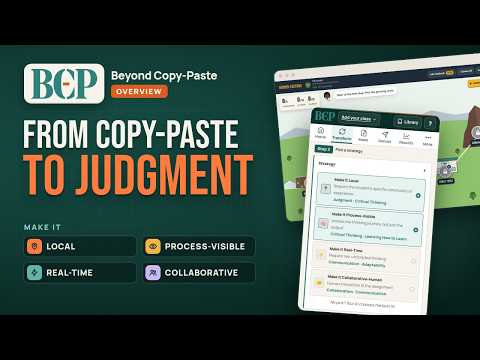
Beyond Copy-Paste is a free Chrome extension that transforms the assignments AI can finish into work only your students can do. It also builds new worksheets, interactive activities and quizzes, and delivers them in Canvas, where the score posts to your gradebook. Your own AI does the building. BCP writes the prompt, you paste it into ChatGPT, Claude or Gemini under your own account, and BCP turns what comes back into a finished file. Students never use AI. They get a plain activity that runs on a school Chromebook. Made by a teacher with 22 years in middle and high school classrooms. Used by teachers in multiple districts across the country. No account. No subscription. ═══════════════════════════════════════════ THE PROBLEM If AI can finish the assignment, the assignment has to change. Summarize this article. Define these words. Compare and contrast. All of it gets ghostwritten in three seconds. When AI can complete the assignment without the student, the school was teaching prediction, not the student. AI is a prediction machine. It can't make a call with the evidence in your room and defend it out loud. That's judgment, and it belongs to your students. Literacy is the floor. Judgment is the ceiling. ═══════════════════════════════════════════ THE FRAMEWORK The Prediction Zone is where AI already wins. Recall, summaries, single-right-answer work. The Judgment Zone is where only your students can. Local evidence, live decisions, visible reasoning, and thinking that depends on a classmate. BCP moves work into the Judgment Zone with four strategies. Make It Local. Make It Process-Visible. Make It Real-Time. Make It Collaborative-Human. ═══════════════════════════════════════════ TRANSFORM Where BCP started. Now it has its own tab. Check an assignment. BCP writes a prompt that tries your assignment the way a high, mid or struggling student with a chatbot would, so you see what a student could turn in without thinking. After students take it, a diagnosis prompt sorts their errors into four failure modes. Only one of them is fixed by reteaching. Transform an assignment. Drop in a worksheet, lesson or PDF. Your AI redesigns it from BCP's prompt. Same standard, same skill, done in class, sized for one teacher and 32 to 36 students. Stack strategies and add pacing, a 5E or Gradual Release arc, scaffolds, answer keys or misconception checks. Build from it. One click carries the result to the worksheet, slides, quiz or podcast builder, with subject, grade and learning target filled in. ═══════════════════════════════════════════ MAKE Save up to five classes with their English learners, IEPs, 504 plans, GATE students and languages. Everything you make fits the class you pick, and student pages never carry labels like ELL or Modified. For students • Worksheets students do on screen, handwrite on with a Chromebook, or print. Or drop in one you already use and BCP rebuilds it as an interactive page, word for word. • Interactive activities. A model, a game, a workbench, a Reading Investigation, or practice in the format of your state test or district benchmark. • Quizzes and tests. See below. For your teaching • Slides built to support the discussion, not replace it. • Rubrics that grade the thinking trail, not the polish. • Discussion guides where the accountability is human. • Unit plans built on a real-world phenomenon, local by default. • Infographics, plus flyers in 21 craft styles. • Two-voice podcast scripts and video overviews for NotebookLM. Math gets CRA and number-line scaffolds. ELA gets Hochman, Tier 2 vocabulary and Structured Literacy. Automatic, by subject and grade. Reading Investigation turns an article or primary source into a lesson. Students predict, unlock one section at a time, mark up the text and back every answer with evidence. You see the path each student took, not just a percentage. Audio support writes read-aloud narration in English and a home language, so IEP and 504 read-aloud happens without an adult reading. It never gives away an answer. ═══════════════════════════════════════════ QUIZZES AND TESTS Five formats from one form. An interactive test, a PDF, a Word file, a QTI 1.2 quiz file for Canvas, and Google Forms. Every wrong answer traces to a real misconception, and the answer key names it, so a miss tells you what to reteach. Questions spread across Depth of Knowledge levels. Correct answers spread evenly across A, B, C and D. BCP checks the answer-key balance and the figures before it builds the file. Pick how much the test gives away. Teach names the method. Practice names the unit. Transfer names neither and mixes in earlier units. Same content, same difficulty. After the quiz, drop its Student Analysis CSV into BCP with the misconception key. You get "19 students drop the negative when a term crosses the equals sign," not "class average 68%." One click starts a reteach worksheet with the error filled in. ═══════════════════════════════════════════ DELIVER Paste what your AI made into the Deliver tab. BCP checks it, names what's broken in plain words and gives you the fix to paste back. Then pick a path. Use in Canvas. A SCORM file you add as an assignment. The score posts when the student presses Finish, and you grade the written answers. Your course needs the SCORM tool turned on. Publish a link. A link and QR code that expire in 7, 30 or 90 days. Name and ID boxes block publishing, and trackers are refused. Print it. BCP's prompts pair every color with a shape or label, so pages hold up on a black-and-white printer. Students can save and finish later. Every drag has a keyboard way to do it. Nothing loads from other websites, so school filters can't break it. Already built your own activity? BCP adds only what the gradebook needs. ═══════════════════════════════════════════ RESULTS Class results. Drop in your students' reports and see which mistakes are common and who shares them, keyed by submission code, never by name. Five grading prompts for tier sorts, feedback drafts, judgment checks, process checks and override audits. ═══════════════════════════════════════════ EXAMPLES, NORMS AND GUIDES 160 before-and-after redesigns across 15 subjects, tagged by strategy and Equity Inversion, each with a Build something similar button. Six Classroom AI Norms with a poster to print. Privacy rules, a self-check tribunal, bias language, and what it costs in water, power and hidden human labor. A tool guide, three syllabus policies ready to copy, what to say when you think AI wrote it, and My assignment failed, which starts from what went wrong and hands you the fix. ═══════════════════════════════════════════ WHO IT IS FOR K-12 teachers building daily lessons, and college instructors. Department leads designing common assessments. Coaches running PD on AI. Title I schools serving multilingual learners and students whose lived knowledge is the input AI can't fake. ═══════════════════════════════════════════ PRIVACY AND PRICING Your class details stay in your browser, and BCP never receives your students' work. Your prompt goes to the AI you paste it into, under your account, so keep student names out. BCP warns you when it sees one. Two features send data out on purpose. Publish link hosts the activity file, never student responses, at activities.beyondcopypaste.com until it expires. Use in Canvas sends scores and saved work to your LMS. BCP never sees them. Free. No account. No subscription. No upsells. Privacy policy at https://tcurry2324.github.io/beyond-copy-paste/ ═══════════════════════════════════════════ WHO BUILT IT Tarquinn Curry has taught middle and high school for 22 years, from special education and life science to biology, film, robotics and coding. CSTA Responsible AI Fellow. California State AI Task Force member. ASU+GSV AI Innovator 2025. Author of Beyond Copy-Paste. He built BCP from the chair he still sits in every day.
5 out of 52 ratings
Details
- Version4.39.0
- UpdatedOctober 11, 2026
- Size6.24MiB
- LanguagesEnglish
- Developer
Email
quinnsight23@gmail.com - Non-traderThis developer has not identified itself as a trader. For consumers in the European Union, please note that consumer rights do not apply to contracts between you and this developer.
Privacy

Beyond Copy-Paste: AI-Resilient Teaching Toolkit has disclosed the following information regarding the collection and usage of your data. More detailed information can be found in the developer's privacy policy.
Beyond Copy-Paste: AI-Resilient Teaching Toolkit handles the following:
This developer declares that your data is
- Not being sold to third parties, outside of the approved use cases
- Not being used or transferred for purposes that are unrelated to the item's core functionality
- Not being used or transferred to determine creditworthiness or for lending purposes
Support
For help with questions, suggestions, or problems, visit the developer's support site