


Overview
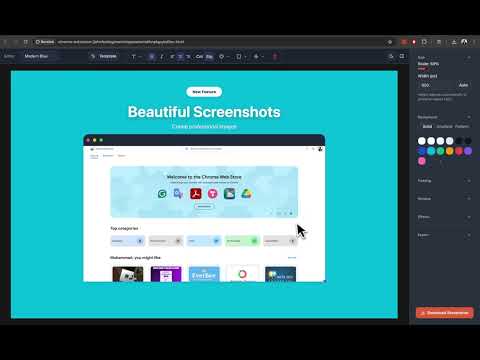
Capture beautiful screenshots with full page, mobile, tablet, and desktop viewport options
Beveled — Make Your Screenshots Better Create beautiful, professional screenshots in seconds. Beveled is a privacy‑first Chrome extension and web app that helps you capture pages (visible area, full page, or device viewport), then enhance them with templates, pattern/gradient backgrounds, and precise annotations — all processed locally in your browser. - Why Beveled - Fast, polished results for docs, changelogs, marketing, and social - Privacy‑first: no servers; images and edits stay on your device - Consistent branding with reusable templates and styles - Works as both a Chrome extension and a web app (upload images) - Capture modes - Visible area: one‑click capture of the current viewport - Full page: auto scroll & stitch long pages with pixel accuracy - Device viewport: emulate mobile/tablet/desktop sizes before capture - Design & backgrounds - Templates: start from curated layouts and reusable presets - Backgrounds: solid, gradient, grainy, and seamless pattern backgrounds - Window chrome: macOS‑style bar and rounded corners - Shadows & depth: soft shadows, blur radius, and corner radius controls - Annotations & overlays - Text: headings, labels, and captions with alignment and spacing - Shapes: rectangles, circles, highlights, and callouts - Arrows & pointers for flows and UI emphasis - Smart layout: snapping, precise positioning, and layering - Export - High‑quality PNG or JPEG with adjustable size/quality - Theme - Light/dark modes with a modern tangerine accent palette - Perfect for - Product screenshots for changelogs, release notes, marketing pages - Blog/social visuals (X/Twitter, LinkedIn, Product Hunt) - Design handoff, QA, documentation, onboarding, and bug reports - How it works 1) Open the popup and choose a capture mode (visible, full page, or device preset) — or use the web app to upload. 2) Refine with templates, backgrounds (pattern/gradient), window chrome, shadows, crop, and annotations (text, arrows, shapes). 3) Export and share. - Privacy & permissions - No account required; all processing is local. - Uses storage for local preferences and the latest capture. - Uses tabs/activeTab for capture; uses the Chrome Debugger API for device viewport emulation. - Support & feedback - Open‑source project. Contributions welcome. - Found a bug or want a feature? Open an issue in the repository.
0 out of 5No ratings
Details
- Version0.2.2
- UpdatedSeptember 29, 2025
- Size1.33MiB
- LanguagesEnglish
- Developer
- Non-traderThis developer has not identified itself as a trader. For consumers in the European Union, please note that consumer rights do not apply to contracts between you and this developer.
Privacy

This developer declares that your data is
- Not being sold to third parties, outside of the approved use cases
- Not being used or transferred for purposes that are unrelated to the item's core functionality
- Not being used or transferred to determine creditworthiness or for lending purposes
Support
For help with questions, suggestions, or problems, please open this page on your desktop browser