


Overview
Tab manager in Chrome's side panel: group tabs by site, search, suspend and save them. Private, no account.
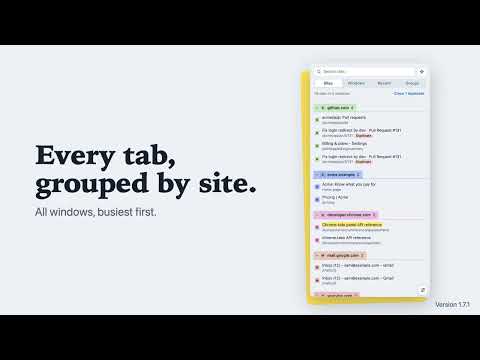
BetterTabs is a better tab manager for Chrome. It lists every open tab, from every window, in the side panel, grouped by website, so you can find the one you want even with hundreds open. Built for too many tabs, including the ones AI assistants and browser agents open while they research for you. Search them, group them, suspend them to free memory, close duplicates, and save a set of tabs to open again later. WHAT YOU CAN DO • See your tabs by site, by window, by when you last used them, or by Chrome tab group • Search tabs by title or address as you type (Alt+Shift+F opens the panel with search ready), and find closed pages from your Chrome history • Close duplicate tabs in one click, keeping the one you are on • Select several tabs, then close, suspend or group them together • Group all of a site's tabs into one Chrome tab group in one click • Suspend tabs you are not using to free memory; they stay in the list and reload when you click them • Save tabs as a named list and open it again later, or save a list as a bookmarks file • Favourite a tab, or a whole site, and keep it one click away, even after you close it • Rename any tab so you recognise it • Recent tabs are kept for you automatically, so a crash or a restart does not lose your tabs: reopen them from the Restore screen • Save a backup of your favourites, lists, names and settings to one file you keep, and restore it after a reinstall • The list keeps its order while you work, so rows never move under your mouse; Tidy up sorts it again when you want • Jump to the tab you are on, switch to a tab in another window, use it with the keyboard, in light and dark mode PRIVATE BY DESIGN No account, no server, no analytics. BetterTabs has no host permissions, so it cannot read or change the pages you visit. It is open source (MIT): github.com/MXmaster2s/BetterTabs WHY DOES CHROME SAY "READ AND CHANGE YOUR BROWSING HISTORY"? Chrome shows that warning for extensions that can see tab titles and addresses or search your history. BetterTabs uses tabs only to draw your tab list, and your history only to find a page when you search for a tab that is not open. It never changes your history, and nothing leaves your computer. IF CHROME SAYS "PROCEED WITH CAUTION" People who use Enhanced Safe Browsing see that message for any extension from a new developer. BetterTabs has no host permissions and makes no network requests, and its code is open for anyone to read. WHAT'S NEW IN 1.7 Select mode, saved lists, Group this site, recent tabs kept automatically, a backup file for everything you save, favourites that stay after you close the tab (and for a whole site), search that also finds pages in your Chrome history, a list that holds still while tabs change, a redone Settings page with shortcuts written for your computer, and a tooltip on every button.
0 out of 5No ratings
Details
- Version1.7.1
- UpdatedNovember 13, 2026
- Size37.24KiB
- LanguagesEnglish
- DeveloperWebsite
Email
rohit@cloudcraftspace.com - Non-traderThis developer has not identified itself as a trader. For consumers in the European Union, please note that consumer rights do not apply to contracts between you and this developer.
Privacy

This developer declares that your data is
- Not being sold to third parties, outside of the approved use cases
- Not being used or transferred for purposes that are unrelated to the item's core functionality
- Not being used or transferred to determine creditworthiness or for lending purposes
Support
For help with questions, suggestions, or problems, please open this page on your desktop browser